
About | Download | Newsletter | System requirements | Purchase | Documentation | Version History | License agreement | Customers
About
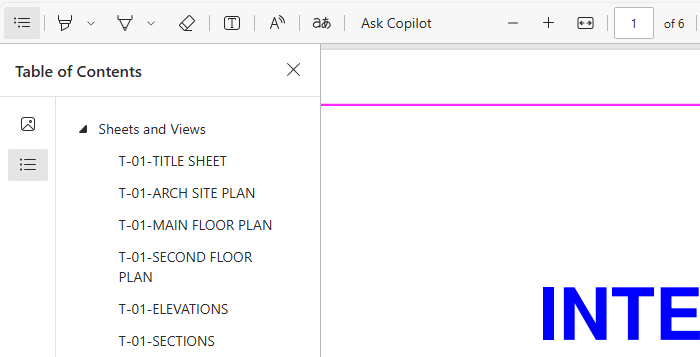
JTB Layouts2PDF help you print selected layouts with selected plot style to one pdf file. Your current Page Setup on each layout will be used.
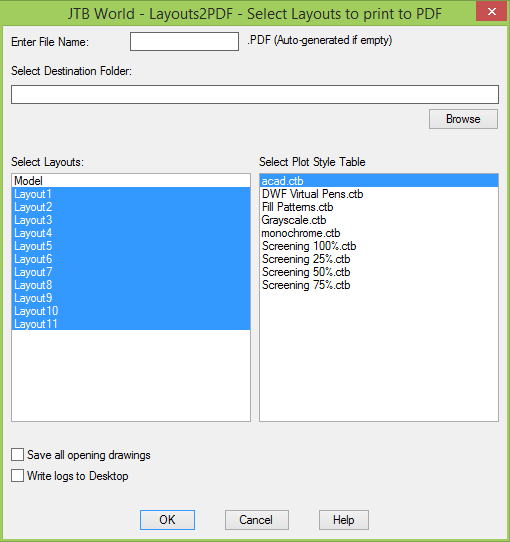
Example followed by output.

Other related apps are JTB Batch Publish and Batch Plot for AutoCAD.
Download
JTB Layouts2PDF trial is available as an AutoCAD app on Autodesk App Store.

Alternative download: JTB_Layouts2PDF_3.1.0.zip
System requirements
AutoCAD 2012 or later or verticals based on AutoCAD where AutoCAD 2026 is the most recent version supported.
All verticals or flavors based on AutoCAD should be working like AutoCAD Architecture (ACA), Architectural Desktop (ADT), AutoCAD Civil 3D, AutoCAD Electrical , AutoCAD Map 3D, AutoCAD Mechanical, AutoCAD MEP (AMEP, ABS), AutoCAD P&ID, AutoCAD Plant 3D, Autodesk Advance Steel.
BricsCAD or other CAD software with LISP functionality can be supported upon request.
Compatible with those operating systems AutoCAD runs on like Windows 8, Windows 8.1, Windows 10 and Windows 11.
Older Windows versions might also work but are not directly supported.
JTB World is an Autodesk Authorised Developer

Purchase
New license: 25 USD for one license or less depending on the quantity of licenses. Support and upgrades is included for versions released within 1 year after purchase. If Auto-Renewal is selected it is 8 USD per year and can be cancelled at anytime.
Upgrade license: 8 USD for 1 year for one license or less depending on the quantity of licenses. If Auto-Renewal is selected it is 8 USD per two years and can be cancelled at anytime.
Upgrade license: 13 USD for 2 years for one license or less depending on the quantity of licenses. If Auto-Renewal is selected it is 13 USD per two years and can be cancelled at anytime.
Once you have purchased a license, follow the instructions and email to JTB World for the license activation key. See activation instructions here: JTB World Apps Licensing.
If you have really many users that you want to give access to this software we can discuss a discounted price based on your particular situation. Educational discounts available.
The license is perpetual. If you have more than one computer and you are the only user of the application one license is enough.
The network license manager is available at no extra cost and normally most useful for companies with quite many licenses.
If your US company is tax exempt contact us directly.
2Checkout (Verifone) supports 45+ online and offline payment methods globally, but availability depends on shopper country, currency.
Main families of payment methods
-
Credit/debit cards (global core): Visa, Visa Electron, MasterCard, Maestro, Eurocard, American Express, Discover/Novus, JCB, UnionPay, plus domestic Visa/MasterCard variants in markets like Brazil and Turkey.
-
Local/regional cards: Dankort/VISA (Denmark), Bancontact (Belgium), Postepay (Italy), CB/Carte Bancaire (France), local Turkish and Brazilian cards, and other regional card schemes.
-
Digital wallets: PayPal, PayPal Express, Google Pay, Apple Pay, Alipay, WeChat Pay, MobilePay (DK), Vipps (NO), and others like Skrill, Neteller, Qiwi, WebMoney, Trustly depending on region.
-
Bank transfer & offline: Local and international bank/wire transfer (US, DE, UK, rest of world), SEPA-type transfers in EU, purchase orders, and additional local bank transfer rails in EMEA/APAC.
Documentation
Installation
Use the AutoCAD app installer that also puts a button on the Add-ins (Plug-Ins in older versions of AutoCAD) Ribbon tab.
Activation
See activation instructions here: JTB World Apps Licensing.
Usage
First, you have to setting up your layouts with PageSetup command. Once paper sizes, plotting scales, orientations etc. are at the right place, run Layouts2PDF command. A dialog will bring up for you to select layouts and plot style. Then you can specify the output pdf file name and browse for a destination folder. Click OK and waiting for AutoCAD do the publishing job. You can watch the plotting progression and details by click to the plot/publish notification icon at lower right corner of AutoCAD window.
Version History
- 2025-03-25 - version 3.1.0
- Added Autodesk AutoCAD 2026 support.
- 2024-12-27 - version 3.0.0
- Added Autodesk AutoCAD 2025 support.
- 2023-05-15 - version 2.5.0
- Added Autodesk AutoCAD 2024 support.
- 2022-04-25 - version 2.4.0
- Added Autodesk AutoCAD 2023 support.
- 2021-07-09 - version 2.3.0
- Remove messages about uninstallation in very-silent installation mode.
- 2021-04-13 - version 2.2.2
- Added AutoCAD 2022 support.
- 2020-07-26 - version 2.2.1
- Upgraded to License 4.3
- 2020-05-16 - version 2.2
- Added AutoCAD 2021 support.
- 2019-03-28 - version 2.1
- Added AutoCAD 2020 support.
- 2018-03-22 - version 2.0
- Network license implemented.
- Added AutoCAD 2019 support.
- 2017-03-21 - version 1.0 update
- Added Autodesk® AutoCAD® 2018 support. No change in version number.
- 2016-08-19 version 1.0
- First release
License agreement
The license agreement is found here.
Customers
Some JTB Layouts2PDF Customers
Trinam Drafting & Design
GKN Driveline
Bosch
Contact us for any questions, wishes or comments.