
About | Download | Newsletter | System requirements | Purchase | Documentation | Version History | License agreement | Customers
About
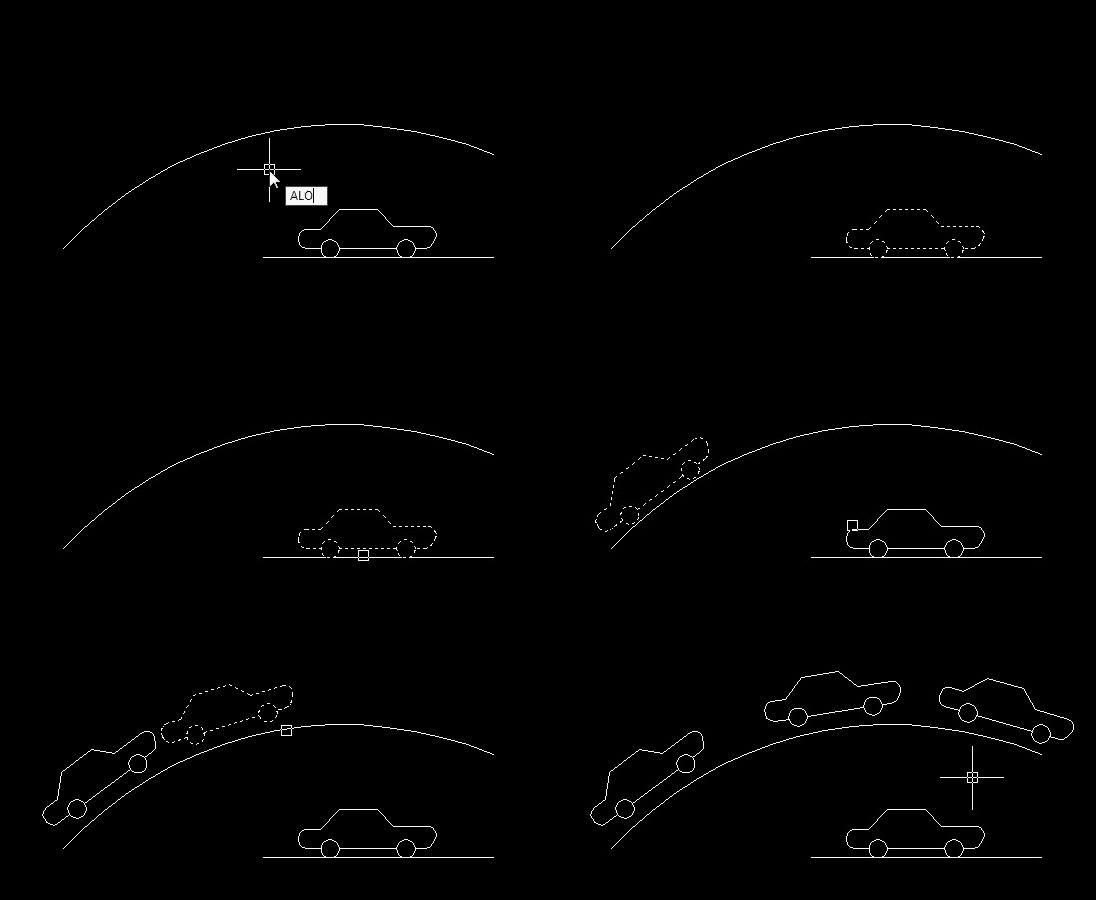
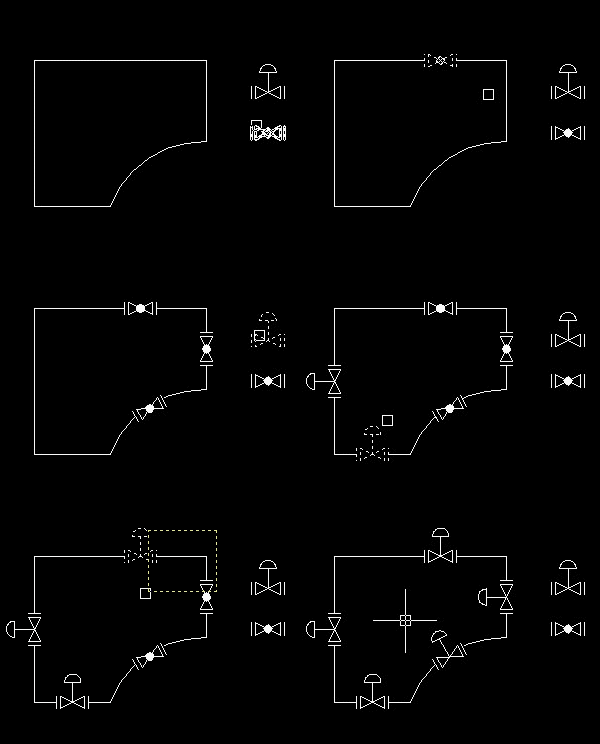
The JTB_Align_Any and JTB_Align_Objects commands will copy and align your text, block or selection of objects at picked point of selected line or curve. Curve can be Arc, Circle, Polyline, Leader or 3D Polyline, in current space as well as nested inside Blocks or Xrefs.
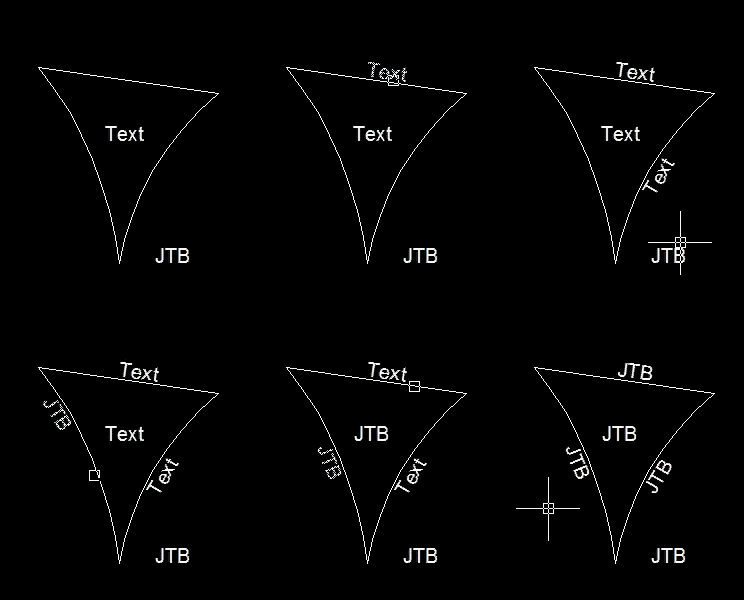
Text will be aligned and placed at an the same offset distance as text in current dimension style. Block will be aligned and fit tangentially to curve. You can press TAB key or type F to flip aligned object(s) to either sides; Type O to move object(s) to specified offset distance; Type R to rotate object(s); Right click on line or curve to move object(s) rather than copy; Type U to undo previous action.
More interesting, if you pick on text or block, or on empty space, Match Text Content or Match Block command will run, help you easily manage your drawing's tags and symbol blocks.
The "plus" commands are:
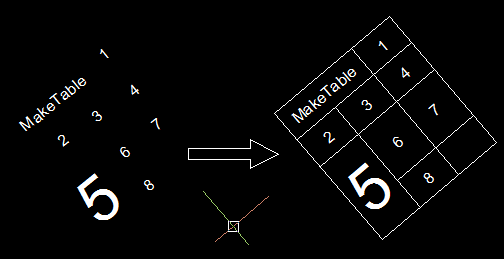
1. JTB_Make_Table (MTB): Make an ACAD table and MS. Excel table from texts.
2. JTB_Align_Quick (ALQ): Quickly line up texts and block's insertion points.
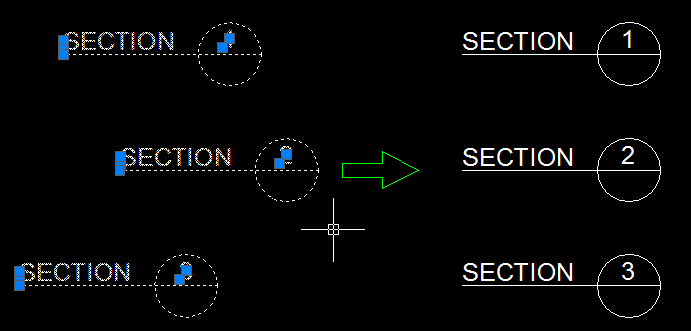
3. JTB_DimScale (DSC): Change the dimension scale and linetype scale accordingly
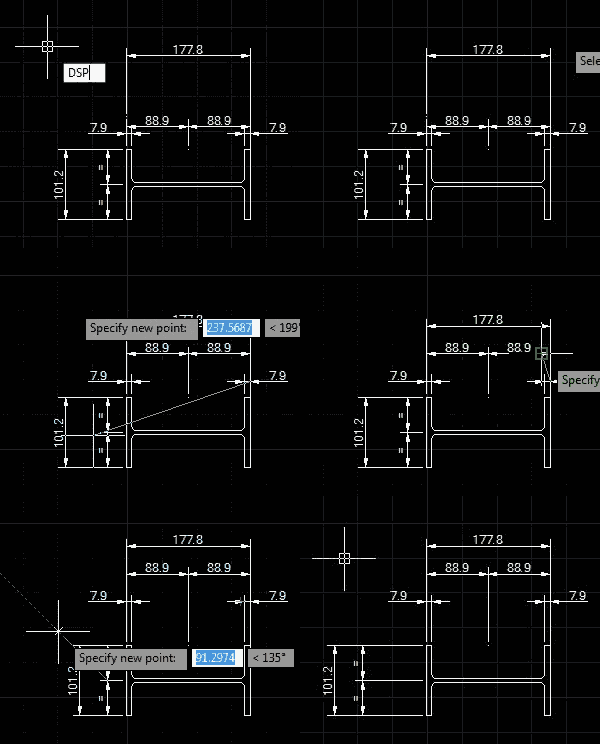
4. JTB_DimSpace (DSP): Adjust space within linear and aligned dimension objects.
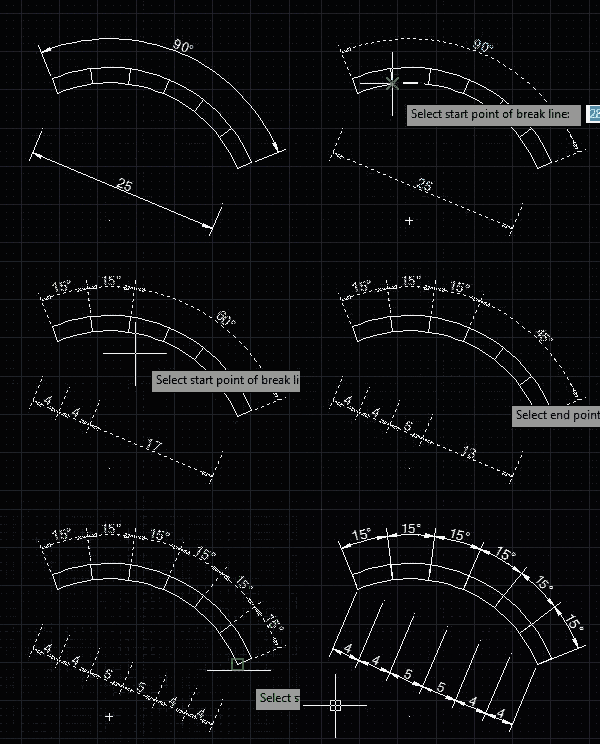
5. JTB_DimBreak (DBR): Break dimensions lines, or trim/extend dimensions extension lines.
Download
Trial version usage is limited to drawings with less than 500 objects in model space. Support is available during the trial as well as after purchase.
JTB Align Plus Trial for AutoCAD can be downloaded here.

Download JTB Align Plus for BricsCAD and AutoCAD (both as trial and for customers)
Download JTB Align Plus for GstarCAD v3.7. Contact us for newer version.
System requirements
Operating system: same as the CAD software is running on.
Compatible with AutoCAD versions (2012 and up to AutoCAD 2026). Works with all flavors/verticals based on AutoCAD like AutoCAD Architecture (ACA), AutoCAD Civil 3D, AutoCAD Electrical , AutoCAD Map 3D, AutoCAD Mechanical, AutoCAD MEP (AMEP, ABS), AutoCAD P&ID, AutoCAD Plant 3D, Autodesk Advance Steel.
Compatible with BricsCAD and GstarCAD.
Contact us for older versions or for other CAD software.

JTB World is an Autodesk Authorised Developer

Purchase
New license: 25 USD for one license or less depending on the quantity of licenses. Support and upgrades is included for versions released within 1 year after purchase. If Auto-Renewal is selected it is 8 USD per year and can be cancelled at anytime.
Upgrade license: 8 USD for 1 year for one license or less depending on the quantity of licenses. If Auto-Renewal is selected it is 8 USD per two years and can be cancelled at anytime.
Upgrade license: 13 USD for 2 years for one license or less depending on the quantity of licenses. If Auto-Renewal is selected it is 13 USD per two years and can be cancelled at anytime.
Once you have purchased a license, follow the instructions and email to JTB World for the license activation key. See activation instructions here: JTB World Apps Licensing.
If you have really many users that you want to give access to this software we can discuss a discounted price based on your particular situation. Educational discounts available.
The license is perpetual. If you have more than one computer and you are the only user of the application one license is enough.
The network license manager is available at no extra cost and normally most useful for companies with quite many licenses.
If your US company is tax exempt contact us directly.
2Checkout (Verifone) supports 45+ online and offline payment methods globally, but availability depends on shopper country, currency.
Main families of payment methods
-
Credit/debit cards (global core): Visa, Visa Electron, MasterCard, Maestro, Eurocard, American Express, Discover/Novus, JCB, UnionPay, plus domestic Visa/MasterCard variants in markets like Brazil and Turkey.
-
Local/regional cards: Dankort/VISA (Denmark), Bancontact (Belgium), Postepay (Italy), CB/Carte Bancaire (France), local Turkish and Brazilian cards, and other regional card schemes.
-
Digital wallets: PayPal, PayPal Express, Google Pay, Apple Pay, Alipay, WeChat Pay, MobilePay (DK), Vipps (NO), and others like Skrill, Neteller, Qiwi, WebMoney, Trustly depending on region.
-
Bank transfer & offline: Local and international bank/wire transfer (US, DE, UK, rest of world), SEPA-type transfers in EU, purchase orders, and additional local bank transfer rails in EMEA/APAC.
Documentation
See the help file.
See activation instructions here: JTB World Apps Licensing.
Version History
Most recent and previous versions:
- 2025-03-25 - version 5.1.0
- Added Autodesk AutoCAD 2026 support.
- 2024-11-11 - version 5.0.0
- Added Autodesk AutoCAD 2025 support.
- Request for new license key is needed. See instructions here.
- 2023-04-04 - version 4.6.0
- Added Autodesk AutoCAD 2024 support.
- 2022-04-25 - version 4.5.0
- Added Autodesk AutoCAD 2023 support.
- 2021-07-09 - version 4.4.0
- Remove messages about uninstallation in very-silent installation mode.
2021-04-13 - version 4.3.2
- Added AutoCAD 2022 support
2020-07-25 - version 4.3.1
- Upgraded to License 4.3
2020-05-08 - version 4.3.0
- Added AutoCAD 2021 support
2019-08-12 - version 4.2.1
- Fixed write permission issue in app's folder
2019-07-04 - version 4.2
- Update of the installer.
- Issues fixed related to having other JTB World apps installed.
2019-03-28 - version 4.1
- Update of the installer. It is recommended to uninstall the old version first
- Added AutoCAD® 2020 support
- Minor bug fixes
2018-02-22 - version 4.0 update
- Added AutoCAD 2019 support. No change in version number.
2018-02-19 - version 4.0
- Only updated for BricsCAD:
- Added support for BricsCAD V18
- Network license implemented.
- Fix bug in Help button on dialogs
- Fix bug made images not loaded in Align Object
- Fix bug in Align Any > Rotate option
2017-03-21 - version 3.7 update
- Added support for AutoCAD® 2018
3.7
Fixed bug that did not release highlight entities.
Minor change.
3.6
Fixed bug in AutoCAD 2016 when geometry center osnap is ticked.
Added support for AutoCAD® 2017
3.5
Added support for AutoCAD® 2016
Fix slide image side-effect bug
Fix bug when working in paper space's viewport
Upgrade error handler functions
Added digital signing of MSI file
3.4
Fix run-time error in 3.3 version
Fix bug when align on scaled block
3.3
Esc key now just step back 1.
The command prompt now look much better.
There is key + and - add to enhance offset move.
ALA command now take VIEWTWIST into account, therefore if your viewport is twisted, texts are still upward.
Match text content added to multipleader as well.
Fixed bugs in DimSpace, DimBreak, Align Any command.
3.0
Upgrade Align Text command to Align Any which works with block.
Embedded Match Text or Match Block functions to Align Any command.
Upgrade Align Objects command.
Enable Undo in 2 Align commands.
Add JTB Align Plus Settings command.
2.1
Change the way enter keywords of Flip, Mirror, Rotate or Offset to familiar Autodesk AutoCAD gesture: type key then enter.
2.0
Change application's name to Align Text Plus.
New ribbon interface.
Add 5 commands: Align Object, Align Quick, Make Table, DimSpace and DimBreak.
Works with all AutoCAD Verticals.
1.4
Fix error when working with annotative dimstyle.
Compatible with Civil 3D.
Enable working with 3D Polyline
Fix error when running in different Autodesk® AutoCAD® language.
1.3
Enable align Texts on Circles.
Using Right click to move Texts.
Add 2 commands: Dimscale and Match Text (==)
Refine functions and create new ribbon interface.
1.2
Works with Attributes, nested lines, arcs or polylines.
License agreement
The license agreement is found here.
Customers


10 DESIGN
BRC IMAGINATION ARTS
Hayward Baker Inc.
NGCB
Kopplin Group
Smurfit Kappa
van der Meer Consulting
ESCON GmbH
Thomson Architectural Group, Inc.
Deep South Crane
Mario Associates
asm advisory
Daly.Smith
DME Alliance Engineering Consultants, Inc.
Engesur
LandsteinerGmbH
EG Controls
GGGAE
Auditoria Services
Appledore Marine Engineering
Vesta Terminals
Mapitec Engineering & Consultancy
OHM Advisors
Graña y Montero S.A
Contact us for any questions, wishes or comments.