
About | Download | Newsletter | System requirements | Purchase | Documentation | Version History | License agreement | Customers
About
- Enhance Your User's Experience with the our DWG Infotip Shell Extension.
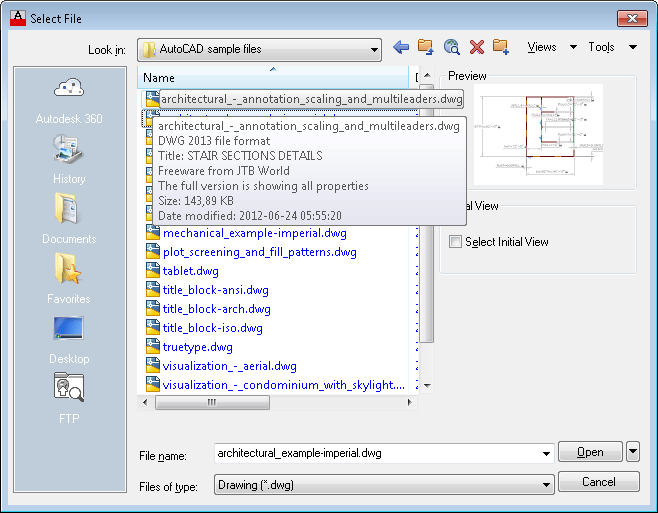
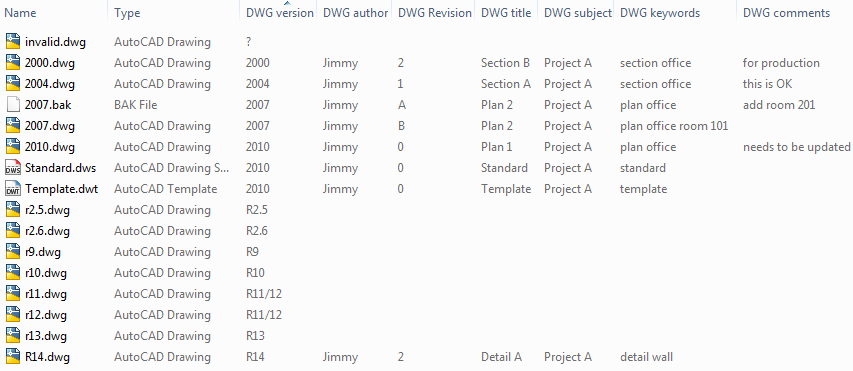
- Show the DWG properties as an Infotip (tooltip) in Explorer or even from file dialog boxes within AutoCAD.
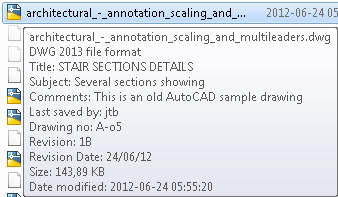
- Use DWGPROPS in AutoCAD and add information in the Summary or Custom tabs and it will show up just hovering above a DWG file.
- The Infotip will show the version of the DWG file, file size, date modified and most property information.
- PROPULATE allows quick, automated population of the Drawing Properties dialog data fields.
- No need to have AutoCAD installed. That means that everyone at your company can see this information.
- No need to open the drawing to know information like revision and other valuable information in the drawing.
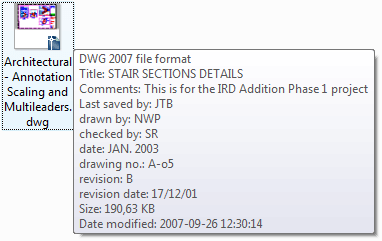
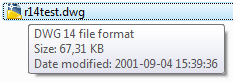
The freeware version is showing the DWG file format and title.
See also the complementary application DWG Columns for Explorer to show the information in columns in Explorer.
Download
The following download is a freeware version that also can be used for trial purpose. Only the DWG version and title shows. The full version will show all properties.
DwgInfoTip can be downloaded and installed as an app from the Autodesk App Store site.

Contact us for downloads of full version if you are a customer.
System requirements
Only DWG files in 2007, 2010, 2013 and 2018 file format shows property information. If there is need to support older DWG versions let us know. DWG 2007 is created by AutoCAD 2007 up to 2009 including verticals as well as other DWG compatible software. DWG 2010 is created by AutoCAD 2010, AutoCAD 2011 and AutoCAD 2012 based applications. DWG 2013 created by AutoCAD 2013, AutoCAD 2014, AutoCAD 2015, AutoCAD 2016, AutoCAD 2017. DWG 2018 created by AutoCAD 2018, AutoCAD 2019, AutoCAD 2020, AutoCAD 2021, AutoCAD 2022, AutoCAD 2023, AutoCAD 2024, AutoCAD 2025, AutoCAD 2026.
This works with DWG and DXF files edited with applications like AutoCAD, Inventor, Revit, Dassault Systemes DraftSight, Caddie, progeCAD, Bricsys BricsCAD, IMSI TurboCAD, GRAPHISOFT ArchiCAD, GstarCAD, nanoCAD, MicroStation, ZWCAD+ and others.
Windows 7, Windows 8, Windows 8.1 and Windows 10. 32-bit or 64-bit.
Windows 2000, Windows XP, Windows Vista might also work but are not supported.
JTB World is an Autodesk Authorised Developer






Purchase
New license: 10 USD for one license or less depending on the quantity of licenses. Support and upgrades is included for versions released within 1 year after purchase. If Auto-Renewal is selected it is 3 USD per year and can be cancelled at anytime.
Upgrade license: 3 USD for 1 year for one license or less depending on the quantity of licenses. If Auto-Renewal is selected it is 3 USD per two years and can be cancelled at anytime.
Upgrade license: 5 USD for 2 years for one license or less depending on the quantity of licenses. If Auto-Renewal is selected it is 5 USD per two years and can be cancelled at anytime.
Once you have purchased a license, follow the instructions and email to JTB World for the license activation key. See activation instructions here: JTB World Apps Licensing.
If you have really many users that you want to give access to this software we can discuss a discounted price based on your particular situation. Educational discounts available.
The license is perpetual. If you have more than one computer and you are the only user of the application one license is enough.
The network license manager is available at no extra cost and normally most useful for companies with quite many licenses.
If your US company is tax exempt contact us directly.
2Checkout (Verifone) supports 45+ online and offline payment methods globally, but availability depends on shopper country, currency.
Main families of payment methods
-
Credit/debit cards (global core): Visa, Visa Electron, MasterCard, Maestro, Eurocard, American Express, Discover/Novus, JCB, UnionPay, plus domestic Visa/MasterCard variants in markets like Brazil and Turkey.
-
Local/regional cards: Dankort/VISA (Denmark), Bancontact (Belgium), Postepay (Italy), CB/Carte Bancaire (France), local Turkish and Brazilian cards, and other regional card schemes.
-
Digital wallets: PayPal, PayPal Express, Google Pay, Apple Pay, Alipay, WeChat Pay, MobilePay (DK), Vipps (NO), and others like Skrill, Neteller, Qiwi, WebMoney, Trustly depending on region.
-
Bank transfer & offline: Local and international bank/wire transfer (US, DE, UK, rest of world), SEPA-type transfers in EU, purchase orders, and additional local bank transfer rails in EMEA/APAC.
Documentation
Installation
To install run setup.exe.
Administrator rights are needed to install.
After installation restart of Windows is needed.
Usage
Use DWGPROPS within AutoCAD and populate with information.
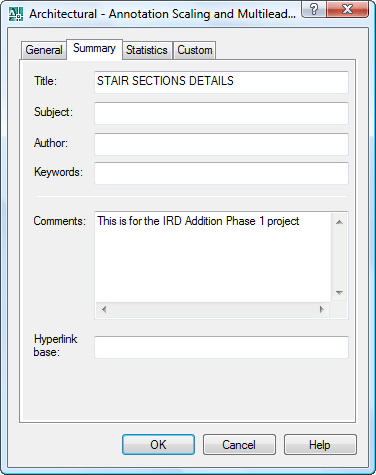
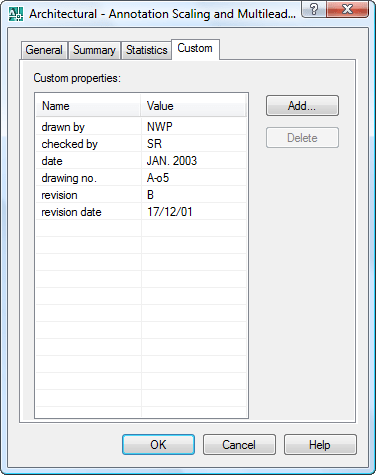
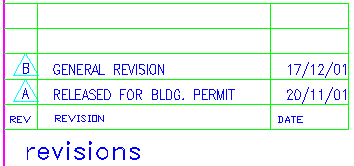
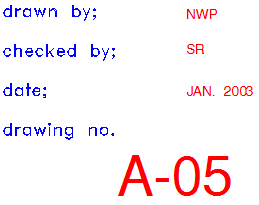
PROPULATE can be used to automatically populate for example attribute information from the title block into the properties. See this PROPULATE tutorial.
And here is what it look like in Explorer.
Version History
- 2019-03-28 - version 1.6 update
- Added Autodesk® AutoCAD® 2020 support.
- 2018-03-22 - version 1.6 update
- Added Autodesk® AutoCAD® 2019 support.
- 2017-03-21 - version 1.6 update
- Added Autodesk® AutoCAD® 2018 support.
- 2016-09-20 - version 1.5
- Updated installer that works more consistently than before.
- version 1.4
- Added support for AutoCAD® 2017
- version 1.3
- Support for DWG 2013 file format
License agreement
The license agreement is found here.
Customers
Automatic Software Pvt. Ltd.
Binsky
Engineering Concepts & Design, L.P.
Erdemli Proje Ltd. Sti.
Innophos
Mock, Roos & Associates, Inc.
Shambaugh & Son
Coggins-Hill
Contact us for any questions, wishes or comments.
See also the complementary application DWG Columns for Explorer to show the information in columns in Explorer.