
About | DST Converter | Download | Newsletter | System requirements | Purchase | Documentation | Version History | License agreement | Customers
About
Edit properties on multiple sheets belonging to Sheet Set Manager (SSM) for AutoCAD, GstarCAD and BricsCAD, NanoCAD Plus/Pro, Graebert's ARES Commander 2022 and newer, DraftSight 2021 and newer, ZWCAD 2023 and newer, or AutoCAD Architecture's Project Navigator (PN) Sheet Set View with ease. If you want to change properties like a revision, date or name on two or more sheets at the same time SSMPropEditor is for you. Your productivity will increase and you will save time avoiding a lot of manual work.
Sheet Set Properties, Sheet Set Custom Properties, Sheet Properties and Sheet Custom Properties can be edited and bulk updated.
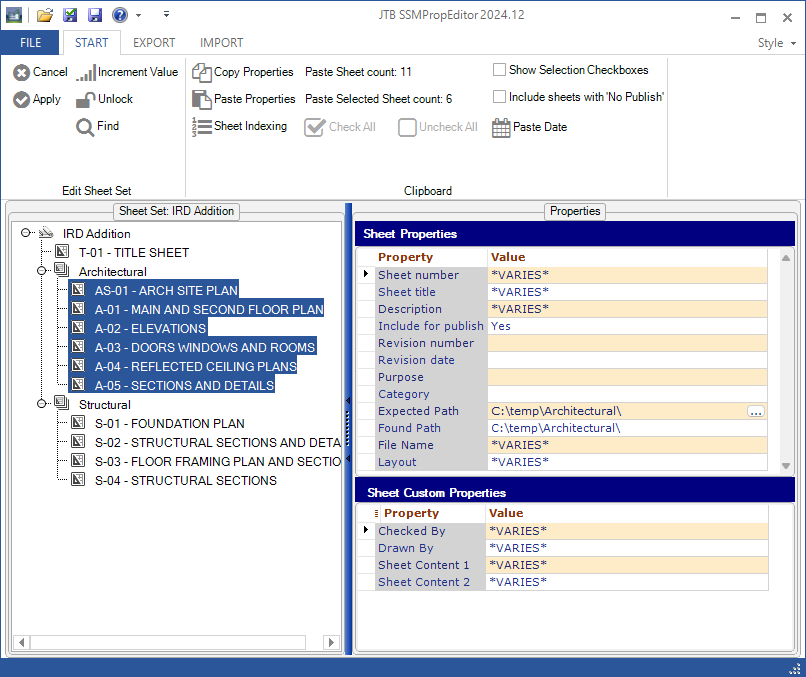
Copy Sheet Properties from one sheet to one or multiple other sheets.
Copy Sheet Set Properties from one Sheet Set to another. If the property itself is not existing in the destination Sheet Set it will be created.
Increment revisions quickly on multiple sheets.
Paste the total sheet count to any property.
Optionally rename the actual drawing file associated with the sheet.
Optionally rename actual layout name on the drawing file associated with the sheet.
Export all Sheet or Sheet Set Properties information to a text file or an Excel file.
Import back the exported file after manual changes have been made. Search or Find and replace can be used for example in Notepad or Excel.
Find and replace text values on properties.
Launch your DWG application from the tree view opening the sheet drawing. The application could for example be AutoCAD, AutoCAD LT or TrueView.
Workaround when sheet title contains unsupported characters? Have you got “The name cannot be longer than 64 characters”? SSMPropEditor can help with this.
Integration with Vault and vaulted Sheet Sets and support for DSS, DSU and DSH files.
Can be used without any CAD software being installed.
SSMPropEditor will save you time and money and make you less frustrated when you don't need to edit one sheet at a time.
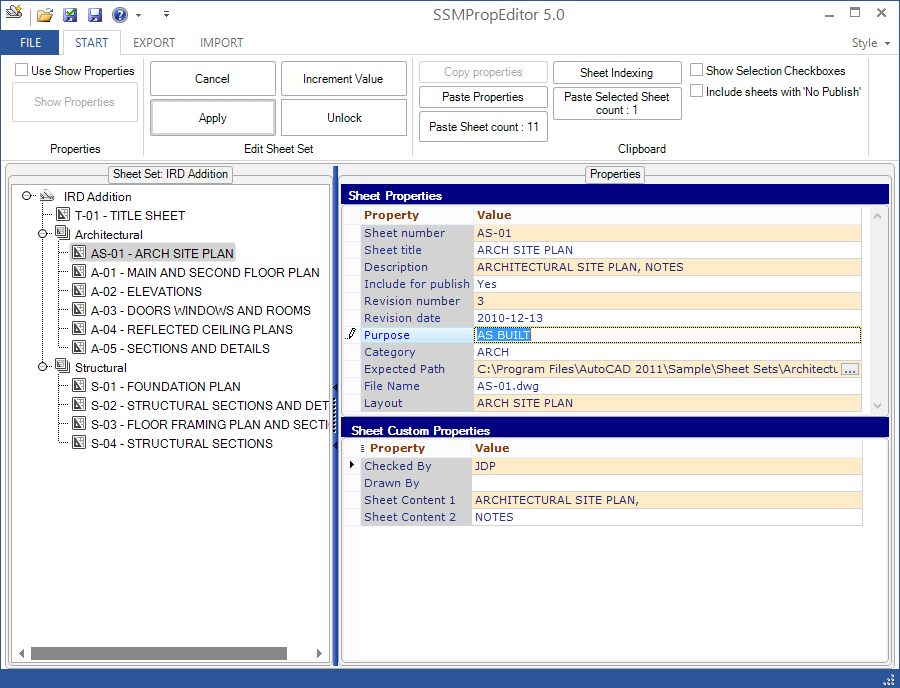
Update and correct non-existing paths to improve performance of the Sheet Set Manager.
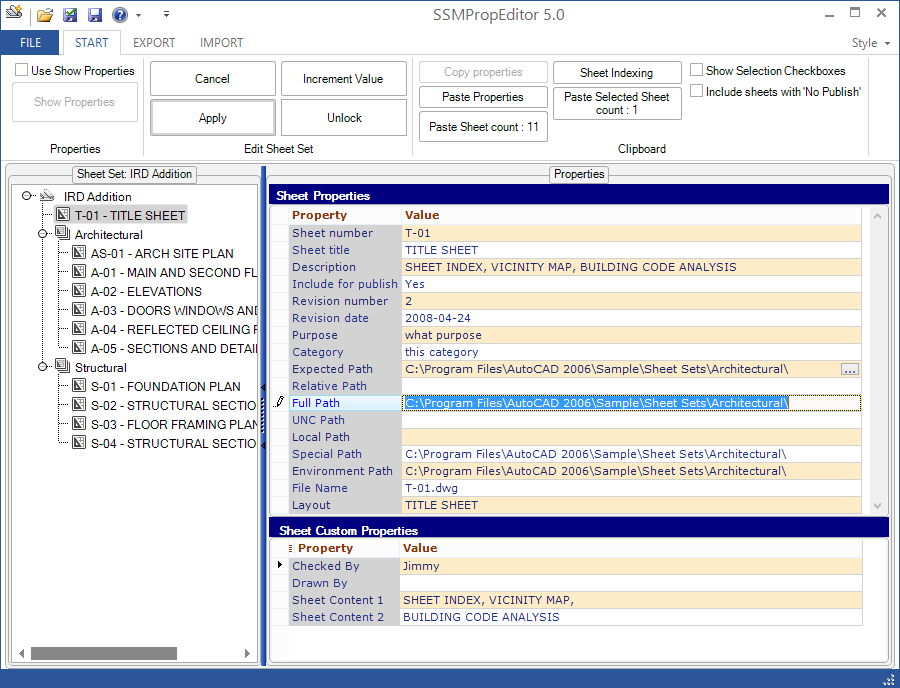
The installer now adds Edit With SSMPropEditor to Windows Explorer context menu for DST files. "Add Edit With SSMPropEditor to Explorer.reg" and "Remove Edit With SSMPropEditor to Explorer.reg" are added to installation folder and can be used manually.
When it comes to Sheet Set Manager performance within AutoCAD (and possibly other CAD applications) there can be several reasons. There are a few things that can be done to tune it in. Take a look at these posts:
Performance tips when using SSM
Sheet Set Manager performance tips
Try also to temporary disable the anti-virus and then try SSM. If it is quicker there might be ways to configure it to exclude AutoCAD.
DST Converter
The DST converter is useful for IT or CAD Managers to correct performance problems with SSM Sheet Sets that started to perform badly. The program converts a DST file to an XML file that can be edited in an XML editor or Notepad and then converted back to DST. One customer used it to replace some dead paths in an SSM file and made a 50 sheet set of construction dwgs each open in 20 seconds instead of the 1½-2 minutes it was taking. Another customer found that the size of the DST was increasing more than reasonable and was able to manually compress and remove erroneous data. Eventually found out that changing the "include in publish" status was what caused the bloat.
There is no trial for DST Converter but if you open a DST file in SSMPropEditor a corresponding XML file will be created in the %TEMP% folder so you can review the format of it. Purchase details.
For one customer there were two "nodes" in this path: AcSmDatabase\AcSmSheetSet\AcSmPublishOptions each named "AcSmCustomPropertyBag" that each contained over 8MB of data. He deleted these nodes and converted the XML back to a DST and everything is OK.
So for some reason, it looks like changing the "include in publish" status (at least in this particular SS) is causing the bloat.
DST Converter can also be used to merge Sheet Sets.
Merge, purge and convert Sheet Set DST files for AutoCAD, BricsCAD, GstarCAD, NanoCAD Plus/Pro, ZWCAD, and any other CAD software using Sheet Set DST files with our JTB DST Tool.
Download
JTB SSMPropEditor works for 30 days in trial mode with full functionality.
Current version is 2026.4.1. This installer will also install SSMPropEditor as AutoCAD app. This will install a Plug-ins/Add-ins Ribbon tab panel in AutoCAD 2012 up to AutoCAD 2027 as well as verticals. (Menu will not show up in AutoCAD LT).
- JTB_SSMPropEditor_2026.4.1_installer.zip
- Older versions available here.
JTB SSMPropEditor can be downloaded and installed as an app from the Autodesk App Store site.

System requirements
.NET Framework 4.8 or later.
Operating system - Windows 11, Windows 10, Windows Server 2022, Windows Server 2016. Both 32-bit and 64-bit.
Contact us if there's a need for support for older Windows versions. Windows 8.1, Windows 8, Windows 7, Windows Server 2012 R2, Windows Server 2012, Windows Server 2008 R2, Windows 2008 Server might still work.
To rename the actual layout name full AutoCAD 2013 or newer needs to be installed.
The software runs stand-alone and does not require AutoCAD or other CAD software to be installed unless renaming of actual layout name should be done.
Compatible with AutoCAD versions (2005 and up to AutoCAD 2027) that has Sheet Set Manager (SSM). Works with all flavors/verticals based on AutoCAD like AutoCAD Architecture (ACA), Architectural Desktop (ADT), AutoCAD Civil 3D, AutoCAD Electrical , AutoCAD Map 3D, AutoCAD Mechanical, AutoCAD MEP (AMEP, ABS), AutoCAD P&ID, AutoCAD Plant 3D. Compatible with AutoCAD Architecture, AutoCAD LT, etc.
Compatible with BricsCAD V13 and newer.
Compatible with GstarCAD 2015 and newer.
Compatible with NanoCAD Plus/Pro 8.0 and newer.
Graebert's ARES Commander 2022 and newer.
DraftSight 2021 and newer.
ZWCAD 2023 and newer.

JTB World is an Autodesk Authorised Developer
Purchase
JTB SSMPropEditor
New license: 125 USD for one license or less depending on the quantity of licenses. Support and upgrades is included for versions released within 1 year after purchase. If Auto-Renewal is selected it is 32 USD per year and can be cancelled at anytime.
Upgrade license: 32 USD for 1 year for one license or less depending on the quantity of licenses. If Auto-Renewal is selected it is 32 USD per two years and can be cancelled at anytime.
Upgrade license: 60 USD for 2 years for one license or less depending on the quantity of licenses. If Auto-Renewal is selected it is 60 USD per two years and can be cancelled at anytime.
Once you have purchased a license, follow the instructions and email to JTB World for the license activation key. See activation instructions here: JTB World Apps Licensing.
If you have really many users that you want to give access to this software we can discuss a discounted price based on your particular situation. Educational discounts available.
The license is perpetual. If you have more than one computer and you are the only user of the application one license is enough.
The network license manager is available at no extra cost and normally most useful for companies with quite many licenses.
If your US company is tax exempt contact us directly.
2Checkout (Verifone) supports 45+ online and offline payment methods globally, but availability depends on shopper country, currency.
Main families of payment methods
-
Credit/debit cards (global core): Visa, Visa Electron, MasterCard, Maestro, Eurocard, American Express, Discover/Novus, JCB, UnionPay, plus domestic Visa/MasterCard variants in markets like Brazil and Turkey.
-
Local/regional cards: Dankort/VISA (Denmark), Bancontact (Belgium), Postepay (Italy), CB/Carte Bancaire (France), local Turkish and Brazilian cards, and other regional card schemes.
-
Digital wallets: PayPal, PayPal Express, Google Pay, Apple Pay, Alipay, WeChat Pay, MobilePay (DK), Vipps (NO), and others like Skrill, Neteller, Qiwi, WebMoney, Trustly depending on region.
-
Bank transfer & offline: Local and international bank/wire transfer (US, DE, UK, rest of world), SEPA-type transfers in EU, purchase orders, and additional local bank transfer rails in EMEA/APAC.
JTB DST Converter
10 USD for one license of JTB DST Converter or less depending on the quantity of licenses. When your purchase is completed you will get an email with the DST Converter download.
If you want more functionality and ease of use take a look at our JTB DST Tool as it can merge, purge and convert Sheet Set DST files for AutoCAD, BricsCAD and any other CAD software using Sheet Set DST files.
If you have really many users that you want to give access to this software we can discuss a discounted price based on your particular situation. Educational discounts available.
The license is perpetual (as a minimum for the version available when purchased) and support is included. If you have more than one computer and you are the only user of the application one license is enough.
If your US company is tax exempt contact us directly.
2Checkout (Verifone) supports 45+ online and offline payment methods globally, but availability depends on shopper country, currency.
Main families of payment methods
-
Credit/debit cards (global core): Visa, Visa Electron, MasterCard, Maestro, Eurocard, American Express, Discover/Novus, JCB, UnionPay, plus domestic Visa/MasterCard variants in markets like Brazil and Turkey.
-
Local/regional cards: Dankort/VISA (Denmark), Bancontact (Belgium), Postepay (Italy), CB/Carte Bancaire (France), local Turkish and Brazilian cards, and other regional card schemes.
-
Digital wallets: PayPal, PayPal Express, Google Pay, Apple Pay, Alipay, WeChat Pay, MobilePay (DK), Vipps (NO), and others like Skrill, Neteller, Qiwi, WebMoney, Trustly depending on region.
-
Bank transfer & offline: Local and international bank/wire transfer (US, DE, UK, rest of world), SEPA-type transfers in EU, purchase orders, and additional local bank transfer rails in EMEA/APAC.
Documentation
Click on the below link for the documentation.
Version History
Known issues in latest release and possibly older releases:
- Changing language within the application requires to restart it to avoid unexpected problems.
- Vault 2021 is by default supported. Contact us for other versions to be supported.
Most recent version:
- 2026-04-15 - version 2026.4.1 download
- Fixed regression bug since 2026.3.0 that could cause sheets to look like they are missing the DWG in the tree view.
Complete JTB SSMPropEditor version history here.
Wishes and feature requests
- Optionally have a spread sheet view or grid to edit the values in.
- To manually rearrange view categories.
- Rename categories. (Can be done with help of our JTB DST Tool)
- To be able to plot using for example AutoCAD or AutoCAD LT.
- Ability to rearrange the “Locations” (folders) under the Model Views Tab and the same ability to rearrange the “Categories” under the Sheet Views Tab.
- Support to manipulate the .APJ project files for AutoCAD, Inventor and more.
- Support for AutoCAD Electrical toolset's project-based system Project Manager. An ASCII text with a .wdp extension defines each project.
- The ability to move sheet views from one sheet to another, while maintaining linked callouts. ref
- Add new or delete custom properties.
- Change case. (Workaround is to export to Excel, change case and import)
- Spell check. (Workaround is to export to Excel, spell check and import)
- Delete selected sheets or subset including sheets.
- Tool to help migrate data from old title blocks with normal attributes to attributes with fields connected to the sheet set.
- Create a new sheet set from scratch based on data in an Excel file or the like with either using existing drawings or creating new ones. (Can be done with help of our JTB Sheet Set Creator)
- Enable the use of page up / page down for moving from one sheet to the next while maintaining the focus on same property (for example, editing sheet title on page 5, press page down, and your cursor is in the position to edit the sheet title on page 6.. page 7 etc)
- Ability to add prefix or suffix to an existing property, including the ability to add to multiple sheets (similar to indexing’s functionality, but maintaining the existing value for each page).
- To sort properties in a custom order. Saved settings in a separate file saved in same folder as the DST. Still this sort order will not show when you run SSM within AutoCAD.
- Create subsets.
- Duplicate existing subset.
- Ability to remove multiple subsets at once or even deleting a subset and all the sheets associated with it. Having to delete multiple sheets is at once is excellent but would like to do the same with subsets.
- Edit subset custom properties. Not yet available in AutoCAD's Sheet Set Manager.
- Add alphabetic indexing as an option to Sheet Indexing.
- Combine Sheet Sets / Merge Sheet Sets. (Can be done with help of our JTB DST Tool)
- Split Sheet Set in two or more Sheet Sets. (Can be done with help of our JTB DST Tool)
- Edit saved sheet selections.
- Rename drawings similar to what is possible in the Sheet Set Manager by adding sheet number to the file name.
- Rename Sheet Custom Property names and Sheet Set Custom Property names. (Can be done with help of our JTB DST Tool)
- Include all functionality that SSM has. (this is not likely to happen)
- Edit Sheet Views information. Possibly export/import to Excel.
- Rename renumber Sheet views.
- Support for cloud storage like Autodesk BIM 360.
If you too have a need for any of these wishes please contact us so we know how big the need for it is and can prioritize accordingly.
License agreement
The license agreement is found here.
Customers
Some SSMPropEditor customers and their comments
"I have been using this for years. ... if you're using sheet set manager, this program is a must have. You can renumber hundreds of sheets within seconds. The investment is well worth it." - James Mcclendon
"JTBWorld has some really great tools on his site. I actually bought a personal license for his Sheet Set Property Editor that makes backups of your DST file each time you open one in the application. If you use Sheet Set Manager for your projects, I'd recommend getting yourself a license as well. It's so helpful." - Archie Dodge
"I've been using this for years, it's straightforward, constantly updated, extremely useful for fixing bloated sheetset managers that end up with hard coded paths pointing to null server locations and other problems easily edited with notepad++" - John Hammer
"Sheet Set Savior - I purchased the full version and its worth every penny. If you deal with Sheet Sets often, especially large lets, this product will save you time if you have to renumber a set i.e. "5 of 80". It took me about 20 seconds to renumber a 120 page plan set." - James Mcclendon
"This program is one of the best values for the money we spent. I have mentioned this to management several times. The program and the support is above and beyond. "
"I love the SSMPropEditor, by the way. It's the coolest thing since sliced bread."
“I love your SSMPropEditor. I’ve used it on two major projects this past week and it has saved me at least a day, maybe two, over others here not using the SSM. The SSM speeds up productivity, but the SSM Properties Editor makes it feasible considering you can have titles 64 characters long and longer, plus special characters. The ability to change properties on multiple sheets at once is something that really makes this worth having. I was able to change 45 sheet title blocks in a matter of minutes.” - Archie Dodge
"I've just sent out a final issue of some 40-50 drawings for a project that I've been working on all year. I only needed to use the Prop editor once, but it worked 'exactly like it said on the tin'. Excellent! Why don't Autodesk do this already?
Great product." - Happy customer.
I've purchased The SSMPropEditor and It's the best investment I have made in my life. I'm editing custom sheet set data regarding drawn-by and checked by and lot of other data for hundreds of sheets in seconds while it took me days to do it - quote on AUGI
Thanks for your support Jimmy. We managed to rename the Layouts as well. This app deserves 10 stars unfortunately I can only give 5. Best AutoCAD app available out there. - Francisco Barbieri
A new customer about SSMPropEditor: It's like Christmas and Birthday together! :-)
Really wish I would have had this program several times in my career. It would have saved me a ton of work.
"Excellent!!! Huge time saver
I haven't done extensive testing on this app yet but it's already saved me tons of work. Templates are great but there are simply times when you need to "retrofit" elements to existing sheet sets. In my case I was looking to roll out a drawing revision block that is driven by Sheet Set custom properties across +15 sets with 20+ sheets. This app has allowed me to just copy/paste. Honestly I think this functionality should be baked into AutoCAD from the get go but JTB World has done a great job filling the gap! I strongly recommend it."
"As a Cad Support person with Brisbane City Council (Australia) I have been responsible for the implementation of Sheet Set Manager within AutoCad and AutoCad Map 3D. This initiation was overall excepted well, however one of the few complaints I have received is the inability of editing multiple drawing (often in excess of 100 drawings) Titleblock information (SSM Titleblock Fields.
I found "SSMPropEditor" on JTB World's Website (a website I visit regularly). I organised for an evaluation licence and used SSMPropEditor on a number of large projects Brisbane City Council are currently involved with. All Cad Users involved with these Projects and using SSMPropEditor commented how much easier and quicker it made editing mutiple drawings. The main comment was ... "when can we buy it".
As a result Brisbane City Council will be purchasing "SSMPropEditor" (multiple copies) and are extremely happy with exactly how this software works. It enhances the use of Sheet Set Manager within AutoCad products.
A big thank you to JTB World"
Glen McCarley
Design Project Manager
City Design - Engineering Group
Roads and Traffic
Brisbane City Council

"I believe everyone should be using AutoCAD's Sheet Set Manager, as it greatly improves drawing management. I also believe everyone should be using your Sheet Set Property Editor and Sheet Set Path Editor. Both tools greatly improve AutoCAD's Sheet Set Manager. Our users have indicated that using your software allows them to update the title block data more effectively and efficiently, thus saving time with drawing revisions and submissions." - Keith Biggs, CAD Technical Coordinator, RF Binnie & Associates Ltd.

HOLY COW THERE MR JB where has this software been all my life, thanks for taking off at least a day of frustration per job now it takes only 15 min.
I've purchased The SSMPropEditor and It's the best investment I have made in my life. I'm editing custom sheet set data regarding drawn-by and checked by and lot of other data for hundreds of sheets in seconds while it took me days to do it - Pierre
"This tool is a lifesaver!"
"I would be lost without this APP!!! Such a huge time saver!"
What I have used it for today, it’s awesome. I hate to think how many hours I’ve wasted without it in the past. - Kevin
This makes a WORLD of difference applying the same properties to multiple custom sheet properties!
I really appreciate your support. SSMPropEditor is by far the best app I've seen for AutoCAD it will safe us a lot of time. We will be certainly buying a license.
"Thank you again for such a wonderful program and the support that you have given since our purchase. This has to be one of the best values for our money. Highly recommend this program for anyone who uses SheetSets."
This software is a huge boost to production!
We are using the SSMPropEditor app. This is a powerful app and so very well written and incredibly useful. It works very well and saves us an immense amount of time. I appreciate how well it works and interacts with the sheet set file, even if in the Autodesk Construction Cloud. I highly recommend this for everyone using sheet sets. Thank you for your efforts on this and providing such a timesaving, robust, and user friendly tool.
More JTB SSMPropEditor customers here.
SSMPropEditor will help you save time and money when working with multiple sheets in the Sheet Set Manager.
SSMPropEditor can help with: AutoCAD Sheet Set, AutoCAD Sheet Set Manager, AutoCAD Sheet Set performance, AutoCAD Sheet Set Manager performance, ACAD SSM, SSM performance issues, AutoCAD Sheet Set Properties, AutoCAD Sheet Properties and much more.
If you want to create Sheet Sets and their properties in an automated manner take a look at our JTB Sheet Set Creator.
Merge, purge and convert Sheet Set DST files for AutoCAD, BricsCAD, GstarCAD and any other CAD software using Sheet Set DST files with our JTB DST Tool.
JTB Batch Publish app publishes sheets in Sheet Sets to files like PDF and DWF with advanced naming functionality.
JTB Sheet Set Renumber to update running sheet numbers and total in title blocks.
If you want other features added feel free to contact us with your wishes.
More Sheet Set Manager resources:
- Sheet Set Manager performance issue with Windows 2008 R2 server with SMB V2 active
- Slow Sheet Set Manager solution
- How to use unsupported characters in Sheet Set Manager
- Sheet Set Manager productivity tips on sheet indexing like how to solve the problem with Sheet X of Y or Page X of Y showing up on the title block
- How to rename a Sheet Set dst file
- Sheet Set Manager performance tips
- Sheet Set Manager tutorial, tips and tricks
- Clear sticky Sheet Sets from Recent Documents List in AutoCAD
- Add a comma to the sheet title of a sheet in AutoCAD
- Performance tips when using SSM
- AutoCAD Sheet Set Manager properties shows '----' when you don't want to
- Sheet Set Manager Documentation
- How to rename Sheet Set or Sheet Custom Property names