
About | JTB Process Monitor | Download | Trial | Newsletter | System requirements | Purchase | Documentation | Support | Version History | License agreement | Customers
About
JTB FlexReport is a report tool for applications using network license systems like FlexNet / FLEXlm (flexlm license manager), IBM LUM (IBM License Use Management), DSLS (Dassault Systèmes License Server), SLM/Sentinel LM/Sentinel RMS/Sentinel Protection Server/SafeNet Sentinel (SafeNet / Gemalto / Thales), LM-X, Solidworks SNL License Manager, T-Systems license manager product LICMAN, Vertex Systems, MathLM (Wolfram Mathematica license manager), RLM (Reprise License Manager) and RLMCloud, Ranorex, Venturis (TRICAD), Altium, Primavera from Oracle, GHSlm (Green Hills Software License Manager), LSTC-Dyna (LS-DYNA / Ansa / mETA / Livermore Software Technology Corporation), BETA LM (BETA CAE Systems), PKit license manager (PersonalQM / Method Park / Stages), ELM (EPLAN License Manager), Sentinel HASP (aka Aladdin HASP SRM) by SafeNet, DP Technology (DPT/ESPRIT), Tebis, CodeMeter (Wibu-System), DS-2 (PLM of Zuken PCB Design), TLM (TASKING License Management by Altium), or 12D software licensing. With JTB Process Monitor any Windows application like Acrobat, Visio, Bentley MicroStation, single licensed AutoCAD or AutoCAD LT can be reported usage of.
Do you want to optimize your software purchases tomorrow? By the license tracking JTB FlexReport does and the graphic reports that can be produced JTB FlexReport will help you to manage and forecast future license usage and license usage trends at your company.
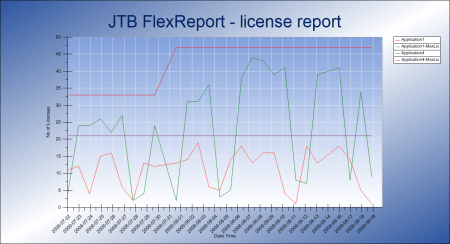
Is SAMsuite, SAMreport or FlexNet Manager/FlexNet Manager for Engineering Applications a too expensive product or SAMreport-Lite not enough? Do you want better license statistics or searching for an alternative to FlexNet Manager for your floating licenses (concurrent licenses)? Need help with your software asset management? Then take a good look at JTB FlexReport that is an inexpensive solution.
Email or Contact us to get a time limited trial for free. You can try it in your environment with your real data for a few weeks with full functionality.
Full support is provided during trial period. Right after installing it for the first time it works in trial mode for 7 days. Email us the computer number as reported in JTB FlexReport Config>License Activation (install JTB FlexReport Core first).
We offer Proof of Value (POV) of JTB FlexReport, by the ability to testing its capabilities within your environment, so that you can build a business case for the software based on your own real data.
JTB FlexReport will help you to see the license usage over time and help to justify new purchases. This will help you to decide when and how many licenses you will need to purchase next time. Instead of guessing and purchasing more licenses than you really need you can save your money using JTB FlexReport. JTB FlexReport will help to implement Software Asset Management (SAM) procedures in your organization, optimize existing investments, be better prepared for Vendor Audits, reduce risks like unexpected software costs, maintain compliance, control costs and reduce costs.
Look at an introduction on YouTube, in Flash format or in PowerPoint format.
For PowerPoint version make sure you view the PowerPoint show as it's animated. Press F5 in PowerPoint.
(Download Microsoft PowerPoint 2010 Viewer or newer if you don't have PowerPoint or the PowerPoint viewer)
Alternative online presentation format of the PowerPoint presentation.
JTB FlexReport web report
if you want to host a web based version of JTB FlexReport we have it. See this blog post for an example of usage.
More functionality
JTB FlexReport can produce HTML reports showing who uses the licenses right now. Basic report Sample 1. Advanced report Sample 2 or a dark version. These can be created manually or automatically and for example be put on SharePoint. See also the freeware JTB FlexReport LT.
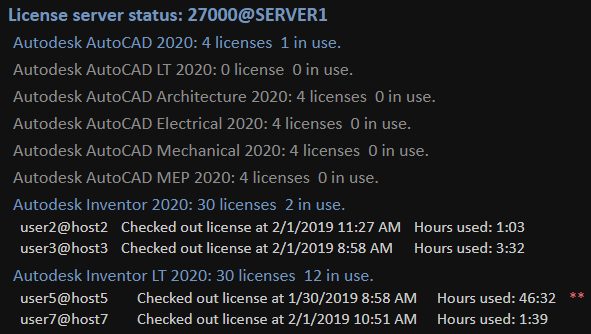
Histogram Chart that can help to determine if you need more or less licenses. Notice how there are 25 licenses but probably it could be enough with 20 or even 15 licenses because there is very small percentage when there are more than 15 licenses used concurrently.
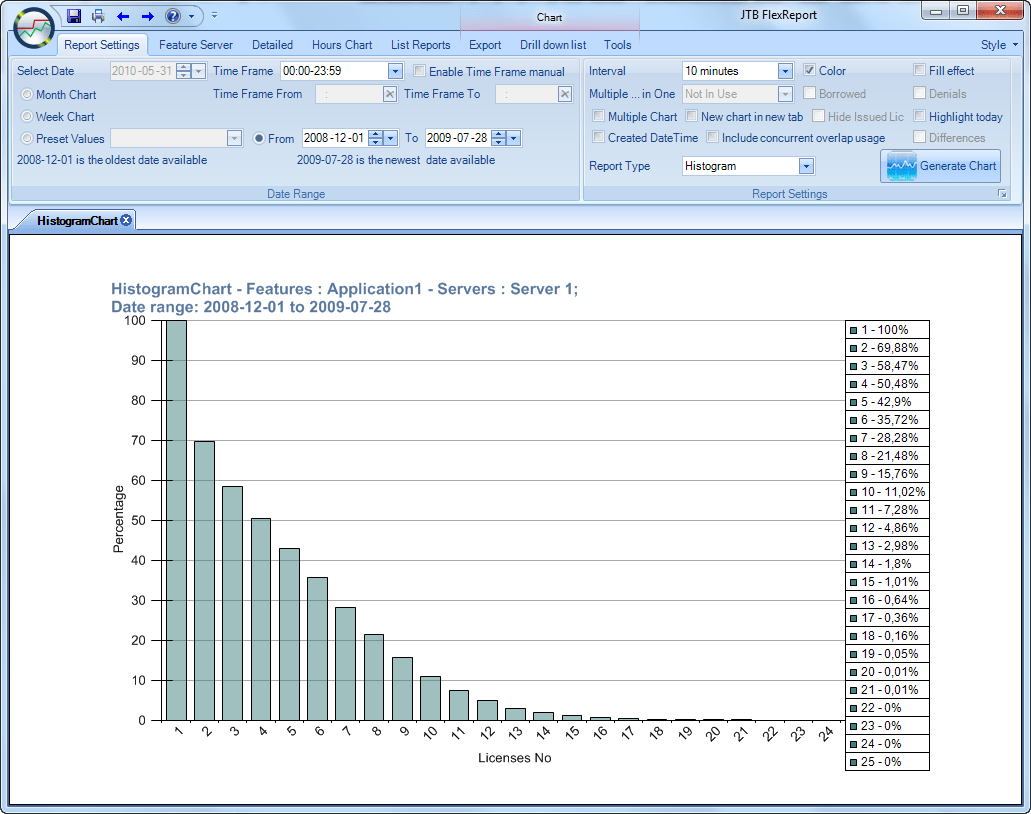
Data is also logged to a database so you can track the usage per user or host (computer) as well as work with groups of users or hosts. Great if you need help to split license costs. Groups of features or servers can also be created and be used for reporting upon.
Email notifications (alerts/reminders) when usage is exceeding a specified level.
Let's say you have 10 licenses of your software that costs $3,000 each. Now you have 20 users that shares these licenses. Do you know if you really need these 10 licenses or if you need more now when 2 more users are coming in? If you have JTB FlexReport it will be easier to make a correct decision. If you just need to purchase 1 less license imagine your ROI (Return Of Investment) and benefit of using JTB FlexReport.
With the help of JTB FlexReport you can minimize software and maintenance/subscription/renting spendings.
JTB FlexReport supports reporting on usage of applications and companies that uses FlexNet / FLEXlm from Flexera/Revenera (formerly Globetrotter Software, Macrovision and Acresso), IBM LUM and applications like 12d Model from 12D Solutions, RISA-3D (SLM based) and many more. Several thousands of independent software vendors have used the FlexNet / FLEXlm family of products. Among them are companies and/or applications from ANSYS (ANSYS License Manager), Abaqus, Autodesk, AVEVA (PDMS), Borland, Cadence, CADopia (IntelliCAD), Citrix (Citrix MetaFrame, Citrix XenApp), Cognos, EDS, Esri (ArcGIS), I-Deas, Macromedia, Mathsoft (MathCAD), Mathworks (Matlab), Mentor, Pixar, Platform, Progman/Cadcom, PTC (Pro-Engineer), Rasterx (RxView), Rational, Siemens PLM Licensing, Softimage, Solidworks, Sybase, Synopsys, Unigraphics, WindRiver, ZWSOFT (ZWCAD, ZW3D), etc. IBM LUM is used by Dassault Systemes with applications like Catia and Enovia. LM-X is for example used by Solibri products. MathLM (Mathematica), Vertex Systems (Vertex BD - BIM Software for Steel and Wood Framing Construction, Vertex G4 - 3D Mechanical Engineering Software for Machinery Industries, Vertex Flow PDM / PLM Software).
RLM (Reprise License Manager) is for example used by Ansys/EvenAG, Bitplane, CadWorks, CMG (CMGL), Bricsys/BricsCAD, DesignBuilder, Elemental Tech, FEMTools/DDS, FINCAD, Genarts, GibbsCAM, Graebert (ARES), HumanSolutions, Lanner, LLamasoft, MAPublisher, Minesight, Oasys Design Systems, Programming Research, Runge, Siemens/KineoCam, Siemens/LMS (LMS International), Simerics, SolidAngle, Solver, StreamSim, TecPlot, Trace32 (Lauterbach), WesternGeco (Gedco). Import of RLM license server report log is available as well as snapshots taken with the rlmutil.exe utility.
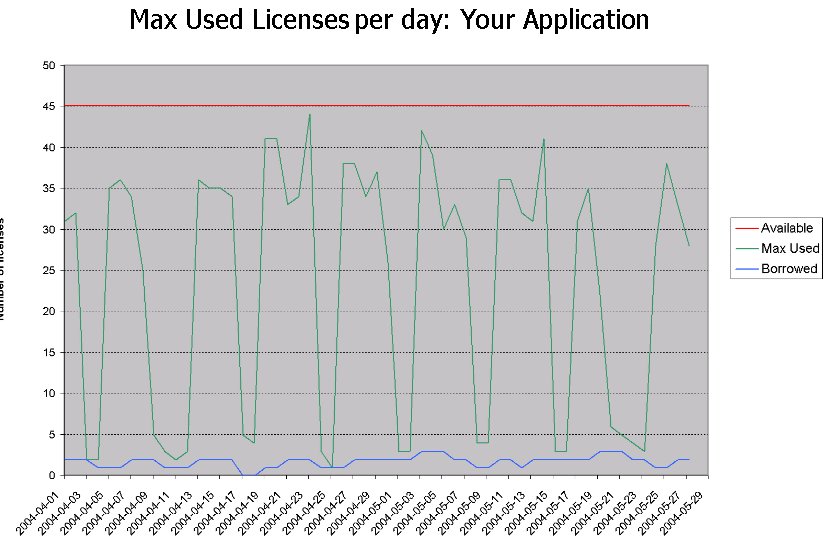
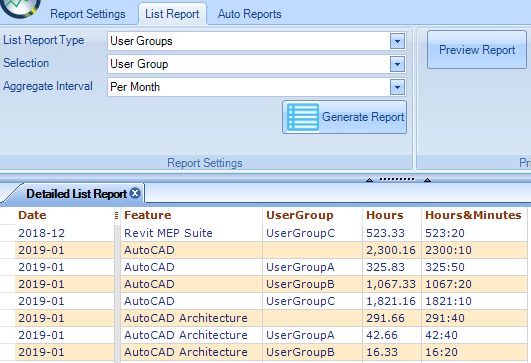
This is an example of a detailed report created with JTB FlexReport. Every user is mapped to a group. The group can be a location, division, cost center, it's up to you. You can also see what users that are not within a group.

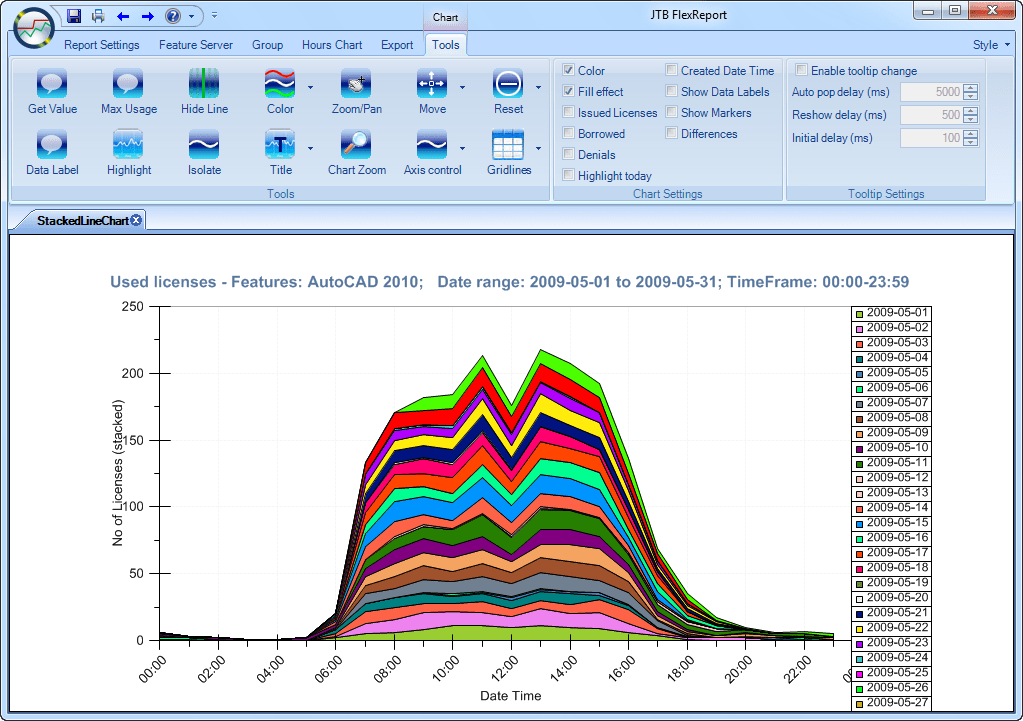
Report app that makes it easy to create different type of charts and reports of the license usage and historical usage. Create the reports manually or automatically on schedule to be published on a server as PNG files or emailed.
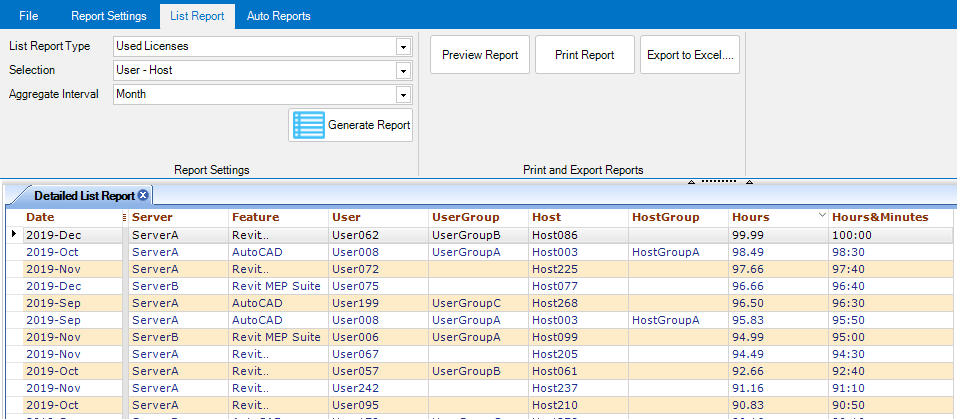
This report is showing how many hours each user has used applications each month sorted with the highest usage first.


If you have cascading licenses or multiple versions of the same application, you can combine the various separate reports to get a total usage. This way it can help you to comply with that your company are not using more licenses than allowed as can be the case if you for example have AutoCAD 2018, AutoCAD 2017, etc. on subscription from Autodesk.
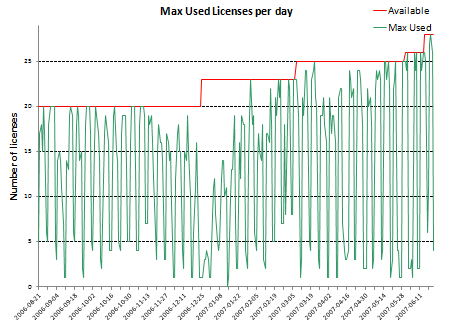
Look at historical data of for example of 20 months where max usage per day is showed. Notice that the available number of licenses has been adjusted up and down. In this case the licenses are rented on a monthly basis.
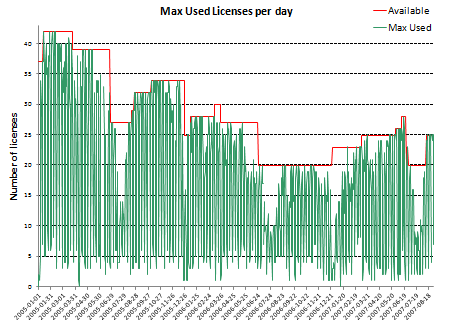
Or 10 months.
Or just 5 days.
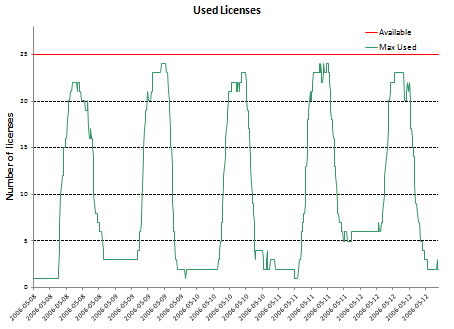
Any of the chart and list reports can be created automatically on a regular interval as PNG images and if a fixed name is used for them they can be put on a simple HTML page that users can access or for example SharePoint.
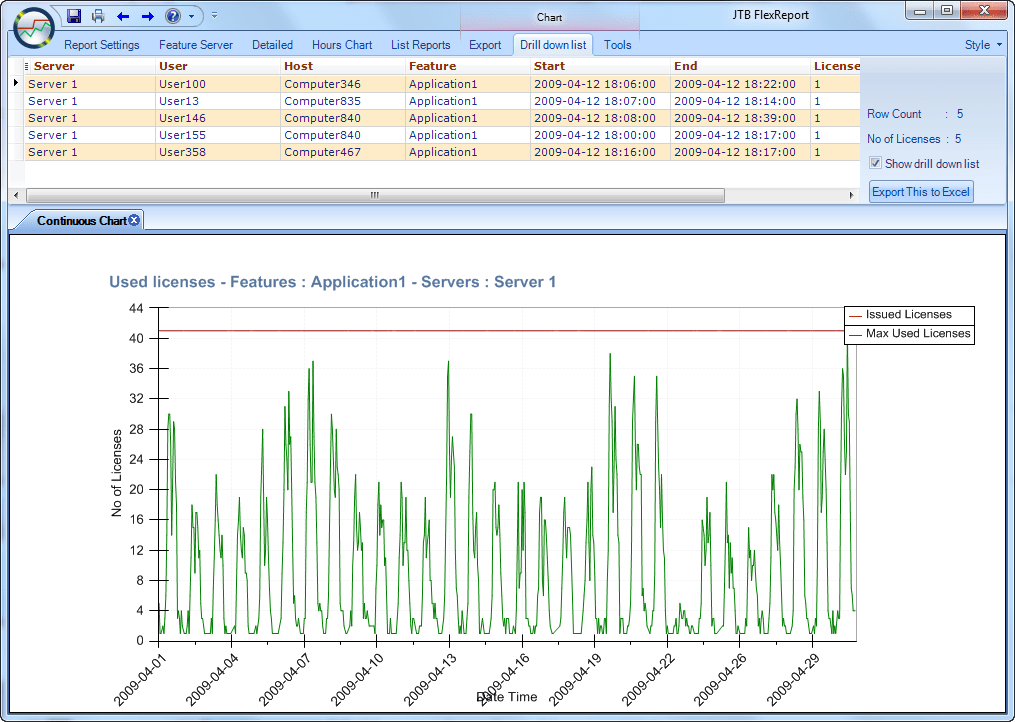
Drilldown to find who might have used licenses at a specific point in time.
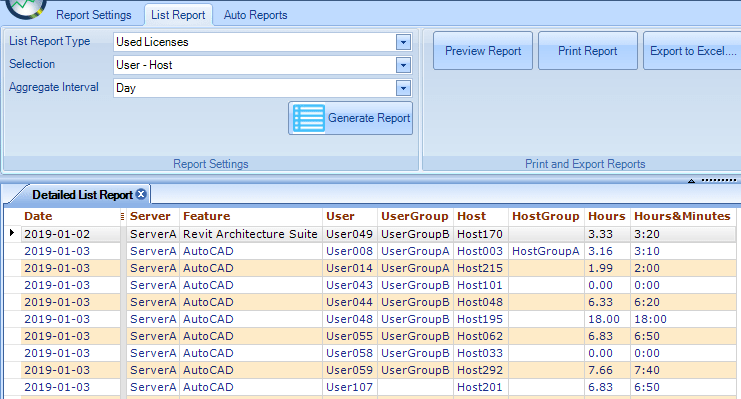
Usage per Feature per Day.
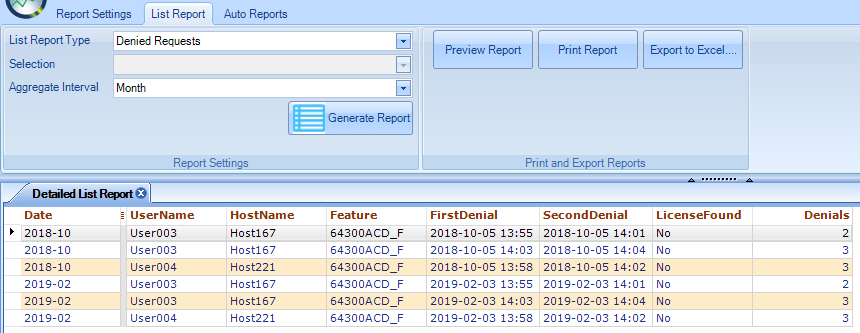
Denied per Month. Notice in column LicenseFound how some users did not find a license within a reasonable time as well as how many times they were denied.

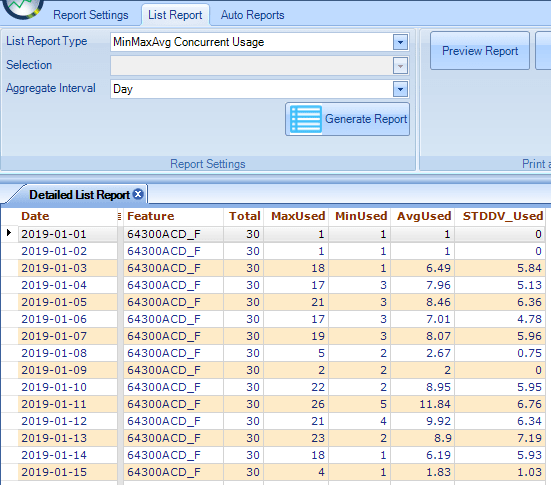
Concurrent Usage Per Month report showing max, min and average usage as well as standard deviation.

Find out what users have borrowed licenses but still are online and connected to the network and if needed contact them to return the license earlier. Use the Pinged Host Report.
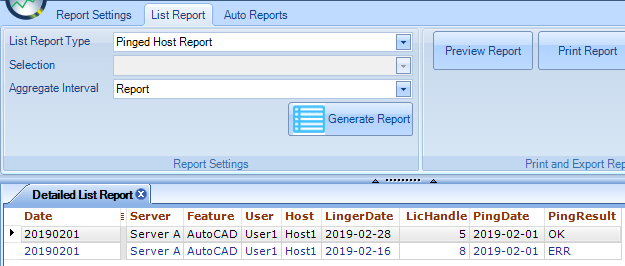
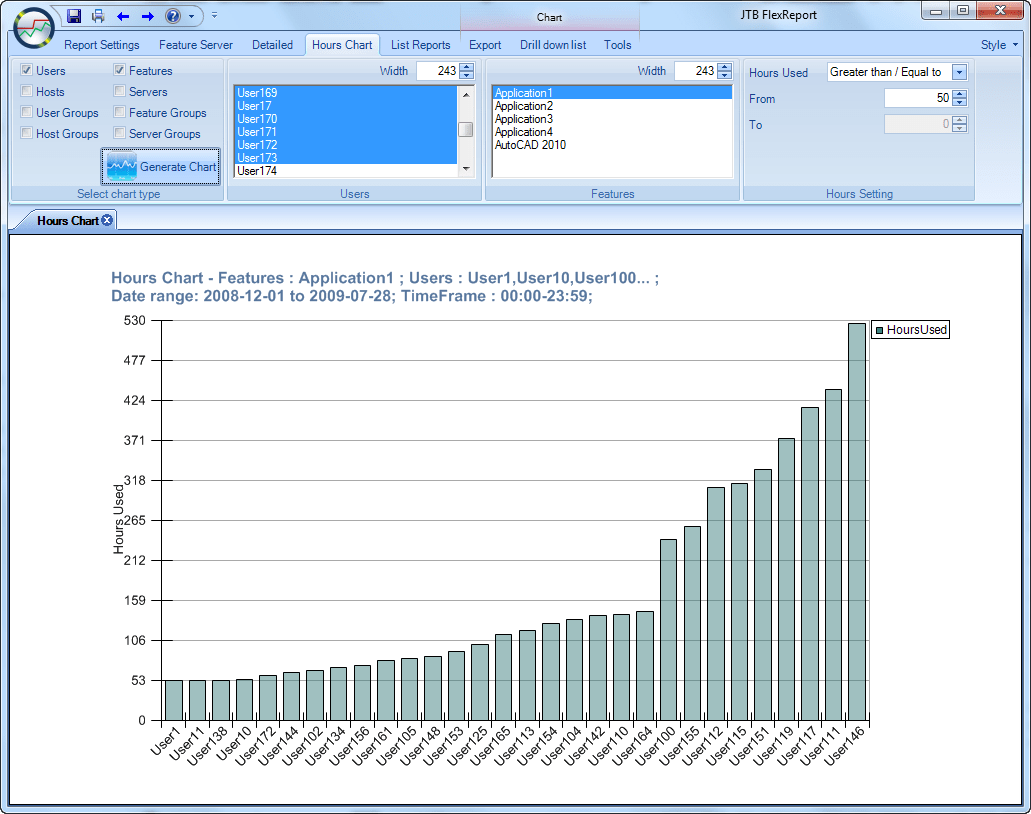
Chart report on how many hours users have been using a feature.
For Autodesk customers who own a subscription with multi-user access or network maintenance or Design & Creation Suites, JTB FlexReport can help you transition to a plan for named users.
IBM LUM idle time reporting is available where the the percentage idle time per Workbench, user and host is reported on per day, week or month. Contact us for details.
German privacy law, the EU General Data Protection Regulation (GDPR) compliance or similar can be met by not recording any details about the users and hosts.
Multiple license servers in a LNA/WAN can be monitored from one location even across multiple time zones or countries. No limitation in number of servers, features, users or hosts that can be monitored.
FlexNet/FLEXlm support includes Floating (Concurrent) Licenses (also referred to as concurrent usage or network licensing), Redundancy via License-File List (distributed license servers), Redundant License Server Systems (triads or three-server redundancy) and node-locked licenses (Counted Licenses and Uncounted Licenses).
This is a list of systems that are not directly supported but JTB Process Monitor can report on the application usage of many of the applications using these license systems. Archicad wibu, Felics, Bentley licensing and SELECTserver, RSoft, GNS License Manager, Orcaflex, Transoft, Sparx, Bitlock, Elprocad, Rhino3d zoo, IBM Rational ClearCase Atria.
Contact us if you have a need for full support of any of them or any that is not listed here.
Get ready to optimize network license and most any other software's usage as well as your software assets.
Network license assessment can be made easier with JTB World's license reporting for FlexNet and many other license systems.
Are you a PowerBI user? if so connect to the database and create your own reports. See JTB World Blog: Example of usage of JTB FlexReport and JTB Process Monitor
Typical users of JTB FlexReport are: IT managers, Director of Information Technology, CAD managers, IT staff, IT technicians, IT Asset Management staff (ITAM), License Administrators, Software Compliance Specialists, Software and Sys Admins, Application Administrators, BIM/CAD Systems Managers, Asset Co-ordinators, Network Sys. Admin., Systems Administrators, Design Technologies Administrator, Technology Manager any many more.
JTB Process Monitor
This is a separately purchased module that expands the functionality of JTB FlexReport to be able to record and monitor usage of processes or applications.
This opens the door to monitor usage of standalone applications like Word, Excel, Outlook, Adobe creative cloud for teams, Autodesk Named User licenses, AutoCAD LT or applications with network licenses that otherwise are not supported by JTB FlexReport. And with that you can reduce cost and optimize licensing for many more products.
There is a service part and a client part of the application and two separate installers. The data is saved into the main JTB FlexReport database and reports on the usage can be done in the normal way. This means that JTB FlexReport also needs to be installed. The client computer does not need to be connected to the network all the time, making it useful even when users are working off-line like from their home or on travel. It still can monitor the usage and when connected again it will send back the data to the server.
Another usage scenario is to identify users that might not need a full license.
There are also applications that even though they use FlexNet or LUM they are used only a few seconds or minutes and their usage recorded with JTB FlexReport is limited because of the snapshot intervals. With JTB Process Monitor also these applications can be more correctly monitored.
Optionally allow the user to select a project to associate with the session when an application is started. This way you can report on hours used per project.
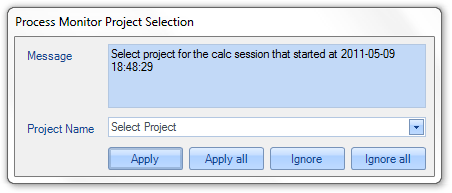
If you have a need to split costs of software based on usage JTB Process Monitor will be a big help.
JTB Process Monitor can be set to report on actual usage of a software by monitoring mouse and keyboard usage within the software. So if the software is not being used for a certain time this will be detected.
Do you have a lot of users borrowing network licenses and don't want to see 24 hours usage per day on the reports? Add JTB Process Monitor and either get the time the monitored app is run or actively used.
JTB Process Monitor is useful while preparing to convert standalone licenses to network licenses as it will help to know how much the applications are used and by what users.
JTB Process Monitor can be used to report on what actual product is run on the client when using an Autodesk suite or collection license or named user licenses.
For Autodesk customers who own a subscription with Standalone Maintenance or Design & Creation Suites, JTB Process Monitor can help you transition to a plan for named users.
JTB Process Monitor can report usage of products on Autodesk's named users plans and the token based Autodesk Flex. You get much more functionality and report from JTB FlexReport and JTB Process Monitor that the limited reporting Autodesk provides. Report on how much the applications are actually used by your users. Identify inactive users. Do you really need a license for a user only using the application 4 times per week a total of 2 hours? Or are there better options? With JTB Process Monitor you can better take these decisions.
See more in the JTB Process Monitor Documentation.
For a usage of JTB Process Monitor you need these 5 installers: JTB FlexReport Core, JTB FlexReport Service, JTB FlexReport Client, JTB Process Monitor Service and JTB Process Monitor Client.
Download
Downloads for the latest version 2026.4.0 See also the Documentation and upgrade tips.
Note that version sometimes can be lower for individual installers and files.
See Revision History for details.
Email or Contact us to get a time limited trial for free. You can try it in your environment with your real data for a few weeks with full functionality.
Full support is provided during trial period. Right after installing it for the first time it works in trial mode for 7 days. Email us the computer number as reported in JTB FlexReport Config>License Activation (install JTB FlexReport Core first).
We offer Proof of Value (POV) of JTB FlexReport, by the ability to testing its capabilities within your environment, so that you can build a business case for the software based on your own real data.
Main download
JTB FlexReport Core
JTB FlexReport Core 2026.3.0 Setup.zip
Mandatory installer. This is the main or core service needed to retrieve usage and save to the database. .NET Framework 4.8 or newer required.
Reports service and client
JTB FlexReport Service
JTB FlexReport Service 2026.3.0 Setup.zip
Optional but recommended installer. This is the report service that is needed for the creation of reports. .NET Framework 4.8 or newer required.
JTB FlexReport Client
JTB FlexReport Client 2026.3.0 Setup.zip
Optional but recommended installer. This is the client for the report creation. .NET Framework 4.8 or newer required.
JTB Process Monitor service and client
JTB Process Monitor is priced separately and is not included with the purchase of JTB FlexReport. Let us know approximately how many computers it should monitor and contact us for a quote.
JTB Process Monitor Service
JTB Process Monitor Service 2026.3.0 Setup.zip
Optional installer. This is the service that is needed together with the JTB Process Service. .NET Framework 4.8 or newer required.
JTB Process Monitor Client
JTB Process Monitor Client 2026.4.0 Setup.zip (MSI alternative JTB Process Monitor Client 2026.4.0 MSI Setup.zip)
Optional installer. This is the client for the JTB Process Client. .NET Framework 4.8 or newer required.
Other downloads
Sample database for MS Access
Sample database for MS SQL Server - useful for evaluation and demo of the report and chart features.
Download of FlexNetFeatures.xml. Useful if there is no internet connection or access to the file is blocked where JTB FlexReport is installed. If you want to get descriptions for features in JTB FlexReport Config>Features then download this xml file to your desktop and save it into the JTB FlexReport folder and then click on JTB FlexReport Config>Features>Get Feature Descriptions.
Tracking of Primavera usage is available upon request.
These are two MS Access based tools to help merging multiple MDB databases into one or update an old one if there are database definition problems like indexes missing resulting in duplicate rows and other potential issues.
JTB FlexReport Merge DBs 2022.8.0.zip
JTBFlexReport.NET.mdb 2020.11.0.zip is an empty database if there is a need to start from scratch and you don't have the empty copy in the installation folder.
SQL Server scripts:
Update DB: JTB FlexReport SQL update version 2025.5.0.txt This will add and update needed temporary tables when Update DB fail and the Client shows the error that Temporary tables are not created or that selections fail and only <All> shows in the list.
Backup old data: JTB FlexReport SQL backup old data 11.TXT
Delete old data: JTB FlexReport SQL delete old data 11.TXT
Create a copy of the database and upgrade the copy at the same time:
JTB FlexReport SQL create and copy db version 2025.5.0.txt
This can be useful if JTB FlexReport is not able to automatically add new tables, new indexes or new columns.
Upgrade Tips
When upgrading JTB FlexReport Core, Service or Client from 12.0.0 or newer or JTB Process Monitor from 12.1.0 or newer, just run the setup.
When upgrading from 2025.4.1 or older, the database needs to be updated. After installing run Update DB in JTB FlexReport Config or for SQL Server the Update DB script above can be used.
To upgrade from older versions than above, uninstall previous JTB installations and install the new ones. Before uninstalling it is good practice to first stop the JTB services.
If you want to be on the safe side make a backup of the database or the setup folder but that is normally not needed.
Some settings are saved in the registry and normally are upgraded correctly. But to be on the safe side backup of these keys can be done (one or both may exist):
HKEY_LOCAL_MACHINE\SOFTWARE\JTB World
HKEY_LOCAL_MACHINE\SOFTWARE\Wow6432Node\JTB World
If you want to start with a new database from scratch, backup, delete or rename the old database before installing the new version of JTB FlexReport Core. JTBFlexReport.NET.mdb is the MS Access database to use. For SQL Server see Core documentation how to create a new database.
If using MS Access database now it's time to remember to compact the JTBFlexReport.NET.mdb database using the Database Administration tool or MS Access. Never let it grow close to 2Gb.
JTB FlexReport Config > Update DB can be used to update the database definition (if upgrading from a version older than 2023.8.0 to version 2023.8.0 or newer) to the latest if you plan to keep using an old database. Sometimes this update is not able to solve all problems. A more thorough method for MS Access databases is using JTB FlexReport Merge DBs <version>.zip, extract JTBFlexReportMergeDBs - manual start.mdb and follow the instructions in the .txt file. This can solve bloating databases due to missing or incorrect indexes. If using SQL Server database there are scripts that can help to update the database definition.
Run JTB FlexReport Config>Launch Service Configurator and make sure the settings are correct and press ok. Then check all other properties like license servers to monitor. Start service.
A good practice is to after a while make sure everything works after the upgrade. Start to check that JTBFlexReport2.htm found in JTB FlexReport folder looks ok.
Look for the JTBFlexReport.log file in the temporary folder (the folder can be set in JTB FlexReport Config and is as default %ALLUSERSPROFILE%\JTB World\JTB FlexReport). If there are errors in that file that you don't understand please zip and email it to us for further investigations.
Run JTB FlexReport Service Configurator and make sure the settings are correct. Press Configure and start services and use the two test buttons. Run the Report Client and verify that the reports are working.
Sometimes the following can be needed: Run JTB FlexReport Service Configurator, make sure JTB FlexReport Sampling Service is checked, press Configure and Start Services, then press Clear followed by Sampling All Records.
The following is not needed for version 12.0 or newer. If "Log On As" has been manually modified (when UNC paths are used) for the Windows services of JTB FlexReport you need to modify this again after installing. Typical indicator can be that denials are no longer recorded or reported on even though the debug log paths are still available on the FlexNet tab.
If the configurator for the report service or client crashes or other strange errors happens it might help to uninstall, empty the installation folder(s) and reinstall. Make also sure the .NET Framework is matching the requirement for the installer.
On some systems when running the installer nothing happens. This can be because the settings on the server does not allow running files downloaded from the internet. To solve this right click on the exe and msi files one at a time, select properties and click on unblock.
System requirements
Microsoft .NET Framework 4.8 or/and later is needed.
Operating system - Windows 11, Windows 10, Windows Server 2025, Windows Server 2022, Windows Server 2019, Windows Server 2016, Windows Server 2012 R2, Windows Server 2012. 32-bit and 64-bit operating systems are supported. Windows 2003 Server, Windows XP, Windows 2000 (SP2), Windows Server 2008 R2, Windows 2008 Server, Windows 8.1, Windows 8, Windows 7, Windows Vista might work but are not supported. FLEXlm or FlexNet can be installed and run on other operating systems like Mac OS X, UNIX or Linux and is possible to report usage from but JTB FlexReport must run on a Windows OS.
Microsoft Access is not needed to have installed even if MS Access is selected to be used as database.
If MS SQL Server is used to host the database the following are supported: MS SQL Server 2008 R2, MS SQL Server 2012, MS SQL Server 2014, SQL Server 2016, SQL Server 2017, SQL Server 2019, SQL Server 2022, MS SQL Server Express 2008 R2, MS SQL Server Express 2012, MS SQL Server Express 2014, MS SQL Server Express 2016, MS SQL Server Express 2017, MS SQL Server Express 2019, MS SQL Server Express 2022.
2 GB is the limit for MDB files if MS Access is used.
10 GB is the limit if MS SQL Server Express 2008 R2 or newer is used.
No limit if MS SQL Server is used.
JTB World is an Autodesk Authorised Developer

Purchase
You can always try the product first to make sure it fills your needs. Full support is provided during the trial period.
Contact us for a price quote by sending an email to info@jtbworld.com. Include what applications you have and the number of licenses each or at least the total number of licenses / modules / features / components / bundles / packages you want to report on. No need to include free licenses.
The price is ranging from a few hundred USD and up depending on the amount of network licenses it should handle (for example $4763 USD for 451-500 network licenses to monitor) and depending how much customization that needs to be done, if any. Enterprise license is $9322 USD.
The price is normally not based on number of license servers, services or number of applications or features.
JTB Process Monitor is priced in relation to an estimation of number of clients. The price per license is approximately 1/4 of the price for the main core JTB FlexReport application plus a base cost of $629 USD. Let us know approximately how many computers it should monitor and contact us for a quote.
Price is also geography-based to make the price attractive and reasonable in some countries that typically have lower priced software. Token based licenses are priced in relation to the number of tokens and how much they are worth. Node-locked licenses can also be valued lower than floating licenses. Autodesk subscription customers only pay for the license count they have on subscription even if they have multiple versions. Example: Count the base product/package AutoCAD but not the sum of AutoCAD 2021, 2022 and 2023. And for bundles only count the bundle/suite/collection and not the products that are part of the bundle. If you have a situation that you have much more network licenses than you make use of let us know as we can take that into account and lower the price.
If you're interested in renting the software contact us for details.
Educational institutions like schools, high schools and universities with free or educational licenses like Autodesk Campus licenses are offered substantial discount.
The price includes installation support, support, most upgrades, bug fixes, minor customizations during the first year. The price also includes that you can increase the number of licenses to report on with around 10-20%.
Maintenance (15% of the purchase price) including upgrades and support is available on a yearly basis after the first year. Maintenance is entirely optional. Increases of the number of licenses or products can be adjusted at the time of the change if there is a big increase or when the maintenance is to be paid. The maintenance can be lowered if the number of licenses goes down. The maintenance price can change from year to year as the money value is changing and due to currency exchange factors.
Payment methods
If your US company is tax exempt contact us directly.
2Checkout (Verifone) supports 45+ online and offline payment methods globally, but availability depends on shopper country, currency.
Main families of payment methods
-
Credit/debit cards (global core): Visa, Visa Electron, MasterCard, Maestro, Eurocard, American Express, Discover/Novus, JCB, UnionPay, plus domestic Visa/MasterCard variants in markets like Brazil and Turkey.
-
Local/regional cards: Dankort/VISA (Denmark), Bancontact (Belgium), Postepay (Italy), CB/Carte Bancaire (France), local Turkish and Brazilian cards, and other regional card schemes.
-
Digital wallets: PayPal, PayPal Express, Google Pay, Apple Pay, Alipay, WeChat Pay, MobilePay (DK), Vipps (NO), and others like Skrill, Neteller, Qiwi, WebMoney, Trustly depending on region.
-
Bank transfer & offline: Local and international bank/wire transfer (US, DE, UK, rest of world), SEPA-type transfers in EU, purchase orders, and additional local bank transfer rails in EMEA/APAC.
If you decide to purchase we will send you details so you can make a bank wire transfer or we will send you a hyperlink to a secure e-commerce web site that will handle the purchasing.
Email the computer number as reported in License Activation and you will receive a license key to unlock and register JTB FlexReport after the purchase is done. The license is perpetual even if you don't need or want to pay maintenance you can still use JTB FlexReport for the version you last paid for and for up to the amount of licenses to monitor you purchased for. If upgrade or support or increase of licenses to monitor is needed maintenance needs to be renewed.
If you need to purchase through a reseller see this link.
Documentation
Read the documentation first for instructions on how to install, configure and run JTB FlexReport. For a presentation see this video on YouTube.
Main installers to download for most are “JTB FlexReport Core Setup <version>.exe”, “JTB FlexReport Report Service <version>.exe” and “JTB FlexReport Report Client <version>.exe”.
To get started using JTB FlexReport read the JTB FlexReport Core application documentation PDF, specifically start with the subjects General information, Installation and Getting started. JTB FlexReport Report Service and Report Documentation PDF will be useful to understand how the report creation works.
After installing click on License Activation button in JTB FlexReport Config and send us the computer number so we can send back a license key that you then can enter to activate the license. The installation works without activation for 7 days.
See activation instructions here: JTB World Apps Licensing.
 Download the JTB FlexReport Core application documentation PDF.
 View JTB FlexReport Core Installation YouTube video or download it. (the video is quite old and not up-to-date)
View JTB FlexReport Detailed Reports usage YouTube video or download it. (the video is quite old and not up-to-date)
Download the JTB FlexReport Report Service and Client Documentation PDF. At the end of the document there are several sample reports showing what the report app can achieve.
View JTB FlexReport Chart Report Installation YouTube video or download it. (the video is quite old and not up-to-date)
View JTB FlexReport Chart Client usage YouTube video or download it. (the video is quite old and not up-to-date)
Download the JTB Process Monitor Documentation PDF.
Autodesk Network License Manager and Autodesk GNUL licenses are supported.
See also the FlexNet Feature Codes page with most Autodesk feature codes ad their descriptions.
Support
JTB World regards customer support high and if you consider purchasing our software we will support and guide you for free to be able to run and try it fully.
For any support questions, feature request or feedback feel free to contact us.
Support is most often provided via email. Skype, phone, web-meeting are also available if needed.
Support is included with the purchase during the first year. After that support is provided if you have a maintenance agreement with us.
The support of JTB FlexReport is included in the price during the first year.
Maintenance including upgrades and support is available on a yearly basis after the first year. Maintenance is optional unless there is an increase of licenses to monitor or there is a need for support or upgrades.
Most often support is given within 24 hours even though we cannot guarantee it.
Version History
- 2026-04-04 - JTB FlexReport 2026.4.0
- JTB Process Monitor Client JTB Process Monitor Client 2026.4.0 Setup.zip
- Failure to use projects fixed.
- JTB Process Monitor Client JTB Process Monitor Client 2026.4.0 Setup.zip
Complete JTB FlexReport version history here.
License agreement
The license agreement is found here.
Customers
“With JTB monitoring and distributed licensing, we were actually able to cut 80 licenses off subscription on our last Autodesk renewal. It’s been a great success for us – thank you!” - Dan Glassman, AEI | AFFILIATED ENGINEERS, INC.
"I am very happy with LUM support. It is very good tool. I would recommend to anyone to use this tool." - Jorma at Metso
“JTB FlexReport is dynamite. Expect tech support very quickly. Fantastic graphing and reporting tool for license usage. I liked it so much I personally paid the annual fee so I can keep using it here. And no, I am not a paid spokesman, it’s just that good……….” – Phil Endrizzi, CADD Coordinator
"JTB FlexReport is a must have utility for anyone with more than a handful of licenses if they truly want to understand where they stand with their software license inventory and usage. In addition to license inventory and usage, JTB Flex Report allows us to troubleshoot issues with our license server that would otherwise have likely went unnoticed."
"Your product has been invaluable to me and to the business."
"Since I have been using your JTB FlexReport software it has made my job easier for report generation of license utilization for our various applications. All in all it is a fantastic software product and it is reasonable priced." - David J. Maslowski, Hach
Some JTB FlexReport customers:















Several hundreds more customers are found here.
Tags: network license usage tracking, usage tracker, license tracker, license tracking, Software License Optimization, AutoCAD network license usage, AutoCAD license usage report, Managing Autodesk network licenses, network license-usage report for Autodesk software that uses FLEXlm licensing technology, Autodesk audit, License Compliance, how to ensure future compliance, The Business Software Alliance (the BSA). AdLM monitoring. AdLM or NLM is often used as short for Autodesk Network License Manager.
Autodesk License Types: Named user, Stand-alone, multi-seat version, Network. License Behaviors: Perpetual (non-time-limited), Term Extendable (limited time) and Term Non-Extendable. Autodesk Subscription.