
About | Download | Newsletter | System requirements | Purchase | Documentation | Version History | License agreement | Customers
About
Enhance Your User's Experience with DWG Columns for Windows Explorer / File Explorer.
Show the DWG and DXF properties and metadata in Explorer columns.
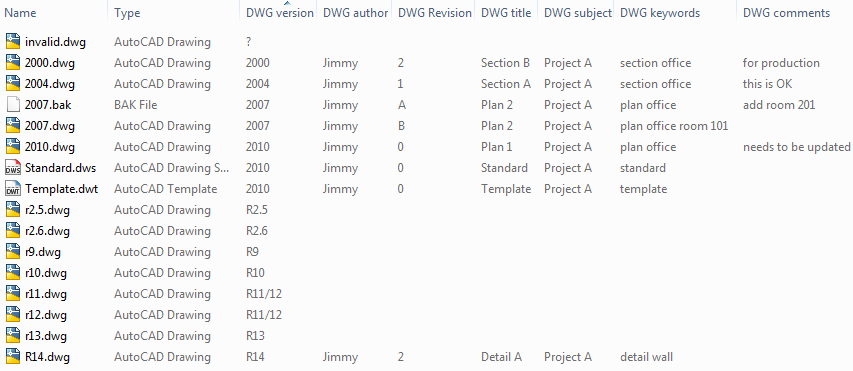
Even in file dialog boxes within CAD that shows drawing files.
Like in AutoCAD.
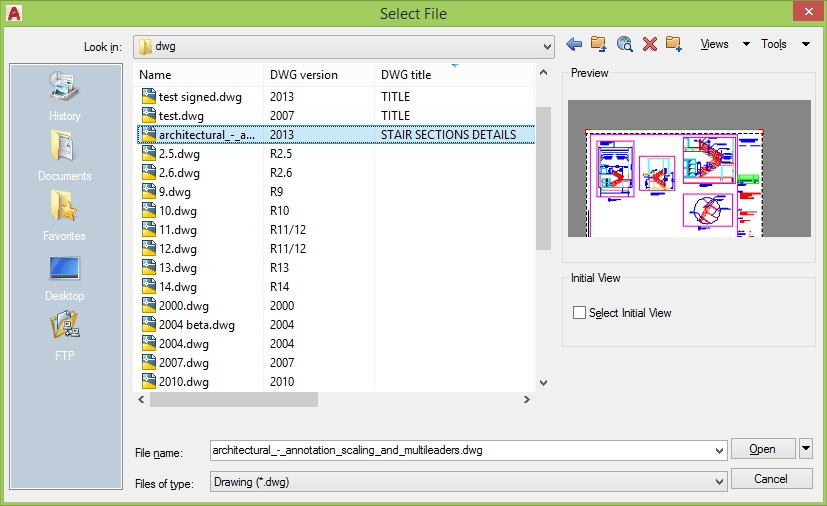
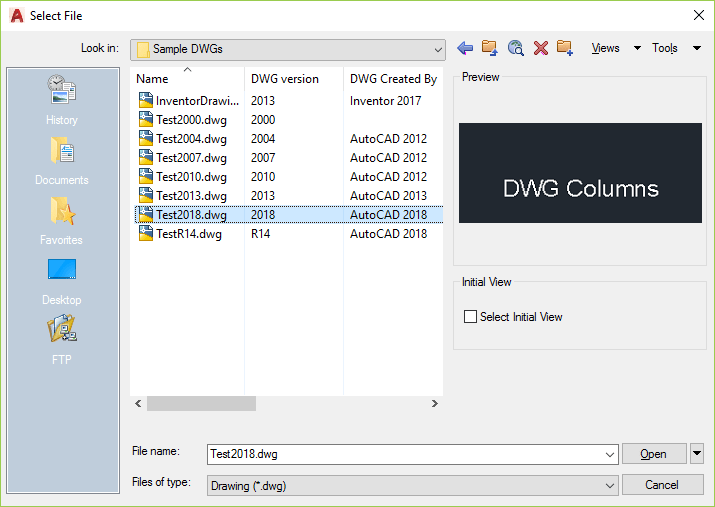
Or ZWCAD.
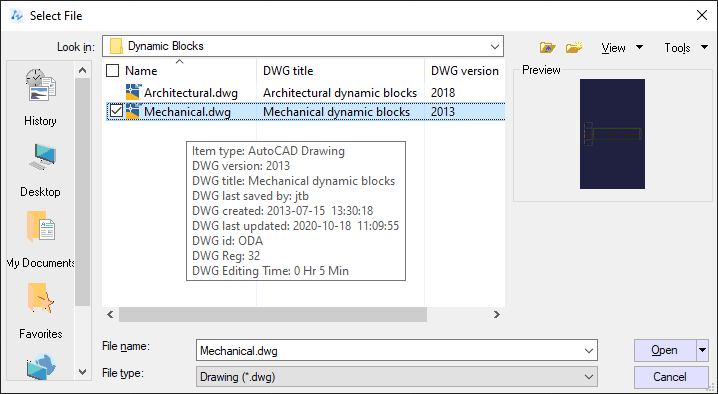
Sort files in Explorer based on any of the columns available like a revision.
InfoTip (ToolTip) with all properties can also be seen when hovering over a file.
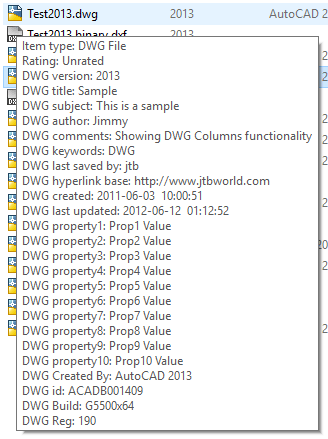
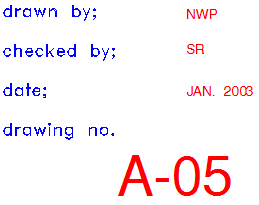
Use DWGPROPS in your CAD and add information in the Summary or Custom tabs and you can show this information in columns in Windows Explorer.
The columns can show these:
- version of the DWG/DXF file
- up to 30 custom properties
- title
- subject
- author
- comments
- created
- hyperlink base
- keywords
- last saved by
- last updated
- revision number
- DWG Editing Time
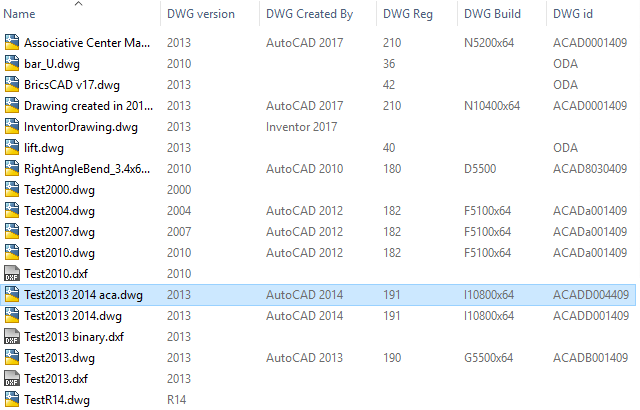
- DWG Created By (Updated when the drawing is initially created and can for example show AutoCAD 2017 or Inventor 2017. This is not updated if an existing drawing is saved by another version of AutoCAD for example)
- DWG id (for example ACAD0001409 making it possible to see difference between a drawing created in AutoCAD or an AutoCAD vertical like AutoCAD Architecture. ODA can show for a DWG created with the Open Design Alliance API like ZWCAD)
- DWG Reg (Version in registry, for example 210 that stands for R21.0 and is same as version 2017)
- DWG Build (AutoCAD build number, for example N5200x64, this matches _VERNUM or info in ABOUT dialog box).
By default all columns starts with the DWG prefix. The same columns are used for all file types supported.
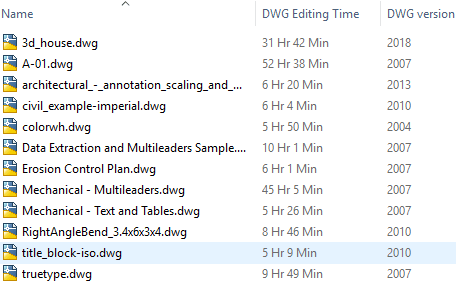
DWG Editing Time column shows how many hours and minutes the drawing has been edited. DWG Editing Time is the same thing as Total editing time that the commands TIME or DWGPROPS>Statistics are showing.
PROPULATE command in AutoCAD allows quick, automated population of the Drawing Properties dialog data fields.
No need to have any CAD installed. That means that everyone at your company can see this information.
No need to open the drawing to know information like revision and other valuable information in the drawing.
Supported extensions and file types are DWG, DXF, BAK, DWT, DWS, SV$ in any DWG/DXF file version even though some older file versions might not support showing all properties. DXF older than version 2004 does not support properties, only file version.
Column names can be customized for example from "DWG Revision" to "Rev" or into other languages.
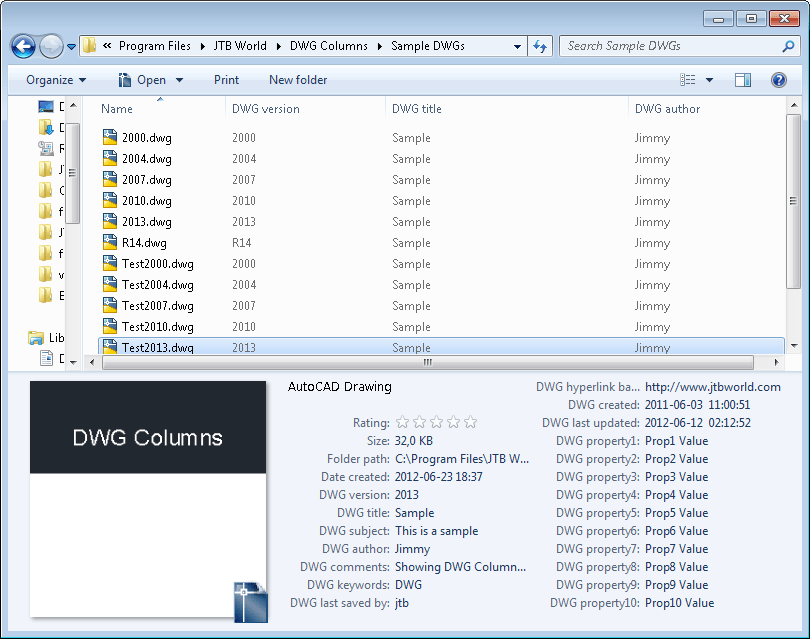
The properties can also be seen in Explorer's Details pane.
See also the complementary application DwgInfoTip to show the information like an InfoTip (Tooltip).
Download
Download
Trial version
The trial app works with full functionality for 30 days, after that only the DWG version column is working.
JTB DWG Columns trial can be downloaded and installed as an app from the Autodesk App Store site (German version).

Trial version 5.1 download:
- JTB DWG Columns Trial setup 5.1.zip (1.9 MB)
Freeware version
The freeware app only shows the DWG version column.
JTB DWG Columns freeware can be downloaded and installed as an app from the Autodesk App Store site (German version).
Freeware version 5.1 download:
Purchased version
Contact us for downloads of full version if you are a customer.
Scripted installation possible. See the documentation for how to run the installer silently.
Directory Opus support: Right click on this link DWG_Columns.vbs.txt and save it as DWG_Columns.vbs without the .txt extension in the folder %appdata%\GPSoftware\Directory Opus\Script AddIns. The file can also be dragged and dropped into the Scripts dialog box that is access from Settings>Preferences>Toolbars>Scripts.
System requirements
System requirements
Windows 10. 32-bit or 64-bit. Windows Vista, Windows 8.1, Windows 8, Windows 7 SP1 with updates applied may work but is not supported.
This works with DWG and DXF files edited with applications like AutoCAD, Inventor, Revit, Dassault Systemes DraftSight, Caddie, CADopia, progeCAD, Bricsys BricsCAD, IMSI TurboCAD, GRAPHISOFT ArchiCAD, GstarCAD, nanoCAD, MicroStation, ZWCAD and others.
Support for all DWG file formats up to DWG 2018.
Microsoft Visual C++ 2015-2019 Redistributable Package is required. A typical indication that the package is not installed is that DwgPropsX.dll cannot be registered.
"Module C:\WINDOWS\system32\DwgPropsX.dll failed to register. HRESULT -2147010895. Contact your support personnel."
Known issues and limitations with Windows XP: DWG 2013 file format not supported. In Windows XP files with names and properties with UNICODE characters does not show correctly, DXF files are not supported and InfoTip is not supported. Microsoft Visual C++ 2008 Redistributable required.
If used together with FreeCommander on Windows 64-bit make sure the 64-bit version of FreeCommander is used.
Directory Opus 12 (file manager for Windows) and newer has support for DWG Columns. See download tab for further details.
Compatibility with any application that creates DWG or DXF files.

JTB World is an Autodesk Authorised Developer







Purchase
New license: 25 USD for one license or less depending on the quantity of licenses. Support and upgrades is included for versions released within 1 year after purchase. If Auto-Renewal is selected it is 8 USD per year and can be cancelled at anytime.
Upgrade license: 8 USD for 1 year for one license or less depending on the quantity of licenses. If Auto-Renewal is selected it is 8 USD per two years and can be cancelled at anytime.
Upgrade license: 13 USD for 2 years for one license or less depending on the quantity of licenses. If Auto-Renewal is selected it is 13 USD per two years and can be cancelled at anytime.
Once you have purchased a license, follow the instructions and email to JTB World for the license activation key. See activation instructions here: JTB World Apps Licensing.
If you have really many users that you want to give access to this software we can discuss a discounted price based on your particular situation. Educational discounts available.
The license is perpetual. If you have more than one computer and you are the only user of the application one license is enough.
The network license manager is available at no extra cost and normally most useful for companies with quite many licenses.
If your US company is tax exempt contact us directly.
2Checkout (Verifone) supports 45+ online and offline payment methods globally, but availability depends on shopper country, currency.
Main families of payment methods
-
Credit/debit cards (global core): Visa, Visa Electron, MasterCard, Maestro, Eurocard, American Express, Discover/Novus, JCB, UnionPay, plus domestic Visa/MasterCard variants in markets like Brazil and Turkey.
-
Local/regional cards: Dankort/VISA (Denmark), Bancontact (Belgium), Postepay (Italy), CB/Carte Bancaire (France), local Turkish and Brazilian cards, and other regional card schemes.
-
Digital wallets: PayPal, PayPal Express, Google Pay, Apple Pay, Alipay, WeChat Pay, MobilePay (DK), Vipps (NO), and others like Skrill, Neteller, Qiwi, WebMoney, Trustly depending on region.
-
Bank transfer & offline: Local and international bank/wire transfer (US, DE, UK, rest of world), SEPA-type transfers in EU, purchase orders, and additional local bank transfer rails in EMEA/APAC.
Documentation
Documentation
Installation
Installation and uninstallation usually requires administration rights.
For upgrading it is recommended to uninstall previous version, restart or log off/log in, delete any remaining files in the installation folder DWG Columns and then install the new version.
Run the setup .exe and follow the instructions. Usually a restart or log off/log in of the computer is needed as explorer.exe needs to be restarted.
If you get "The installer has encountered an unexpected error installing this package. This may indicate a problem with this package. The error code is 2203." you can try to install again or make sure to close or disable applications that locks files like anti-virus programs or backup programs like Carbonite.
Silent installation of version 2.0 or newer (it may be needed to install Microsoft Visual C++ 2015-2019 Redistributable Package before):
Dwgcolumnssetup.exe /VERYSILENT /NORESTART /SUPRESSMSGBOXES /LOG=”%TEMP%\DWGCOL.LOG”
Customization
(Windows Vista, Windows 7, Windows 8, Windows 8.1) , Windows 10
Names of properties (column header) as seen in Windows Explorer can be modified in the DWGPropertyHandler.propdesc file. For each property you can change the label as seen below:
<labelInfo label="DWG version" invitationText=" " />
changed to a Spanish translation:
<labelInfo label="DWG versión" invitationText=" " />
To activate the changes take these steps:
Run cmd.exe as administrator and then the following:
rundll32 "C:\Program Files\JTB World\DWG Columns\DWGPropertyHandler.dll",InstallPropertySchema
Restart Explorer or log out from Windows and log in again to see the change.
If special characters like German Umlaut is used saving with Notepad might make the file not working. Open the file in Notepad after saving it and check if the descriptions look like expected or not. If there is a problem, try instead Ultraedit, Notepad++ or Notepad2 to make the saving with.
Windows XP
Names of properties (column header) as seen in Windows Explorer can be modified in the DwgPropertyHandler.txt file for Windows XP installations.
Restart Explorer or log out and log in to see the change.
Enter properties within CAD
Use DWGPROPS within CAD and populate with information.
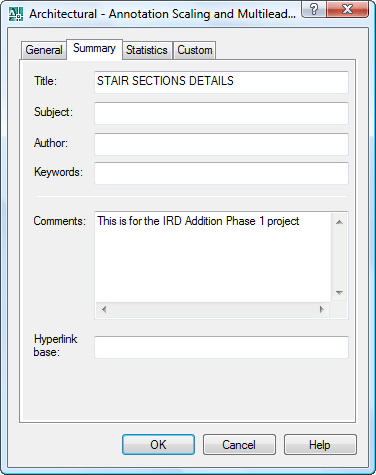
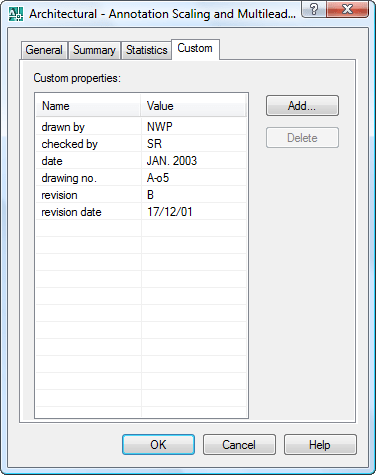
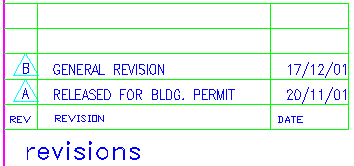
PROPULATE command in AutoCAD can be used to automatically populate for example attribute information from the title block into the properties.
See this PROPULATE tutorial.
Usage in Windows Explorer / File Explorer
And here is what it look like in Explorer.
Right click on the column header and you can select columns to view or hide.
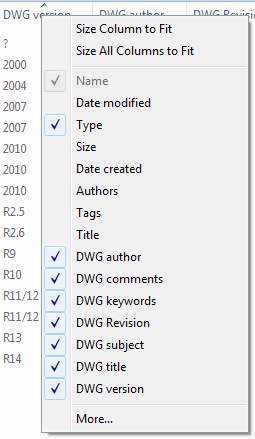
When you click on More... you can select among all available details to show. All columns start with the DWG prefix, even for DXF and other file extensions supported.
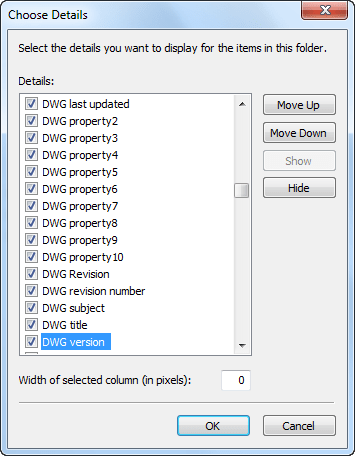
Now it is possible to quickly see DWG properties or to sort on any of them.
If you want to show these columns in all your folders take these steps in Explorer: Select Tools or View from the menu and then select Folder Options or Options. On the View tab click on Apply to Folders.
See also the complementary application DwgInfoTip to show the information like an InfoTip (Tooltip).
Troubleshooting
If there are troubles after upgrading, first step to try is uninstall, delete any remaining files in the DWG Columns folder and DwgPropsX.dll in the System32 folder. A Windows restart or log out and log in might be needed to manually delete remaining files. Then install again.
If only the DWG Version is showing it might be that your trial has expired or that the DwgPropsX.dll in the System32 folder is wrong version.
If the property values are not visible in all columns it can be because of a non-compatible version of DwgPropsX.dll already is existing. To update it manually download and extract DwgPropsX.zip into a new folder and run install.bat as administrator.
- DwgPropsX_2.0.zip (116 KB) for version 2.0 or newer
- DwgPropsX_1.3.zip (44 KB) for version 1.3
- DwgPropsX.zip (44 KB) for version 1.2
Error: “Module C:\Program Files\JTB World\DWG Explorer Column Handler\DwgPropertyHandler.dll failed to register. HRESULT -2147024770. Contact your support personnel.” Contact JTB World for help.
Microsoft Visual C++ Redistributable Package is required. A typical indication that the package is not installed is that DwgPropertX.dll cannot be registered. "Module C:\WINDOWS\system32\DwgPropsX.dll failed to register. HRESULT -2147010895. Contact your support personnel."
If you browse folders that are located on a server that you are connected with through a slow connection (WAN) you may notice that Explorer performance is slow. This is unfortunately a side effect of the need to read all files to be able to show the properties. It seems like newer Windows versions handles this better.
In some cases the app might stop working. Possibly after certain updates of other DWG based apps like AutoCAD. Installing again can help or take these steps:
Run cmd.exe as administrator and then the following:
rundll32 "C:\Program Files\JTB World\DWG Columns\DWGPropertyHandler.dll",InstallPropertySchema
Restart Explorer or log out from Windows and log in again to see the change.
Version History
Version History
- 2022-10-04 - version 5.1
- Fixed bug where DWG Editing Time and Property1 was missing in Details Pane.
2020-04-12 - version 5.0
- Improves DWG Created By column for drawings created by Civil 3D and Mechanical to show correctly.
2019-04-25 - version 4.2
- Bug fixes
2019-03-28 - version 4.1 update
- Added AutoCAD 2020 support. No change in version number.
2018-04-03 - version 4.1
- Added new column to show DWG Editing Time
2018-03-22 - version 4.0
- Added AutoCAD 2019 support. No change in version number.
2018-02-23 - version 4.0
- Increased to handle up to 30 custom properties
2017-03-21 - version 3.3
- Added support for DWG 2018 file format
- Minor bug fixes
2017-02-14 - version 3.2
- Performance improvements to solve performance issues introduced in version 3.1
2017-01-12 - version 3.1
- DWG Created By, DWG id, DWG Reg and DWG Build are new columns.
- Minor bug fixes.
- Version 3.0 was only released to a few customers
2016-10-31 - version 2.3
- Improved the installation process to be more stable.
- There are now also 3 versions of DWG Columns. One fully functional version that can be purchased, one trial and one freeware.
2015-10-12 - version 2.2
- Fixed issue with cleaning up column information when uninstalling.
2015-02-23 - version 2.1
- Added digital signing to DLL and installer.
- Works also for AutoCAD 2015.
2014-03-28 - version 2.0 update
- Updated installer for the Autodesk App version to support AutoCAD 2015 and verticals.
2013-10-17 - version 2.0
- Support for DXF files and InfoTip/ToolTip.
- 30-day trial available.
Wish list
Do you have need to see also Explorer Handler support Solidworks, MicroStation DGN files and so on? Please contact us with your interest.
License agreement
Customers
"DWG Columns for Explorer is one of the greatest tools I’ve ever seen. Simply awesome! I have used it for the past couple of years."
"Oh wow... Thank you so much for making that happen! Just installed & tested and is working great - editing time is showing and accurate. Brilliant. Also, the support for up to 30 custom properties is excellent. I have a whopping 27 attribute values in my title blocks, and can now display all of them in Directory Opus. Thanks so much for your help & ongoing support Jimmy."








































Eversource
Engineering Strategies, Inc.
PENTA Engineering
Projectus Team Oy
Rogers-O’Brien Construction
Card Trix Cardboard Engineering
10 DESIGN
Innophos
SANBORN | HEAD & ASSOCIATES, INC.
Nordiskabrand AB
Grounds for Play
TARRANT COUNTY COLLEGE
Excel Engineering, Inc.
Gatserelia Nawar & Associates
DFW CONSULTING
Hochschule Osnabrück
Alliant Technologies
CDC Inc
Dobler Metallbau GmbH
Ventura Engineering
CSO Technik Ltd
EBPC ENGINEERING BUSINESS PROCESS CONSULTANTS SC
KOPLA Engineering UG
Ramboll
CONTOURED, INC.
Sargent Solutions, Inc.
Blum Engineering
BC Greenhouse Builders
PSK Syd AB
ELMASYAPI
TSO REALI
FANUC America Corporation
Hunt Engineering
Jacobsen Construction
M+A Architects
Design Master Software, Inc
Costacurta S.p.A.-VICO
Peter Hunt Services Ltd
EDAC Inc
Rockland County Highway Dept
McGrathNicol
Bennett & Francis
Allgeier, Martin and Associates, Inc
Suconsult AS
BOARCH arkitekter a.s
Hunt Engineering Services
IMM.sa
Syd Ark Konstruera AB
March Manufacturing Inc. / March Pump
CCL Industries Inc.
Contact us for any questions, wishes or comments. A lot more can be done to automate your work.