
 AutoCAD for Mac is a CAD (Computer Aided Design or Computer Aided Drafting) software application for 2D and 3D design and drafting on the Mac OS X platform. And because it’s AutoCAD, you’re working natively in DWG™ format, so you can easily share files with clients, suppliers, and partners around the world, regardless of platform.
AutoCAD for Mac
AutoCAD 2020 for Mac and AutoCAD LT 2020 for Mac released July 10, 2019.
AutoCAD 2019 for Mac and AutoCAD LT 2019 for Mac released November 26, 2018.
AutoCAD 2018 for Mac and AutoCAD LT 2018 for Mac released November 20, 2017.
AutoCAD 2017 for Mac and AutoCAD LT 2017 for Mac released December 12, 2016.
AutoCAD 2016 for Mac and AutoCAD LT 2016 for Mac released November 21, 2015.
AutoCAD 2015 for Mac and AutoCAD LT 2015 for Mac released October 14, 2014.
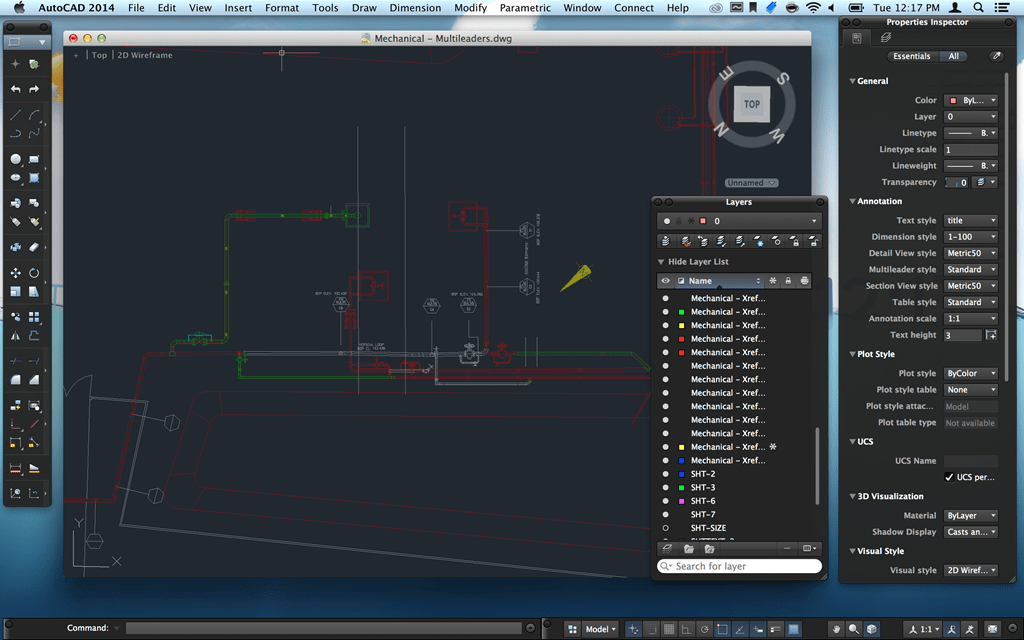
AutoCAD 2014 for Mac and AutoCAD LT 2014 for Mac released October 22, 2013. AutoCAD 2014 for Mac Service Pack 1 and AutoCAD LT 2014 for Mac Service Pack 1.
AutoCAD WS for Mac 2012 announced August16th, 2011
AutoCAD LT for Mac 2012 announced August16th, 2011
AutoCAD for Mac 2012 announced August16th, 2011
AutoCAD for Mac was released October 15th, 2010.
AutoCAD for Mac OS X was announced August 31th, 2010.
AutoCAD for Mac on Autodesk's site.
AutoCAD 2011 for Mac Online Help
AutoCAD for Mac version history
| Official Name | Date of release | Comments |
| AutoCAD 2011 for Mac | 2010, October 15 | First release. (aka SledgeHammer) |
| AutoCAD 2011 for Mac Update 1 | 2010, December 17 | |
| AutoCAD 2012 for Mac | 2011, August 19 | Network licensing added. (aka Iron Maiden) |
| AutoCAD LT 2012 for Mac | 2011, August 19 | First LT version. (aka Ferris) |
| AutoCAD 2013 for Mac | 2012, March 27 | Project Manager (aka Sheet Set Manager), Boundary stretching tool according to the situation, Multi-Edit Hatch, Leader line that is included in the text up to the front, Strikethrough, Latest user templates, PDF underlay. (aka Jaws) |
| AutoCAD LT 2013 for Mac | 2012, August | |
| AutoCAD 2014 for Mac | 2013, October 22 | Retina display support, Autodesk 360 Sync for your drawings and design files, Package Drawing (aka eTransmit), Autodesk Exchange Apps, it’s now possible to set a default save-as version for your drawings, Secure load protection against malicious AutoLISP applications, FIND command fixes, usability enhancements, including a new online help homepage, a reworked welcome screen, and a print dialogue preview button. (Sandstone) |
| AutoCAD LT 2014 for Mac | 2013, October 22 | |
| AutoCAD 2015 for Mac | 2014, October 14 | Dynamic Blocks, Layer States, Data Linking and Quick Select. |
| AutoCAD LT 2015 for Mac | 2014, October 14 | |
| AutoCAD 2016 for Mac | 2015, November 21 | Xref path management, Express Tools, Revision Clouds, DIM Command Enhancements, Command Preview, and Selection Effects. Properties Palette, Multi-Lingual User Interface (MUI), Update Notification, Smaller PDFs with select-and-search capability, Pan and Zoom improvements, TrueType font enhancements. |
| AutoCAD LT 2016 for Mac | 2015, November 21 | |
| AutoCAD 2017 for Mac | 2016, December 12 | User Interface updates, tool sets into two tabs and customizable, File tabs, importing PDFs and running multiple AutoCAD sessions side-by-side, Full Screen Mode |
| AutoCAD LT 2017 for Mac | 2016, December 12 | |
| AutoCAD 2018 for Mac | 2017, November 20 | Migrate Custom Settings, Tabbed Palettes and Auto-Hide Docked Palettes, Command Alias Editor, Object Selection enhancement, PDF Import Enhancements, Combine Text, Plot and Page Setup Enhancements, Flatten, Improved Xref Path Management, Touch Bar Support, DCL support and more |
| AutoCAD LT 2018 for Mac | 2017, November 20 | |
| AutoCAD 2019 for Mac | 2018, November 26 | German and Japanese languages are now supported, DWG Compare |
| AutoCAD LT 2019 for Mac | 2018, November 26 | |
| AutoCAD 2020 for Mac | 2019, July 10 | Korean language added, block palette, quick measure |
| AutoCAD LT 2020 for Mac | 2019, July 10 |
AutoCAD for Mac 2012
AutoCAD 2012 for Mac Service Pack 2 - This update resolves compatibility issues that have been reported while using the software on the latest versions of Mac OS X Snow Leopard (10.6.8) and Mac OS X Lion. It also resolves problems reported by the Customer Error Reporting (CER) utility and other general problems identified after AutoCAD 2012 Service Pack 1 was made available.
Design and shape the world around you with AutoCAD® for Mac® software. Explore your ideas, speed documentation, and share data seamlessly. With the power, flexibility, and accuracy you expect from AutoCAD® software in an intuitive, native Mac interface, AutoCAD for Mac helps you take your design and documentation further.
Native Support For Mac OS
Get the robust 3D free-form design tools and powerful drafting capabilities you expect from AutoCAD in an intuitive Mac® interface. AutoCAD for Mac software takes full advantage of the Mac OS® X platform. Draw and manage layouts using controls that work like you think. Pan and zoom with Multi-Touch gestures and find your designs quickly using Cover Flow navigation to flip through previews of your files
3D Free-Form Design Tools
Explore your design ideas with easy-to-use tools that help you transform concepts into reality. Push and pull faces, edges, and vertices to model complex shapes. Refine mesh surfaces and create high-precision NURBS curves and surfaces. Preview surfaces and solids as you create them—in real time
Native Support For DWG
Work natively in DWG™, one of the world’s most common file formats. Share files easily and confidently regardless of platform.
Network Licensing
AutoCAD for Mac offers a choice of licensing options – including network licensing – to help simplify software asset management and give you more flexibility in maximizing the software across geographically dispersed teams. JTB FlexReport can report on the usage.
Productivity Tools
Auto-complete options help you access commands more efficiently. The power of multi-functional grips extends to most AutoCAD objects, including lines, arcs, dimensions, and mleaders as well as 3D faces, edges and vertices. External reference (xref) visor puts xref tools at your fingertips. Elements modified in one file are easily updated in related design files. Divvy up large project components and work on them simultaneously to maximize efficiency.
Rendering Tools
AutoCAD for Mac software transforms your designs into images that convey the nuances of your design. Powerful rendering tools let you choose from hundreds of materials, apply photometric lighting, and control the display to create highly accurate, photorealistic images.
Associative Array Functionality
Reduce rework by creating relationships between arrayed objects, such as windows on a building or trusses on a bridge. The automation, management, and editing tools in AutoCAD for Mac software help you reduce repetitive tasks
Parametric Drawing
Define persistent object relationships and your design adjusts automatically as you draw—parallel lines stay parallel, concentric circles stay centered. Infer both geometric and dimensional constraints in real-time.
Intuitive Interface
AutoCAD for Mac commands and tools will be familiar to AutoCAD users. And if you haven’t used AutoCAD software in years, the intuitive interface and context-sensitive help function in AutoCAD for Mac can help smooth out your learning curve.
Customization
Configure settings, extend the software, and build custom workflows. You can even create specialized design and drafting applications—such as industry-specific software or add-on applications from partner developers.
AutoCAD for Mac 2011
AutoCAD 2011 for Mac is only available in a stand-alone licensed version. There are no multi-seat stand-alone or network versions available.
What AutoCAD features are not available in AutoCAD for Mac
Although AutoCAD 2011 for Mac is based on AutoCAD 2011, it was written to be a native Mac application. As such, it is a new and separate product and not simply a port from the Windows version. In the first release of this new product, there are some features and functionality that exist in AutoCAD 2011 that are not yet available in AutoCAD 2011 for Mac, including (but not limited to):
- 3DWalk, 3DFly, and animation support
- Action Recorder and playback of Action Macros
- Autopublish
- Batch Standards Checker and the ability to use cad standards [STANDARDS, CHECKSTANDARDS]
- CAD Manager Tools
- ‘Classic’ dialogs for image, xref, and layers
- Custom dictionaries
- Data Extraction Wizard [EATTEXT] (Attribute extraction can still be done using –ATTEXT)
- dBConnect and Datalink support
- DesignCenter
- DGN support
- Digitally signing drawings or notification when opening digital signed drawings
- Digitizer support
- Drawing Recovery Manager
- DWF support
- Dynamic block authoring
- Editable drawing properties [DWGPROPS]
- eTransmit and Archive
- Express Tools
- Extended tooltips
- FBX import/export
- Filter and Quick Select
- Geographic location support
- Hyperlink
- In-place editing of blocks or xrefs [REFEDIT]
- Layer filters
- Layer notification
- Layer State Manager (fundamental layer state operations can still be performed using the stAte option in the -LAYER command or using the (layerstate-xxx) AutoLISP functions)
- Layer Translator
- Layer Walk
- Some Layer Tools [LAYCUR, LAYDEL, LAYON, LAYTHW, LAYMCH, LAYMRG, LAYVPI]
- Layout wizard
- Markup Set Manager
- Navigation bar and SteeringWheels
- OLE objects
- Password protecting a drawing or opening password protected drawings
- PDF underlay
- Plot style configuration
- Plotting to file
- Point Clouds
- Purge dialog (all purge options are still available from the command line)
- Quick Properties palette
- Reference Manager (the external reference repathing utility)
- Share with Autodesk Seek
- Sheet Set Manager
- ShowMotion
- Slide creation or viewing
- Table style setup
- Tool palettes
- User Profiles
- VBA (Visual Basic for Applications)
- Visual LISP editor
- WMF import/export
- Xref notification
Other Functionality
- Most AutoLISP will work unless it includes Windows calls (using .NET) or uses DCL dialogs
- Most ARX applications will work unless it includes MFC or .NET calls
- No import or export of CUI customization
- There is only one workspace
- Visual styles must be created at the command line
- Sun Properties palette and Visual Styles managers are merged with the Properties Inspector
- Camera objects cannot be created
- Materials cannot be edited or created and you can not adjust the way a material maps on an object [MATERIALMAP]
- Tessellation for new 3D mesh objects must be set via the command line (MESHOPTIONS and MESHPRIMITIVEOPTIONS are not available)
- Rendering options are limited (no Advanced Render Settings palette or Rendercrop)
- Limited editing and style support for Multilines
- PC3 plot files may work but will depend on whether or not it uses proprietary drivers
- Page sizes are referenced differently between AutoCAD 2011 and AutoCAD for Mac 2011
- CUI editor may include commands that are not actually available
- Command auto-completion may offer commands that are not actually available
- System variables for missing features may still exist and be editable but will have no affect if the accompanying feature is not included. They have been kept to help preserve scripting compatibility.
How to use trackpad multi-touch gestures in AutoCAD for Mac
You are using a Mac laptop trackpad or the Apple Magic Trackpad as a pointing device for AutoCAD 2011 for Mac and you want to know what multi-touch gestures are available.
The following multi-touch gestures are supported on a Mac laptop trackpad or the Apple Magic Trackpad:
Pan
- 2-finger dragging
- Spacebar + 1-finger dragging
Zoom In
- Pinch open
- Option key + 2-finger drag up
Zoom Out
- Pinch closed
- Option key + 2-finger drag down
3D Orbit
- Shift key + 2-finger dragging
Video Tutorial
AutoCAD for Mac 2011 Update 1
An update is now available for AutoCAD for Mac at the following link:
The following features have been updated to fix issues identified using incoming Customer Error Reports (CER):
- 2D Display
- 3D Selection
- File Navigation
- General UI
- Graphic System
- Hatch
- Install
- Layers
- Open/Save
- Properties Inspector
- Quick View Tools
- Start-up
General changes and improvements have been made to the following features:
Hatch
AutoCAD for Mac is no longer unstable when deleting certain hatch objects.
Memory Use
Some memory leaks have been fixed to improve memory consumption.
Palette & Toolbar Icons
Palette and toolbar icons should always be displayed.
Plot
PDF output quality has been improved.
Start-up
On systems that do not meet the minimum system requirements, a message is displayed when AutoCAD for Mac is launched.
Splash screen should always disappear.
Text Style
Xref-dependent text styles can no longer be set current.
Operating System Compatibility for AutoCAD for Mac
You are wondering what operating systems are supported for the AutoCAD 2011 for Mac release. Here they are:
- Mac OS® X v10.6.4 or later (Snow Leopard)
- Mac OS® X v10.5.8 or later (Leopard)
System Requirements
- Apple® Mac® Pro 4,1 or later; MacBook® Pro 5,1 or later (MacBook Pro 6,1 or later recommended); iMac® 8,1 or later (iMac 11,1 or later recommended); Mac® mini 3,1 or later (Mac mini 4,1 or later recommended); MacBook Air® 2,1 or later; MacBook® 5,1 or later (MacBook 7,1 or later recommended)
- Mac OS® X v10.6.4 or later; Mac OS X v10.5.8 or later
- 64-bit Intel® processor
- 3 GB of RAM (4 GB recommended)
- 2.5 GB free disk space for download and installation (3 GB recommended)
- All graphics cards on supported hardware
- 1,280 x 800 display with true color (1,600 x 1,200 with true color recommended)
- U.S., U.K., or France keyboard layout
- Apple® Mouse, Apple Magic Mouse, Magic Trackpad, MacBook® Pro trackpad, or Microsoft®-compliant mouse.
- Mac OS X-compliant printer
FAQ
What is AutoCAD 2011 for Mac software?
AutoCAD® 2011 for Mac® software is a version of AutoCAD software developed
specifically to run on Mac OS® X.
How is AutoCAD 2011 for Mac software similar to AutoCAD 2011 software?
AutoCAD for Mac software includes familiar AutoCAD capabilities like 2D and 3D
design tools, including 3D free-form modeling capabilities; 3D visualization and
rendering; advanced customization of the menu, as well as support for LISP and
ObjectARX®/DBX applications; and more. AutoCAD for Mac software creates
files in the same native DWG™ file format as AutoCAD software.
How is AutoCAD 2011 for Mac different from AutoCAD 2011?
A primary difference is in the user interface. AutoCAD 2011 for Mac has been
designed to follow common native Mac application user interface guidelines.
Instead of a ribbon, AutoCAD 2011 for Mac software has the familiar Apple menu
bar, and a number of workflow-based palettes. AutoCAD for Mac also supports
native Mac OS X behavior, such as Cover Flow navigation and Multi-Touch
gestures
You can create custom scripts, linetypes, hatch patterns, and command aliases,
as well as AutoLISP® and ObjectARX applications, in AutoCAD 2011 for Mac;
however, there is no support for DCL in AutoLISP, nor is there access to some of
the custom AutoCAD user interface controls in ObjectARX. Technologies specific
to Windows®, such as Visual Basic for Applications, OLE objects, and Windows
Media® Audio, are not supported in AutoCAD 2011 for Mac.
The most commonly used functionality of AutoCAD is included in AutoCAD for
Mac. However, there are a few commands that are not included in this first
release, including layer filters, layer groups, and layer states; Sheet Set
Manager; and DGN, PDF, and DWFTM underlay support.
Who should use AutoCAD for Mac?
AutoCAD 2011 for Mac software is suited for designers, architects, and
engineers who prefer to work in a native Mac environment, and who need to
create, edit, or review conceptual designs, 3D models, technical drawings, and
documentation.
The functionality in AutoCAD 2011 for Mac software makes this release best
suited for users in small to medium businesses who do not require features
supporting an enterprise wide workflow.
What are the purchasing options and pricing for AutoCAD 2011 for Mac
software?
AutoCAD 2011 for Mac software is available through authorized resellers or from
the Autodesk Store at www.autodesk.com/store. If you need help finding a
reseller, refer to www.autodesk.com/reseller. Consult your local reseller or the
Autodesk Store for pricing information and for information on Autodesk
Subscription.
Can I try AutoCAD 2011 for Mac before I buy it?
Yes, you can try out AutoCAD 2011 for Mac software by downloading a trial
version at www.autodesk.com/autocadmactrial. This fully functioning version of
AutoCAD 2011 for Mac is available as a free* 30-day trial.
Does AutoCAD 2011 for Mac software use product activation?
Yes, with AutoCAD 2011 for Mac software the authorization process includes
product activation.
What is product activation?
Product activation is a software-based license management technology used by
most Autodesk software products. It is a secure, easy process that allows users
who have purchased legitimate software licenses to run their Autodesk software.
The process verifies that the serial number is valid and that the software has
been activated only on eligible computers. Product activation does not change
the way the software works for licensed users. It is similar to activation
mechanisms previously used in Autodesk products but improves security and
license management.
Why is Autodesk requiring Autodesk customers to activate their
software?
Product activation is a simple way to reduce and deter unauthorized use and
casual copying of Autodesk products, with little to no impact on loyal customers.
How do I activate my software?
Through the activation and registration interface, you can activate your product
24 hours a day, seven days a week, on the Internet or via email. Either option
takes only a few steps to complete and requires your product serial number and
registration information.
What if I have more than one computer? Will product activation allow
me to use the software on multiple machines?
Autodesk recognizes that some users may need to operate the software when
they are away from their usual work location. To accommodate this need, the
product activation technology allows an employee to install the software on a
second computer owned by the employee’s company, provided it is for use away
from the employee’s usual work location, the software is used only by that
employee and no other, and only one of the two copies of the software is ever in
use at any one time. Consult the Autodesk Software License Agreement for
details about using the software on a second computer.
Does AutoCAD 2011 for Mac support network licensing?
The first release of AutoCAD 2011 for Mac does not support network licensing.
Can I transfer my AutoCAD license between platforms (from AutoCAD
to AutoCAD for Mac, and vice versa)?
AutoCAD and AutoCAD for Mac are licensed separately. You can transfer your
AutoCAD 2011 license to a license for AutoCAD 2011 for Mac, or vice versa, by
contacting your local reseller and paying a platform exchange fee. You can also
upgrade from a previous version of AutoCAD to AutoCAD 2011 for Mac. To find
a local reseller, go to www.autodesk.com/reseller.
Where can I find more information about software activation?
More information on product activation can be found at
www.autodesk.com/activation.
Do third-party applications based on previous Windows versions of AutoCAD software work with AutoCAD 2011 for Mac software?
Most LISP routines that work in AutoCAD 2011 will run without modification in
AutoCAD 2011 for Mac. LISP routines that are dependent upon DCL or COM
interfaces such as VLA or VLAX are not supported in AutoCAD 2011 for Mac.
Existing ObjectARX applications will require some effort on the behalf of the
developer to work in AutoCAD for Mac. At a minimum, ObjectARX applications
need to be recompiled for Mac OS X. The API (application programming interface)
libraries used by those applications, and the availability of those libraries on Mac
OS X, will give some indication of the modification necessary for the application
to work in AutoCAD 2011 for Mac. For example, the ObjectARX sample
applications compile without modification. Conversely, an application making
multiple win32 system calls will need to be modified.
Can I migrate customizations from AutoCAD 2011 to AutoCAD 2011 for Mac?
AutoCAD 2011 customizations cannot be directly migrated to AutoCAD 2011 for
Mac. However, AutoCAD 2011 for Mac uses a subset of the AutoCAD 2011
cui/cuix XML schema to define the user interface. The values are interpreted
slightly differently (for example, ribbon panels become workflow groups) but they
are very similar. AutoCAD 2011 for Mac supports Menu and Workflow
customization; however, constructs like Profiles and Workspaces are not
supported in AutoCAD 2011 for Mac.
Can I open and save DWG files created in previous versions of AutoCAD in AutoCAD 2011 for Mac?
AutoCAD 2011 for Mac reads DWG files from the following previous versions of
AutoCAD software: AutoCAD Release 14, 2000, 2004, 2007 and 2010. AutoCAD
2011 for Mac has a built-in Save As function, so you can save drawings to and
from AutoCAD releases using the AutoCAD Release 14, 2000, 2004, 2007 and
2010 DWG format(s). In addition, you can use the Save As AutoCAD Release 12
DXF™ command to support drawings to and from releases prior to AutoCAD
Release 14.
Can I open DWG files created in AutoCAD 2011 for Mac in older versions of AutoCAD?
You can open an AutoCAD 2011 for Mac drawing using AutoCAD 2010 and
AutoCAD 2011. For opening drawings with versions prior to AutoCAD 2010, you
should use DWG TrueView™ software to translate DWG files to AutoCAD
Release 14, 2000, 2004, and 2007 file formats. DWG TrueView can be
downloaded at www.autodesk.com/dwgtrueview. DWG TrueView does not
require the AutoCAD application in order to convert DWG files.
How can I get personalized support and training for AutoCAD 2011 for Mac software?
If you purchased this product from an Autodesk Authorized Reseller, contact your
reseller for support and training information. To locate an Autodesk Authorized
Reseller in your area, call your local Autodesk office or visit the Autodesk website
at www.autodesk.com/reseller.
You can also visit www.autodesk.com/autocad-support for a list of the support
options from Autodesk.
Is technical support available through Autodesk Subscription?
When you enroll your AutoCAD for Mac software license in Autodesk®
Subscription, you are entitled to direct technical support via the web. Your
Autodesk distributor, Autodesk Authorized Reseller, or Autodesk retailer can
provide you with Autodesk Subscription enrollment rules, terms and conditions,
and program and pricing details for your location. For more information about
Autodesk Subscription, visit www.autodesk.com/subscription.
How do I find out if service packs are available for AutoCAD 2011 for Mac software?
In the event that Autodesk releases an AutoCAD 2011 for Mac software service
pack, the user will be notified from within the product. AutoCAD 2011 for Mac
recognizes if you have the most up-to-date release and prompts you if there is an
update available.
What benefits does Autodesk Subscription offer?
Autodesk Subscription is a software maintenance and support program that
provides exclusive advantages and delivers the lowest total cost of ownership in
your AutoCAD for Mac Software. Automatically get access to download any new
versions or incremental product enhancements for AutoCAD for Mac software
released during the term of your subscription, as well as exclusive license terms
that are available only to Subscription members. A range of community
resources, including web support direct from Autodesk product support
specialists, make Autodesk Subscription the best way to optimize your
investment in AutoCAD for Mac.
The Subscription fee includes these benefits:
• Autodesk Subscription offers a way to make your software costs predictable.
Whether you opt for a one-year subscription or a multiyear contract, the costs are
known for the entire term of your contract.
• Product enhancements may include extensions, advantage packs, or other
rich content, and many of these enhancements are exclusive to Subscription
members. Subscription members can access these new product downloads that
add new functionality and/or features to your AutoCAD for Mac software. Since they can adapt easily into your current workflows, you can apply them
immediately to your new projects to help you stay competitive.
• Autodesk Subscription helps make managing software licensing hassle-free
and flexible, including the ability to use AutoCAD for Mac software in the office
and at home.
• Get what you need to help you stay productive with AutoCAD for Mac
software. With web support you get direct, one-to-one communication with
Autodesk product support specialists for answers to your installation,
configuration, and troubleshooting questions.
To learn more, take the Subscription tour at www.autodesk.com/subscription.
What product downloads are available for Subscription members?
Product downloads may include the current release of the software, extensions,
advantage packs, or other content for AutoCAD for Mac software. These
enhancements are exclusive to Subscription members and will be able to be
downloaded from the Subscription Center at
www.autodesk.com/subscriptionlogin.
Layer States tips
One of the features not included in the new AutoCAD 2011 for Mac release is the Layer States Manager dialog.
Although the Layer State Manager dialog is not available in AutoCAD for Mac, most of the really important layer state operations can still be performed using either the -LAYER command or the (layerstate-xxx) AutoLISP functions.
Using the stAte option of the -LAYER command, you can do the basics like saving, restoring and deleting layer states. Using the different (layerstate-xxx) AutoLISP functions, you can do quite a bit more. Here is a list of the available functions:
(layerstate-addlayers) Adds/updates a series of layers to a layer state
(layerstate-compare) Compares a layer state to the layers in the current drawing
(layerstate-delete) Deletes a layer state
(layerstate-export) Exports a layer state to an .LAS file
(layerstate-getlastrestored) Returns the name of the last restored layer state in the current drawing
(layerstate-getlayers) Returns a list of the layers saved in a layer state
(layerstate-getnames) Returns a list of the layer state names in the drawing
(layerstate-has) Checks if a layer state is present in the drawing
(layerstate-import) Imports a layer state from a specified .LAS file
(layerstate-importfromdb) Imports a layer state from a specified drawing file
(layerstate-removelayers) Removes a list of layers from a layer state
(layerstate-rename) Renames a layer state
(layerstate-restore) Restores a layer state in the current drawing
(layerstate-save) Saves a layer state in the current drawing
More here.
Knowledge Base documents
- 2011: What AutoCAD features are not available in AutoCAD for Mac
- 2011: AutoCAD for Mac licensing
- 2011: How to use trackpad multi-touch gestures in AutoCAD for Mac
- Operating System Compatibility for AutoCAD for Mac
- 2011: AutoCAD for Mac crashing when launched
- System Requirements for AutoCAD for Mac
- 2011: AutoCAD for Mac cannot launch with unsupported Mac OS language
- Graphics Hardware List
- 2011: How to browse to add a folder to Application Preferences
Customization of AutoCAD for Mac
If you want customization or programming done for AutoCAD for Mac please contact us with your inquiry.