
Some Tips & Trix for AutoCAD 2004.
General
*_toolpalettepath is an undocumented system variable in AutoCAD to set the tool palette path. Use semicolon as a delimiter between multiple paths.
Copy tool palette to new workstation
http://support.autodesk.com/getdoc.asp?id=TS79416
Add hatch patterns to tool pallet
http://support.autodesk.com/getdoc.asp?id=TS79375
ADT 2004 Object Enabler (Can only be installed on 2004 products.)
http://support.autodesk.com/getdoc.asp?id=DL404022
Video card recommendations
http://support.autodesk.com/getdoc.asp?id=TS76421
Maximise the drawing area with CTRL+0 and then you can activate the Tool or Properties Palettes with CTRL+3 or CTRL+1.
You can close the Mtext dialog box by clicking anywhere outside the dialog box in the drawing area. Or you can hit CTRL+Enter.
If you password protect a drawing make sure you have an original that is NOT password protected.
You can disable the ability to password protect drawings when you make a network deployment.
Have fun with MTJIGSTRING and set it in a startup lisp to the name of the user or anything else.
Put (setvar "mtjigstring" (strcase (getvar "loginname"))) in you acad.lsp. It will show the first 10 characters.
If you use the new functions for objects in 2004 and then save the drawing to an older format remember that tabs and indents will not show correct. True color and gradient hatches will not show correct either.
Change the Revert command with this fix. Click here.
You can use the DesignCenter feature to access content and quickly create tool palettes based upon block libraries. Create block tool palettes with one click based upon files or directories of files.
The –PUBLISH and +PUBLISH commands help automate the publishing process. The -PUBLISH command and a presaved Drawing Set Description (DSD) file can run in a script, enabling publishing and plotting of large drawing sets without user interaction. The +PUBLISH command opens the Select List of Sheets dialog box enabling you to select a presaved DSD file. Selecting a DSD file automatically opens the Publish Drawing Set dialog box and prepopulates it with the list of drawing files.
How to find a Color From a Color Book. Select all the text in the text field in the Select Color dialog box and the Color Books tab. Enter a color number and then press TAB.
Want to edit attributes? You might use the properties palette where you easily can edit the attributes. TAB and SHIFT+TAB works well to move among multiple attributes.
The number of minutes between checking for modified xrefs is controlled by the environment variable system variable xnotifytime. Use lisp to set it as follow (setenv "xnotifytime" "10").
Migration tools are found here: www.autodesk.com/migrationtools
If you have blocks on the Tool palettes and want to rotate them press R when it asks for the insertion point. You will then have the option to specify the rotation angle. You can actually type any standard insertion prompts [Scale/X/Y/Z/Rotate/PScale/PX/PY/PZ/PRotate] even though you don't see them. This only works if you click on the tool, not if you click + drag and drop it.
Express Tools DBVIEW is removed but has been compiled for 2004 migth be possible to find online.
There are some bugs that are related to having the Command line floating. If you have problems try to dock it and see if the bug goes away.
You want to disable encryption. It's possible to remove with a custom installation where you have the option to remove file encryption.
Using a window (or crossing) selection, you can continue your selection outside of the current view. When you pick the first point of your selection window, continue to hold down the left mouse button as you drag the cursor outside the display area or viewport.
The new DWG 2004 file format
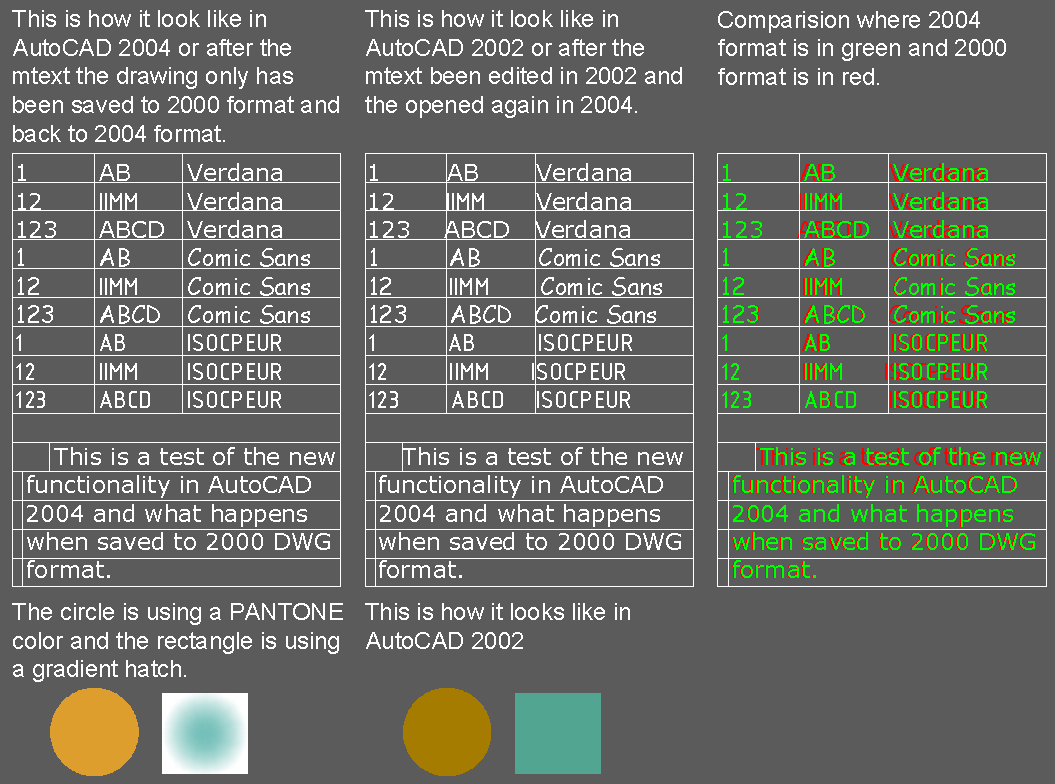
Mtext formatting using tabs or indents are not visible if you open the drawing in AutoCAD 2002 or older.
If the mtext is edited in 2002 or older the formatting is lost when opened in 2004.
If the mtext is not edited in 2002 or older the formatting is retained when opened in 2004.
If true colors or color books are used the closest matching color will show when the drawing is opened in AutoCAD 2002 or older. In some cases when changes to the object has been done they will not be retained when opened again in 2004.
If gradient hatches are used the closest matching color will show as a solid hatch when the drawing is opened in AutoCAD 2002 or older. In some cases when changes to the object has been done they will not be retained when opened again in 2004.
This is something to think about if you have to deliver drawings to a client
in DWG 2000 format.
Look here for a comparison.
Installations
Observere the use of ! in /qb!. This hides the cancel button during the installation.
Set WshShell = CreateObject("WScript.Shell")
WshShell.Run "msiexec /i ""CD\BDC\BatchDWGConverter.msi"" /qb! ACAD_SILENT_LICENSE=YES",1,True
WshShell.Run "msiexec /i ""CD\CCT\CustConvTools.msi"" /qb! ACAD_SILENT_LICENSE=YES",1,True
To get the msi of BDC and CCT you can open BDCSETUP.EXE and CCTSETUP.EXE with winzip and extract it. This way you can prepare silent installs of them.
Create a custom icon with VBS. This can be run after the installation to supply a way to have AutoCAD maximized when started from the icon if you want to. It also includes an example of an argument for starting a profiled based on one placed on the server.
sub createicon()
	Set Shell = CreateObject("WScript.Shell")
	DesktopPath = Shell.SpecialFolders("AllUsersDesktop")
	Set link = Shell.CreateShortcut(DesktopPath & "\AutoCAD 2004.lnk")
	link.Arguments = " /p ""M:\CAD\AutoCAD2004\Support\AutoCAD 2004B5.arg"""
	link.Description = "Launch AutoCAD 2004"
	link.IconLocation = "%SystemRoot%\Installer\{5783F2D7-0201-0409-0002-0060B0CE6BBA}\Acad_icon.exe,0"
	link.TargetPath = """C:\Program Files\AutoCAD 2004\acad.exe"""
	' If the window is minimized or maximized, the system restores it to its original size and position.
	link.WindowStyle = 1
	' Activates the window and displays it as a maximized window.
	' link.WindowStyle = 3
	link.WorkingDirectory = "C:\Program Files\AutoCAD 2004\UserDataCache\"
	link.Save
end sub
LISP
(setq user (vla-get-User (vla-get-Preferences (vlax-get-acad-object))))
; Determines time sensitive right-click functionality longer click duration in milliseconds.
; Should only allow values between 100 and 10000 but it doesn't warn you for other values.
(setq SCMTimeValue (vla-get-SCMTimeValue user))
(vla-put-SCMTimeValue user SCMTimeValue)
; Determines whether time sensitive right-click functionality is on.
(setq SCMTimeMode (vla-get-SCMTimeMode user))
(vla-put-SCMTimeValue user SCMTimeMode)
VB
GetObject(, "AutoCAD.Application") might need to be changed to GetObject(, "AutoCAD.Application.15") if you have an VB application you want to run on AutoCAD 2002 but also having AutoCAD 2004 installed at the same time.
Network/FlexLM
License Timeout
http://support.autodesk.com/getdoc.asp?id=TS67304
New tools added after the release
Autodesk® Color Book Editor
http://support.autodesk.com/getdoc.asp?id=DL404041