
About | Download | Newsletter | System requirements | Purchase | Documentation | Version History | License agreement | Customers
About
Make use of AutoCAD together with an external database. Block attribute values can automatically be updated back and forth to one or many external databases. If you make changes to the attribute values they can be synchronized back to the external database or the other way around.
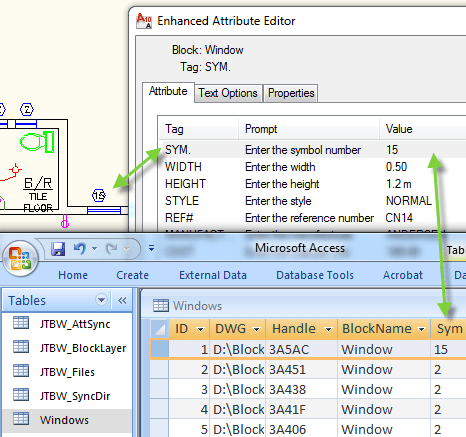
There are three sync methods available and can be set individually for each attribute to synchronize.
- Sync in both directions.
- Sync only from the drawing to the database.
- Sync only from the database to the drawing.
Some information might be useful to sync in both directions while other information like dimensions needs AutoCAD to be the owner. Other information like price might best be owned by the database.
Information in the title block as well as revisions is something that can be synchronized.
More flexibility and functionality than the standard AutoCAD commands EATTEXT, DATAEXTRACTION, ATTIN and ATTOUT.
ACAD_db will improve your work process and experience and will improve quality of your data and remove redundancy and conflicts of data and information.
Support for blocks in both model space and paper space and in multiple layouts. Fields of all types like Sheet Set Manager properties are supported but then sync only from drawing to the database.
Dynamic blocks are supported.
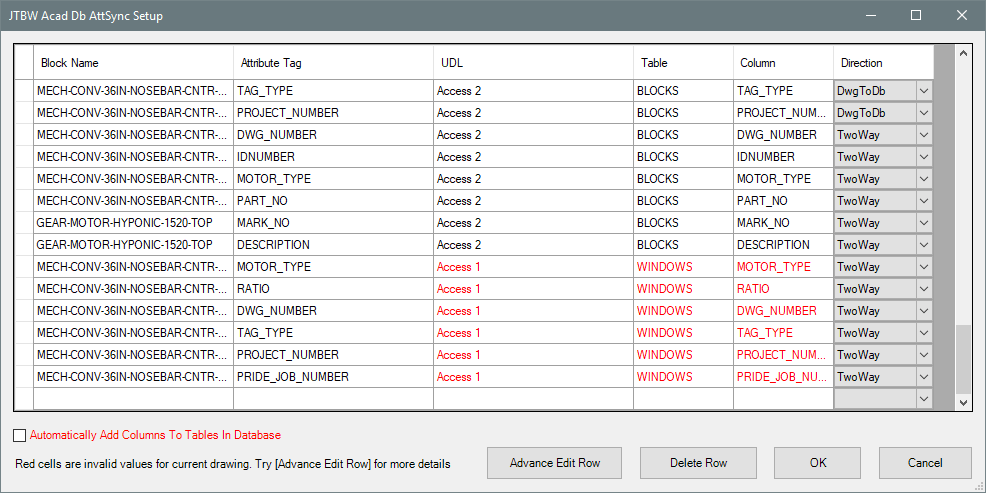
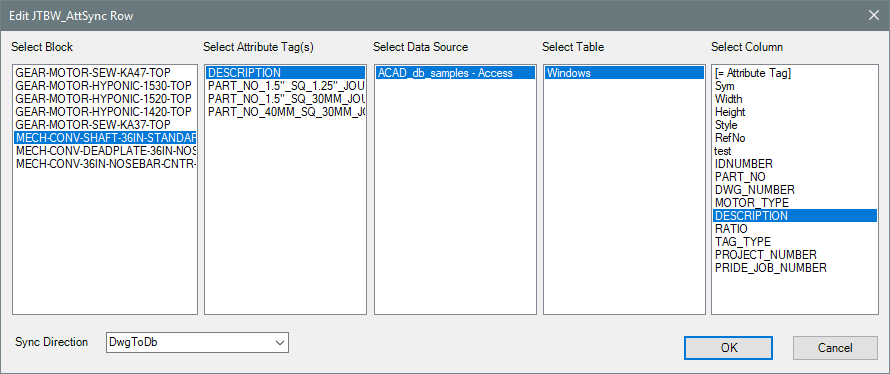
A Setup Window for the database table JTBW_AttSync is available to ease the task to create the connection between the database and the drawing.
Advance Edit Row:
Multi-line attributes are not yet supported but support for them can be added if and when needed.
Download
Installer for version 5.1.0: JTB_ACAD_db_5.1.0.zip.
Sample Access database and drawing are included with the installer.
ACAD_db_SQL.zip (114KB). Sample database for SQL Server/SQL Server Express.
ACAD_db_Oracle.zip Needed if Oracle will be used as database.
System requirements
AutoCAD 2008,AutoCAD 2009, AutoCAD 2010, AutoCAD 2011,AutoCAD 2012, AutoCAD 2013, AutoCAD 2014, AutoCAD 2015, AutoCAD 2016 , AutoCAD 2017, AutoCAD 2018, AutoCAD 2019, AutoCAD 2020, AutoCAD 2021, AutoCAD 2022, AutoCAD 2023, AutoCAD 2024, AutoCAD 2025AutoCAD 2026. Verticals with version 2008-2026 like AutoCAD Architecture, AutoCAD Civil Design, AutoCAD Civil Design 3D, AutoCAD Civil Design Professional, AutoCAD Electrical, AutoCAD Civil 3D, AutoCAD Map 3D, AutoCAD Mechanical, AutoCAD MEP, AutoCAD P&ID, AutoCAD Plant 3D, Autodesk Advance Steel and AutoCAD Structural Detailing.
Both 32-bit and 64-bit is supported.
AutoCAD LT is not and will not be supported.
Any database like Access (MDB or .accdb) or SQL Server that can be connected with dbConnect within AutoCAD is supported. Other examples are SQL Server Express, Oracle, ODBC, etc. AutoCAD 64-bit does only support Access 2010/2013/2016 64-bit or the free Microsoft Office 12.0 Access Database Engine OLE DB Provider/Microsoft Access Database Engine 2010 Redistributable or Microsoft Access Database Engine 2016 Redistributable.
Excel is not supported as it is not a real database.
If you run 64bit AutoCAD you cannot have 32bit Office installed and also connect to MS Access database. If installing Office 64-bit is not an option, some have said that it works to uninstall Office, then install the Microsoft Access Database Engine 2010 and after that install Office again. Another workaround could be to use SQL Server or SQL Server Express as backend and then MS Access 32-bit as a frontend.
Any operating system that can run the above is supported from Windows XP, Windows Vista, Windows 7, Windows 8, Windows 8.1, Windows 10 and Windows 11.
Contact us if support for other CAD software is needed like BricsCAD.
JTB World is an Autodesk Authorised Developer
Purchase
New license: 150 USD for one license or less depending on the quantity of licenses. Support and upgrades is included for versions released within 1 year after purchase. If Auto-Renewal is selected it is 45 USD per year and can be cancelled at anytime.
Upgrade license: 45 USD for 1 year for one license or less depending on the quantity of licenses. If Auto-Renewal is selected it is 45 USD per two years and can be cancelled at anytime.
Upgrade license: 75 USD for 2 years for one license or less depending on the quantity of licenses. If Auto-Renewal is selected it is 75 USD per two years and can be cancelled at anytime.
Once you have purchased a license, follow the instructions and email to JTB World for the license activation key. See activation instructions here: JTB World Apps Licensing.
If you have really many users that you want to give access to this software we can discuss a discounted price based on your particular situation. Educational discounts available.
The license is perpetual. If you have more than one computer and you are the only user of the application one license is enough.
The network license manager is available at no extra cost and normally most useful for companies with quite many licenses.
If your US company is tax exempt contact us directly.
2Checkout (Verifone) supports 45+ online and offline payment methods globally, but availability depends on shopper country, currency.
Main families of payment methods
-
Credit/debit cards (global core): Visa, Visa Electron, MasterCard, Maestro, Eurocard, American Express, Discover/Novus, JCB, UnionPay, plus domestic Visa/MasterCard variants in markets like Brazil and Turkey.
-
Local/regional cards: Dankort/VISA (Denmark), Bancontact (Belgium), Postepay (Italy), CB/Carte Bancaire (France), local Turkish and Brazilian cards, and other regional card schemes.
-
Digital wallets: PayPal, PayPal Express, Google Pay, Apple Pay, Alipay, WeChat Pay, MobilePay (DK), Vipps (NO), and others like Skrill, Neteller, Qiwi, WebMoney, Trustly depending on region.
-
Bank transfer & offline: Local and international bank/wire transfer (US, DE, UK, rest of world), SEPA-type transfers in EU, purchase orders, and additional local bank transfer rails in EMEA/APAC.
Documentation
Documentation for version 4.0.5 here.
Setup procedure
Using the JTB ACAD_db <version>.exe installer will install to program into %ProgramFiles%\Autodesk\ApplicationPlugins\JTBW-ACAD_db.bundle (Sample Access database and drawing in C:\JTB ACAD_db sample\)
Loading to AutoCAD will be done automatically and menu available on the Add-ins tab.
Activation
See activation instructions here: JTB World Apps Licensing.
Usage
Prepare the database that holds information on what block and attributes to synchronize and where.
Make sure there is an UDL file (data source) that points out the location of the main database.
In the CAD program use AcDbSettings command to specify what data source to use as the main database.
Run the AcDbMake command to make new/existing drawing possible to sync.
Now use either just open and save/close the drawing or use any of the commands AcDbOut or AcDbIn to sync information into CAD or out from CAD.
The command line will show full details on if there are any problems and what data has been synchronized.
Tutorial on How to sync block attribute values with a database using ACAD_db.
For more details see the Documentation.
Version History
- 2025-03-25 - version 5.1.0
-
Added support for AutoCAD 2026
-
- 2024-12-23 - version 5.0.0
-
Added support for AutoCAD 2025
-
- 2023-04-02 - version 4.4.0
-
Added support for AutoCAD 2024
-
- 2022-04-25 - version 4.3.0
-
Added support for AutoCAD 2023
-
- 2021-07-09 - version 4.2.0
-
Remove messages about uninstallation in very-silent installation mode.
-
- 2021-04-13 - version 4.1.2
-
Added support for AutoCAD 2022
-
- 2020-07-24 - version 4.1.1
-
Upgraded to License 4.3
-
- 2020-05-09 - version 4.1.0
-
Added support for AutoCAD 2021
-
- 2019-08-19 - version 4.0.5
-
Added error handler when user adds an invalid column name.
-
- 2019-07-30 - version 4.0.4
-
Added error notification when the DBID column is missing.
-
Automatically add ParentBlockName and ParentBlockHandle columns.
- Updated sample database.
-
- 2019-07-15 - version 4.0.3
- Fixed compatibility issue with the new version of the grid.
- 2019-05-28 - version 4.0.2
- Remember last used selections in Settings window of JTBW_AttSync.
- Fully upgraded the source code and installation.
- Settings window of JTBW_AttSync.
- 2019-03-28 - version 3.0 update
- Support for AutoCAD 2020 based products.
- 2018-04-12 - version 3.0
- Support for AutoCAD 2019 based products.
- Added support for future versions of ACE OLEDB database provider
- Installer added
- Various bug fixes
- 2012-10-08 - version 2.0
- Support for AutoCAD 2013 based products.
- Support for Oracle database.
- Fixed a sync bug when NETLOAD is used.
- 2010-08-23 - version 1.1 beta
- Support for MS Access 2010 64-bit and the free Microsoft Office 12.0 Access Database Engine OLE DB Provider.
- 2009-10-26 - version 1.0
- First public release.
License agreement
The license agreement is found here.
Customers

















Contact us for any questions, wishes or comments.

ACAD_db will help you expand and improve your BIM process or information exchange between AutoCAD and an external database.