
About | Download | Newsletter | System requirements | Purchase | Documentation | Version History | License agreement | Customers
About
JTB XClipClean is an Xclip-cutter app for AutoCAD and BricsCAD to clean up xrefs or blocks that been clipped so that the information that is outside the clip is removed. This is useful when you need to remove hidden geometry and minimize DWG file size.
CAD allows blocks and xrefs to be clipped using the XCLIP command. Sometimes for different reasons you have to clean up the blocks or xrefs that have been clipped. JTB XClipClean can help you with that by deleting and trimming geometry that is outside the xclip boundary.
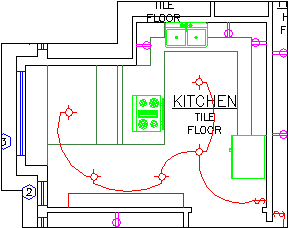
Here the boundary is visible |
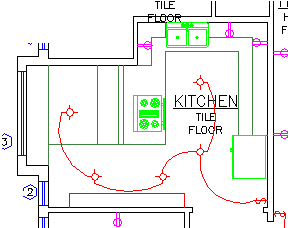
Here it is without the boundary |
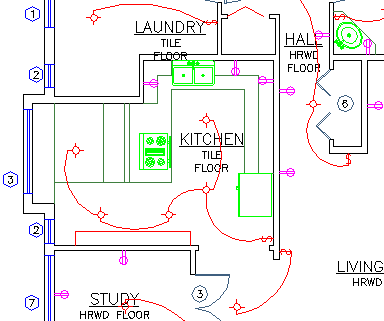
This is how it look like both before using xclip, after deleting the xlip or exploding the block |
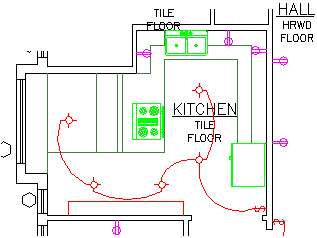
Here is the result after XClipClean has been used on the xclipped block. Either the block can be xclipped again so the text too is clipped or it can be manually adjusted. An option is to explode everything that crosses the boundary that is why the attributes for the tags has been removed. An option is to keep blocks with attributes. |
Revit does not handle xclipped blocks and xrefs so XClipClean can be useful to run on drawings before taking them into Revit.
Limitations: XClipClean was built to solve some specific requirements and thus there are cases where XClipClean does not work well or at all. Nested clipped blocks are not handled. Inverted clipped blocks are not handled. It might be possible to modify the code to handle these cases but the work might be more than the gain.
Download
Trial 30 days with limitations only clean 5 blocks per CAD session.
System requirements
Compatible with most AutoCAD versions (AutoCAD 2004 to AutoCAD 2026). All verticals or flavors based on AutoCAD should be working like AutoCAD Architecture (ACA), Architectural Desktop (ADT), AutoCAD Civil 3D, AutoCAD Electrical , AutoCAD Map 3D, AutoCAD Mechanical, AutoCAD MEP (AMEP, ABS), AutoCAD P&ID, AutoCAD Plant 3D and Autodesk Advance Steel.
BricsCAD Pro or Platinum 15 and newer is supported. BricsCAD Classic is not supported.
Windows XP, Windows Vista, Windows 7, Windows 8 and Windows 8.1, Windows 10, Windows 11.
Only for older versions than 4.0.0: VBA for AutoCAD is required. There is a separate installer for VBA in AutoCAD 2011 and newer versions but Autodesk only have it available for AutoCAD 2014 and newer. As of January 31, 2014, Autodesk is no longer authorized to distribute VBA 6 or earlier versions of VBA for use with Autodesk AutoCAD and other Autodesk products. This change affects the availability to download and install VBA for Autodesk AutoCAD 2013 or earlier. AutoCAD Express Tools is required.
Contact us if support for other CAD software is needed.
JTB World is an Autodesk Authorised Developer

Purchase
New license: 95 USD for one license or less depending on the quantity of licenses. Support and upgrades is included for versions released within 1 year after purchase. If Auto-Renewal is selected it is 29 USD per year and can be cancelled at anytime.
Upgrade license: 29 USD for 1 year for one license or less depending on the quantity of licenses. If Auto-Renewal is selected it is 29 USD per two years and can be cancelled at anytime.
Upgrade license: 48 USD for 2 years for one license or less depending on the quantity of licenses. If Auto-Renewal is selected it is 48 USD per two years and can be cancelled at anytime.
Once you have purchased a license, follow the instructions and email to JTB World for the license activation key. See activation instructions here: JTB World Apps Licensing.
If you have really many users that you want to give access to this software we can discuss a discounted price based on your particular situation. Educational discounts available.
The license is perpetual. If you have more than one computer and you are the only user of the application one license is enough.
The network license manager is available at no extra cost and normally most useful for companies with quite many licenses.
If your US company is tax exempt contact us directly.
2Checkout (Verifone) supports 45+ online and offline payment methods globally, but availability depends on shopper country, currency.
Main families of payment methods
-
Credit/debit cards (global core): Visa, Visa Electron, MasterCard, Maestro, Eurocard, American Express, Discover/Novus, JCB, UnionPay, plus domestic Visa/MasterCard variants in markets like Brazil and Turkey.
-
Local/regional cards: Dankort/VISA (Denmark), Bancontact (Belgium), Postepay (Italy), CB/Carte Bancaire (France), local Turkish and Brazilian cards, and other regional card schemes.
-
Digital wallets: PayPal, PayPal Express, Google Pay, Apple Pay, Alipay, WeChat Pay, MobilePay (DK), Vipps (NO), and others like Skrill, Neteller, Qiwi, WebMoney, Trustly depending on region.
-
Bank transfer & offline: Local and international bank/wire transfer (US, DE, UK, rest of world), SEPA-type transfers in EU, purchase orders, and additional local bank transfer rails in EMEA/APAC.
Limitations: XClipClean was built to solve some specific requirements and thus there are cases where XClipClean does not work well or at all. Nested clipped blocks are not handled. Inverted clipped blocks are not handled. It might be possible to modify the code to handle these cases but the work might be more than the gain.
Documentation
See activation instructions here: JTB World Apps Licensing.
Either all xclipped blocks or xrefs (after being bound) in a drawing can be cleaned or you can clean them one by one.
With XClipClean you can clean your xclipped blocks from everything that is outside the boundaries of the block.
-
Start with the command XCC to clean selected block. What will happen is that you will be prompted to select a block that is xclipped. The block will be saved to a temporary file during this process.
-
Use the command XCCAB for XClipClean All Blocks.
- To do cleaning without exploding nested blocks use the XCC1 or XCCAB1 commands.
If you get this dialog box:
AutoCAD Warning
This operation may take a long time.
To greatly improve performance, the system can disregard Draw Order.
Disregard Draw Order for this operation?
and if you want to avoid it you can change the DRAWORDERCTL system variable. Enter DRAWORDERCTL on the command line and set the value to anything but 3 as seen below.
| Value | Description |
| 0 | Turns off the default draw order of overlapping objects: after objects are edited, regardless of their draw order, the objects are displayed on top until a drawing is regenerated (REGEN) or reopened. This setting also turns off draw order inheritance: new objects that are created from another object using the commands listed below are not assigned the draw order of the original object. Use this setting to improve the speed of editing operations in large drawings. The commands that are affected by inheritance are BREAK, FILLET, HATCH, HATCHEDIT, EXPLODE, TRIM, JOIN, PEDIT, and OFFSET. |
| 1 | Turns on the default draw order of objects: after objects are edited, they are automatically displayed according to the correct draw order. |
| 2 | Turns on draw order inheritance: new objects created from another object using the commands listed above are assigned the draw order of the original object. |
| 3 | Provides full draw order display. Turns on the correct draw order of objects, and turns on draw order inheritance. |
If you run into unexpected behavior inform on any error messages, AutoCAD version, and send one or more sample drawings with instructions how to reproduce the problem.
Limitations: XClipClean was built to solve some specific requirements and thus there are cases where XClipClean does not work well or at all. Nested clipped blocks are not handled. Inverted clipped blocks are not handled. It might be possible to modify the code to handle these cases but the work might be more than the gain.
Hatch trimming is not supported.
HIGHLIGHT variable may be set to 0 if the app fails and you need to restore it to 1 manually.
SDI set to 1 is not supported. SDI must be set to 0.
Version History
Most recent and previous versions:
- 2025-03-25 - version 5.1.0
- Added support for AutoCAD 2026
- 2024-12-16 - version 5.0.0
- Added support for AutoCAD 2025
- Added support for BricsCAD V25
- 2023-06-28 - version 4.3.0
- Added support for AutoCAD 2024
- 2022-10-28 - version 4.2.1
- Fixed bug in License file version 4.7.2
- 2022-04-25 - version 4.2.0
- Added support for AutoCAD 2023
- 2021-08-31 - version 4.1.0
- Fixed error of Xref falsely detected as not found.
- Added support for BricsCAD.
- 2021-07-27 - version 4.0.0
- Upgrade from VBA to .NET improving performance and stability.
- Remove messages about uninstallation in very-silent installation mode.
- 2021-04-13 - version 3.0.1
- Added support for AutoCAD 2022
- 2020-07-18 - version 3.0.0
- Added licensing functions
- Fix error when working with multiple drawings
- Fix error when working ATTDIA = 1
- 2019-09-16 - version 2.5.2
- Fixed a loading problem that could happen in some versions of AutoCAD.
- Fixed a loading problem that could happen in some versions of AutoCAD.
- 2019-08-19 - version 2.5.1
- Restores value of HIGHLIGHT variable if command is cancelled or stopped.
- 2019-03-28 - version 2.5.0
- Added support for AutoCAD 2020
- Bug fix to solve explode problem "Command: _R Unknown command "R". Press F1 for help."
- 2018-05-23 - version 2.4.0
- Fixed loading problem that could happen in some older AutoCAD versions.
- Fixed a problem when run on some non-English AutoCAD that either made it not work or show some unexpected dialog boxes for each clipped block.
- Fixed installer to request to be run as administrator.
- 2018-03-28 - version 2.3.0
- Added Autodesk® AutoCAD® 2019 support.
- Minor bugs fixed that could cause the app to not work in some environments
- 2017-10-10 - version 2.2.0
- Minor bugs fixed that could cause the app to not work in some environments
- Added test to see if VBA and Express Tools are installed
- 2017-04-04 - version 2.1.0
- Minor bugs fixed that could cause the app to not work on some drawings
- Added support for AutoCAD® 2018
- 2017-02-20 - version 2.0.0
- Installer added
- Minor bug fixes
License agreement
The license agreement is found here.
Customers
Some XClipClean reference customers

























Transmost
Wood and Grieve Engineers
Pro Engineering Consulting
WSP USA
Automatic Fire Sprinklers, Inc.
KMD ARCHITECTURE
nspj architects
Electrical Dynamics
Western States Fire Protection
MSP Engineering Group
quattroD
Pura Imagem, Lda
Faulkner Design Group
Meinhardt Hong Kong Limited
Diener & Diener Architekten AG
CromoCGI LLC
American Panel Tec
The Clarient Group
Praksis Arkitekter ApS
Artec
RGF Engineering, Inc.
Silcock Dawson & partners ltd
Herzog & de Meuron
TCI Fabrication
Woodard & Curran Inc.
Ingenieurbüro Schützko
WOHA
SCA Consulting Engineers
AMEC
Stantec Inc.
Pick Everard
ISL Engineering and Land Services Ltd.
Lilker
PBA Projects
Platinum Engineering Ltd
Deutsche Werkstätten Hellerau GmbH
Metaphorm Limited
Allen & Shariff Corporation
PENSPEN Int’l Ltd
Shift architecture
Cox Architects and Planners
blyth+blyth
MCW Consultants Ltd.
Whitneybell Perry
WTH
Livingston Electrical
LGL Sp. z o.o.
Contact us for any questions, wishes or comments. A lot more can be done to automate the work in AutoCAD. Don't waste time and money to do work that can be automated.