
About | Download | Newsletter | System requirements | Purchase | Documentation | Version History | License agreement | Customers
About
This app's functionality is now included in JTB DST Tool.
- If your files that exist in a Sheet Set have moved, been relocated, repathed or the like this tool comes handy.
- Status: File is missing. If it's a few sheets you can do it manually. If you have many sheets use Sheet Set Manager Path Edit.
- You can find and replace a path prefix for all sheets in a Sheet Set.
- If the drawing does not exist in the new location you will be notified as well as if other problems comes up.
Download
Contact JTB World if you have misplaced your download. No trial available of this app.
This app's functionality is now included in JTB DST Tool.
System requirements
This app's functionality is now included in JTB DST Tool.
Compatible with AutoCAD versions that has Sheet Set Manager (SSM) up to 2020 versions. All flavors based on AutoCAD should be working like AutoCAD Architecture (ACA), Architectural Desktop (ADT), AutoCAD Civil 3D, AutoCAD Electrical , AutoCAD Map 3D, AutoCAD Mechanical, AutoCAD MEP (AMEP, ABS), AutoCAD P&ID, AutoCAD Plant 3D, Autodesk Advance Steel.
64-bit AutoCAD is not supported for AutoCAD 2013 or older because the Sheet Set Manager API is a COM server that cannot be called from another process as opposed to an ActiveX server and the VBA environment is 32-bit.
AutoCAD 2014 and newer 64-bit is supported.
VBA for AutoCAD is required.
Windows XP, Windows Vista, Windows 7, Windows 8, Windows 8.1 and Windows 10.
JTB World is an Autodesk Authorised Developer



Documentation
This app's functionality is now included in JTB DST Tool.
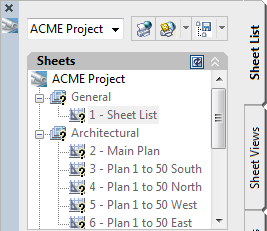
In the project below all sheets has "Status: File is missing" because the files where moved to a new location.
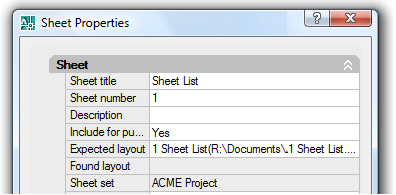
This is easily fixed using Sheet Set Manager Path Edit.
There will come up two prompts when the command is run:
Command: Enter the file path prefix to replace (Example: R:\):
Command: Enter the new file path prefix (Example: C:\):
The result of the run will be prompted to the command line.
Example: when changed from R:\Documents\AutoCAD Sheet Sets to R:\ACME Project
Command: Enter the file path prefix to replace (Example: R:\): R:\Documents\AutoCAD Sheet Sets
Command: Enter the new file path prefix (Example: C:\): R:\ACME Project
Changed Sheet: 1 - Sheet List from 'R:\Documents\AutoCAD Sheet Sets\1 Sheet List.dwg' to 'R:\ACME Project\1 SHEET LIST.DWG'
Changed Sheet: 2 - Main Plan from 'R:\Documents\AutoCAD Sheet Sets\2 Main Plan.dwg' to 'R:\ACME Project\2 MAIN PLAN.DWG'
Changed Sheet: 3 - Plan 1 to 50 South from 'R:\Documents\AutoCAD Sheet Sets\3 Plan 1 to 50 South' to 'R:\ACME Project\3 Plan 1 to 50 South'
Changed Sheet: 4 - Plan 1 to 50 North from 'R:\Documents\AutoCAD Sheet Sets\4 Plan 1 to 50 North' to 'R:\ACME Project\4 Plan 1 to 50 North'
Changed Sheet: 5 - Plan 1 to 50 West from 'R:\Documents\AutoCAD Sheet Sets\5 Plan 1 to 50 West' to 'R:\ACME Project\ Plan 1 to 50 West'
Changed Sheet: 6 - Plan 1 to 50 East from 'R:\Documents\AutoCAD Sheet Sets\6 Plan 1 to 50 East' to 'R:\ACME Project\6 Plan 1 to 50 East'
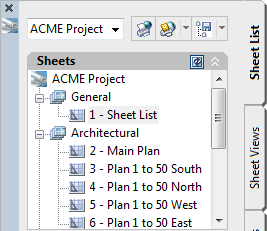
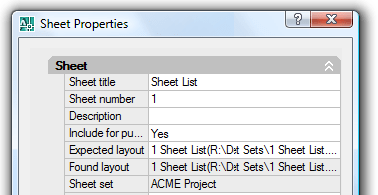
And here is the result. All layouts are found.
-vbaload and -vbarun can be used to create a macro to call the command.
Here’s what you can use as macro code for a button:
^C^C^C^P(vl-vbaload "C:/Sheet Set Manager Path edit tool/SSMChangePathPrefix - r22.dvb")(vl-vbarun "ThisDrawing.SSMChangePathPrefix")
Note that you need to change the path and name of the dvb and use forward slashes to separate folders.
If the new path being specified is not found AutoCAD cannot set the path.
If you need to change the paths before the new folders are created you need to use SSMPropEditor, an app that can do much more making the work with Sheet Set Manager easy.
Purchase
This app's functionality is now included in JTB DST Tool.
The license is perpetual and support is included. If you have more than one computer and you are the only user of the application one license is enough.
Version History
2020-07-24
- This app's functionality is now included in JTB DST Tool.
2019-03-28
- Update for AutoCAD 2020
2018-03-22
- Update for AutoCAD 2019
2017-03-21
- Update for AutoCAD 2018
License agreement
The license agreement is found here.
Customers
Atwell, LLC
Builders PlanSource Inc.
CDM Lighting Design Group
Cogeco Cable Canada
Cole & Associates Inc.
Coleman Engineering Services
Eastern Engineering
EEIS Consulting Engineers
Franz Stibli
Fredericks Inc.
Hartman-Cox Architects
Herbert, Rowland & Grubic
Marshall Tittemore Architects
O'Brien & Gere
Preston Refrigeration
RF Binnie & Associates Ltd.
Solotech
ZFP Jeddah
Contact us for any questions, wishes or comments. A lot more can be done to automate the work with Sheet Set Manager, DST files and AutoCAD products in general. Would you like the Sheet name to math the layout name or match the Sheet title, some Sheet Custom Properties or something else? Would you like to match some Sheet Custom Properties from one Sheet to another?
See also the SSMPropEditor product for editing properties on multiple sheets.
If you want to create Sheet Sets and their properties in an automated manner take a look at our JTB Sheet Set Creator.
Merge, purge and convert Sheet Set DST files for AutoCAD, BricsCAD and any other CAD software using Sheet Set DST files with our JTB DST Tool.
JTB Batch Publish app publishes sheets in Sheet Sets to files like PDF and DWF with advanced naming functionality.
JTB Sheet Set Renumber to update running sheet numbers and total in title blocks.