
About | Download | Newsletter | System requirements | Purchase | Documentation | Version History | License agreement | Customers
About
- AutoCAD Architecture Classification Definitions cannot be exported or imported. With the help of ClassificationDefinitionTools this is possible.
- Some classification structures can be very large and complicated and this tool can help to avoid the need to type everything manually.

Download
Contact us for trial.
ClassificationDefinitionTools trial is fully functional except that you can only import or export 10 items. When purchased it can be used without restrictions.
Contact JTB World to get a new download link for your purchased product.
System requirements
Compatible with AutoCAD Architecture (ACA), Architectural Desktop (ADT) and their verticals like AutoCAD MEP and AutoCAD Civil 3D. Compatible with versions 2007-2022.
Windows XP, Windows Vista, Windows 7, Windows 8, Windows 8.1 and Windows 10.
JTB World is an Autodesk Authorised Developer




Documentation
In the Style Manager>Multi-Purpose Objects there are Classification Definitions that can be useful for many purposes. But you have to add them one by one. Imagine if you have an existing list of many items in Excel or some other format and you have to add them manually.
Tip. ClassificationDefinition is the command to start the Style Manager with only the Classification Definitions.
To install and run ClassificationDefinitionTools do like this:
- Download the plug-in.
- Extract to a folder somewhere locally on your PC.
- Load ClassificationDefinitionTools.dll using the NetLoad command within the application.
- Use the either of two commands ClassificationDefinitionImport or ClassificationDefinitionExport. (Tip. Type Clas and use tab several times)
For example say there is an existing classification like this.
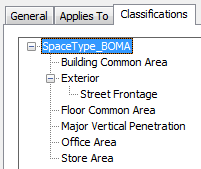
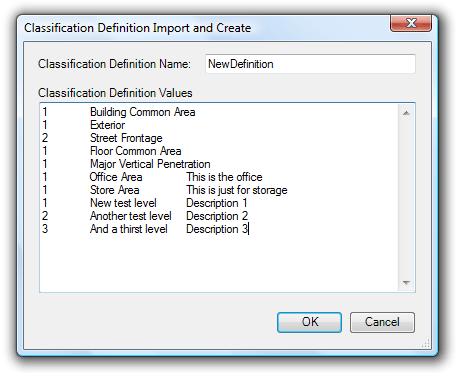
ClassificationDefinitionExport shows the dialog box below. Select a Classification Definition Name in the dropdown list and press Export. This will show the list in the textbox Classification Definition Values. The result is automatically copied into the clipboard so you can paste the result into for example Excel.
The columns are separated by tabs.
The first column shows the level where 1 is the top level.
The second column is the name.
The third column is the description.
ClassificationDefinitionImport shows the dialog box below. If the Classification Definition is existing it appends the values. Copy and paste a bunch of values from Excel, Notepad or some other editor. Notice that the format must be tab separated.
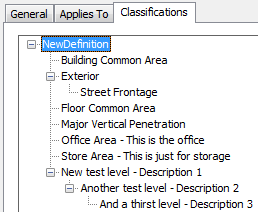
After importing this definition the result in the Style Manager is as below.
If you have really many to import you might need to split and do it in several steps due to limit of number of characters the textbox can handle.
Purchase
See JTB ACA Tools.
Version History
2021-07-12
- Updated for AutoCAD Architecture 2022
2020-05-25
- Updated for AutoCAD Architecture 2021
2019-03-28
- Updated for AutoCAD Architecture 2020
2018-04-11
- Updated for AutoCAD Architecture 2019
2017-04-17
- Updated for AutoCAD Architecture 2018
License agreement
The license agreement is found here.
Customers
Contact us for any questions, wishes or comments.