
About | Download | Newsletter | System requirements | Purchase | Documentation | Version History | License agreement | Customers
About
This Catenary program for AutoCAD and BricsCAD makes it easy to create or draw a catenary curve as a polyline by specifying the start and end point and the length or sag and optionally a diameter(width).
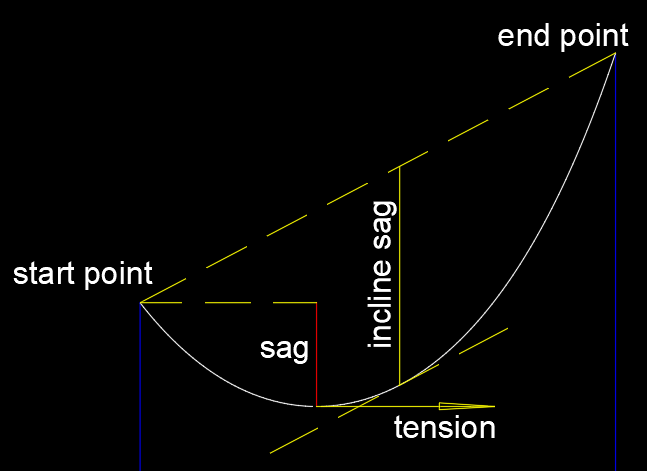
A catenary cable is hanging from 2 base points. The other properties of the catenary are: Length, Sag, Incline Sag and Tension at sag. Specify one property and the catenary is determined.
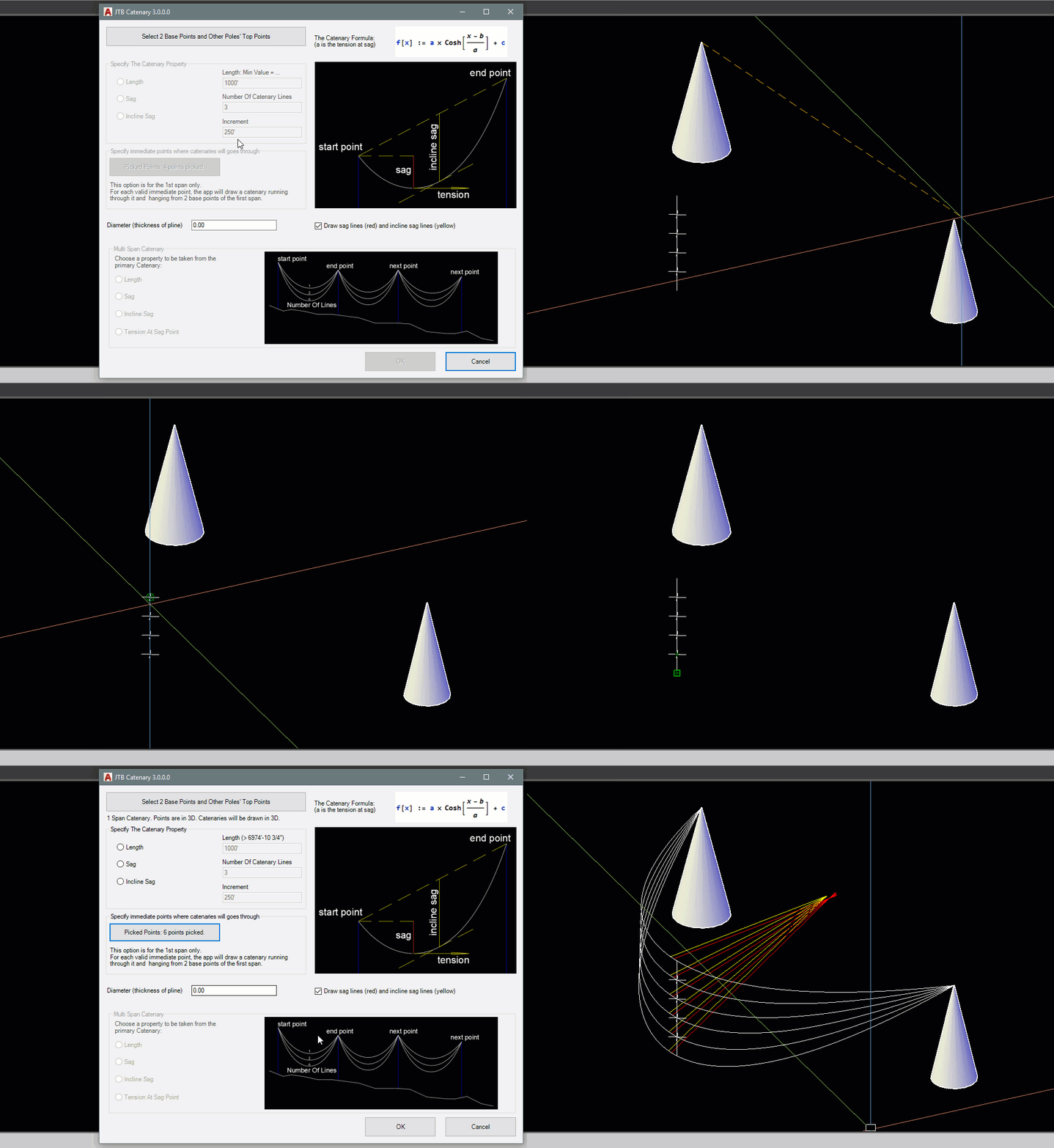
You can also specify an immediate point for the catenary to go through.
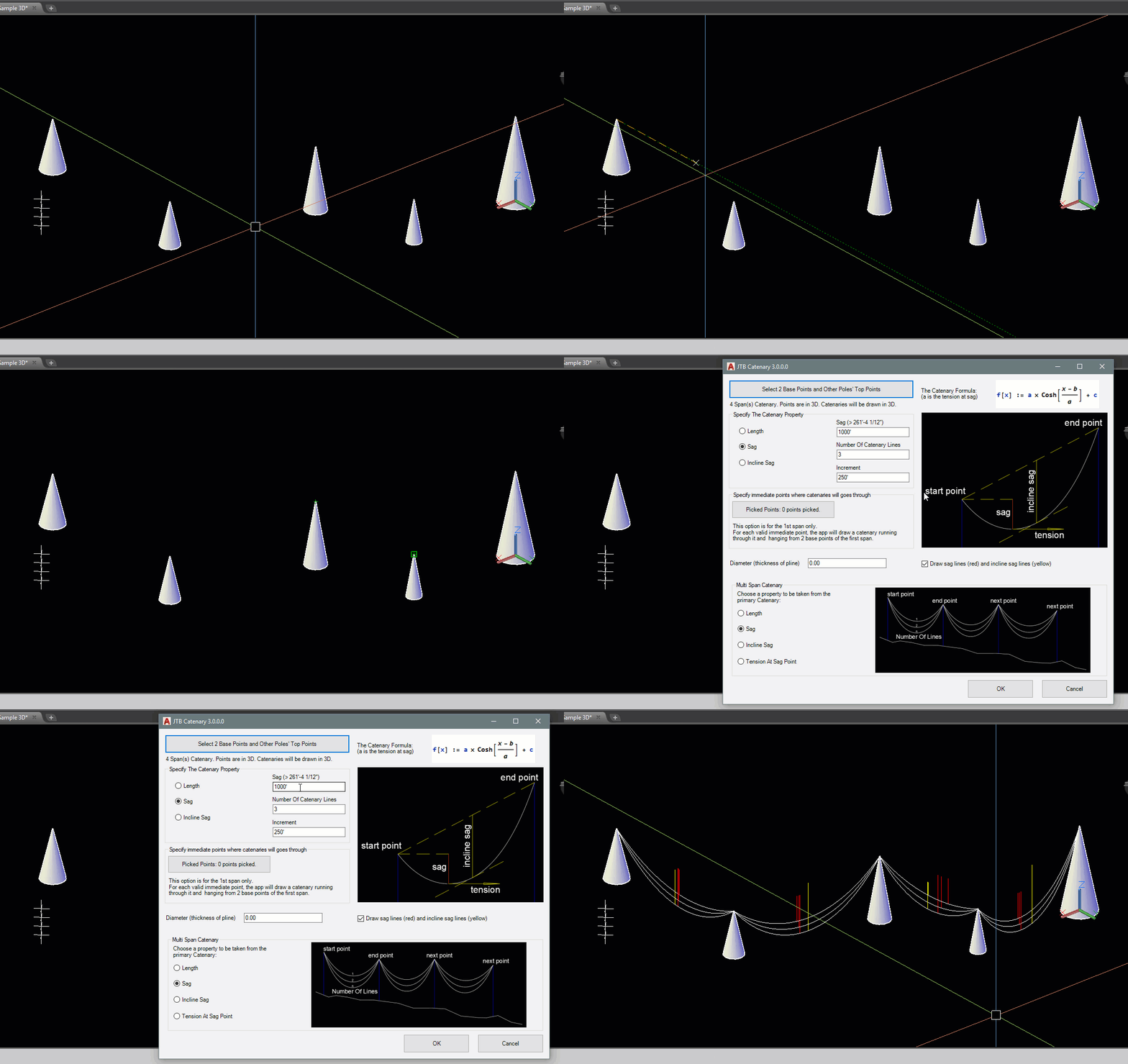
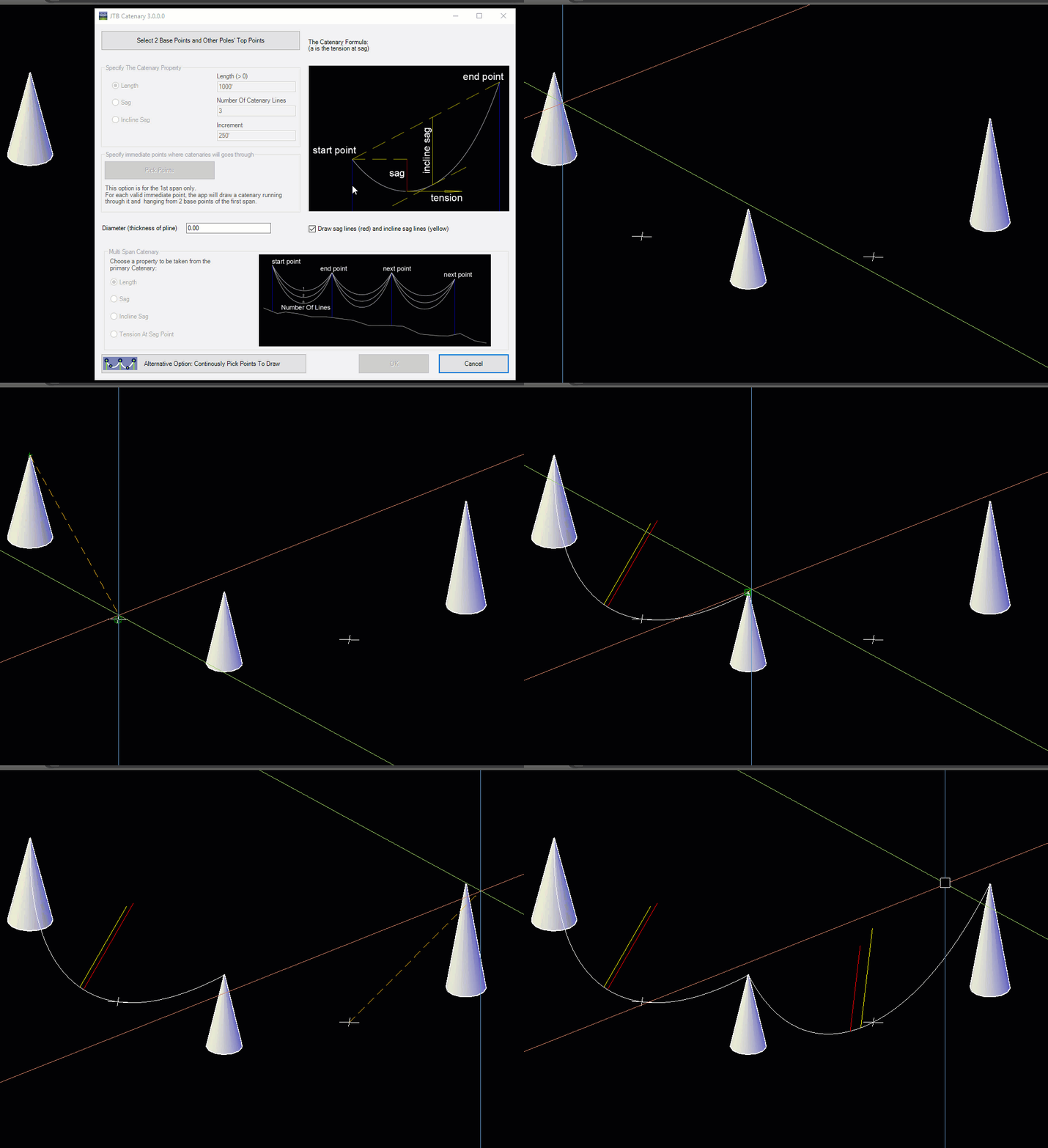
You can draw multiple catenaries with length or sag or incline sag increasing. You can also draw multispan catenary by picking more than 2 points. If your picked points have Z coordinates, it is assumed that catenary will be hanging down in 3D space, and the catenary will be drawn in 3D.
This can be useful for drawing freely hanging cable, hose, chain, transmission line, anchor line (anchor rode), cord, rope, string, suspension bridge cable, arch, hawser, wire, zip lines or the like.
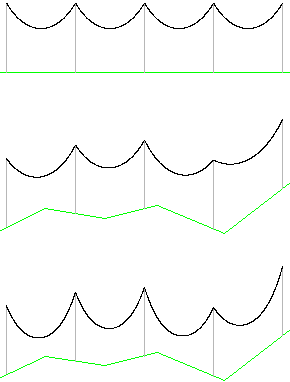
The current version is creating a catenary line using the catenary formula y = cosh(x) = (e^x + e^-x)/2 and numeric analysis that results in a good enough curve for many purposes.
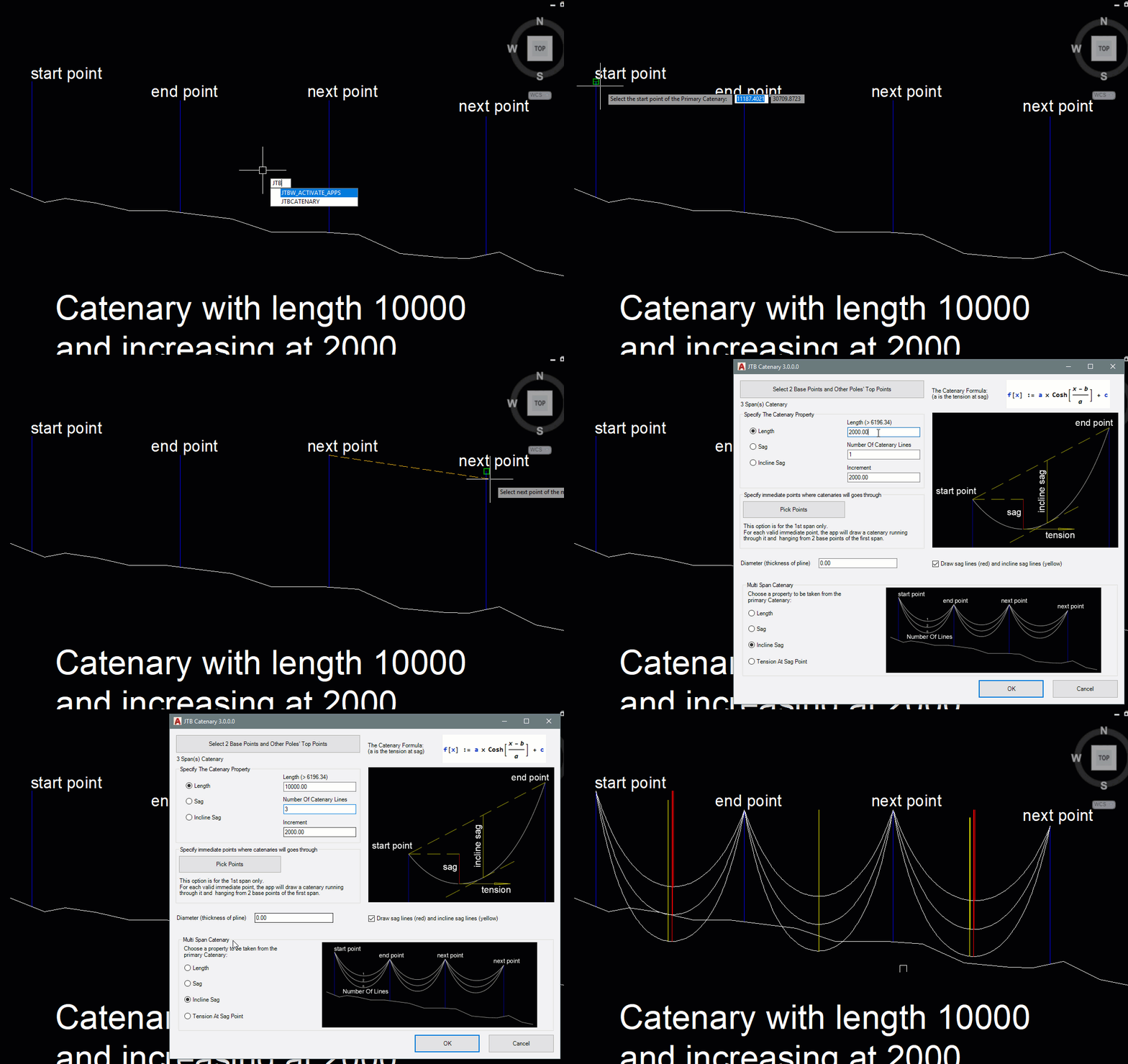
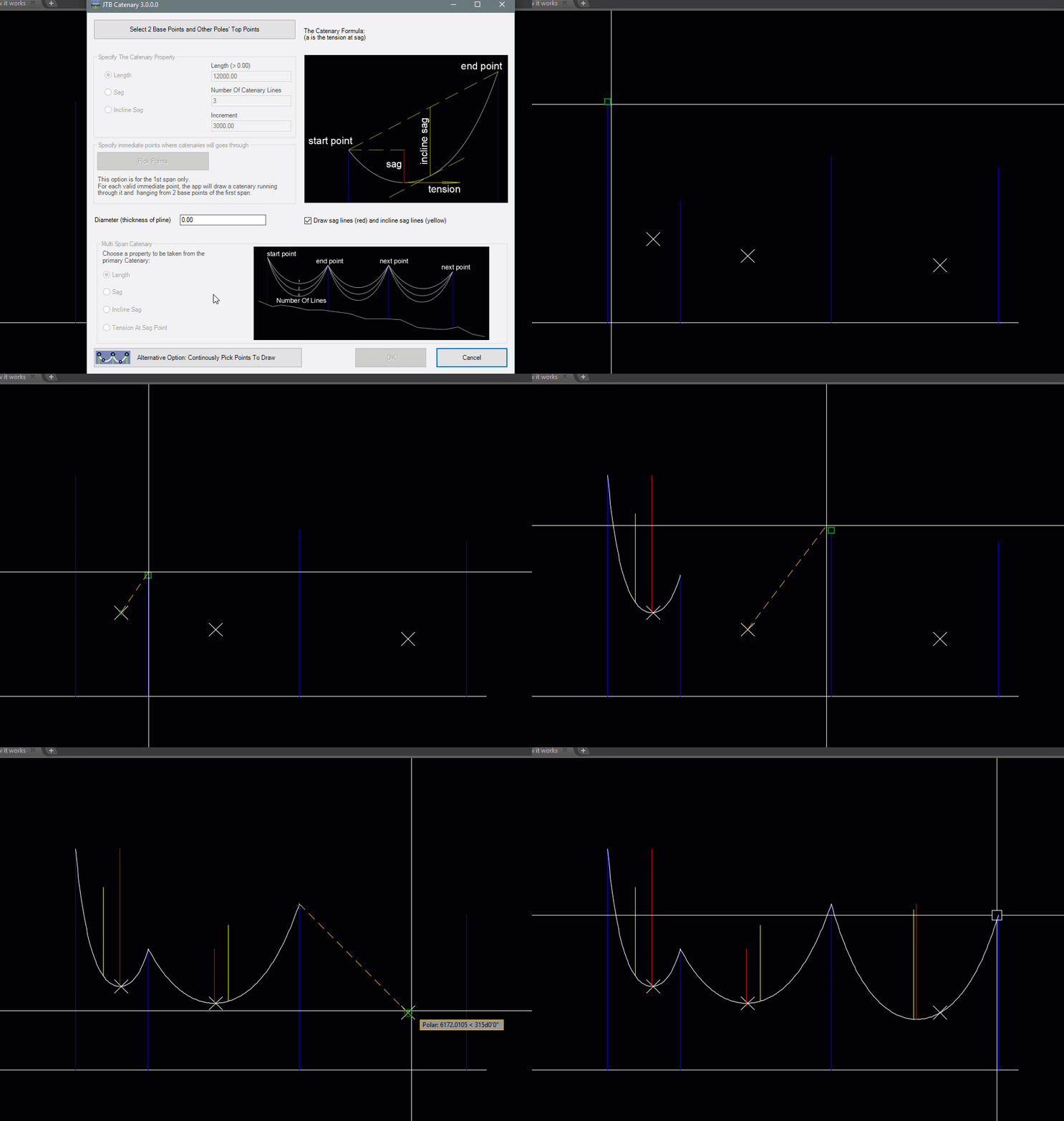
How it works in 2D
How it works in 3D
How to create catenaries go through immediate points
The Input Window Dialog
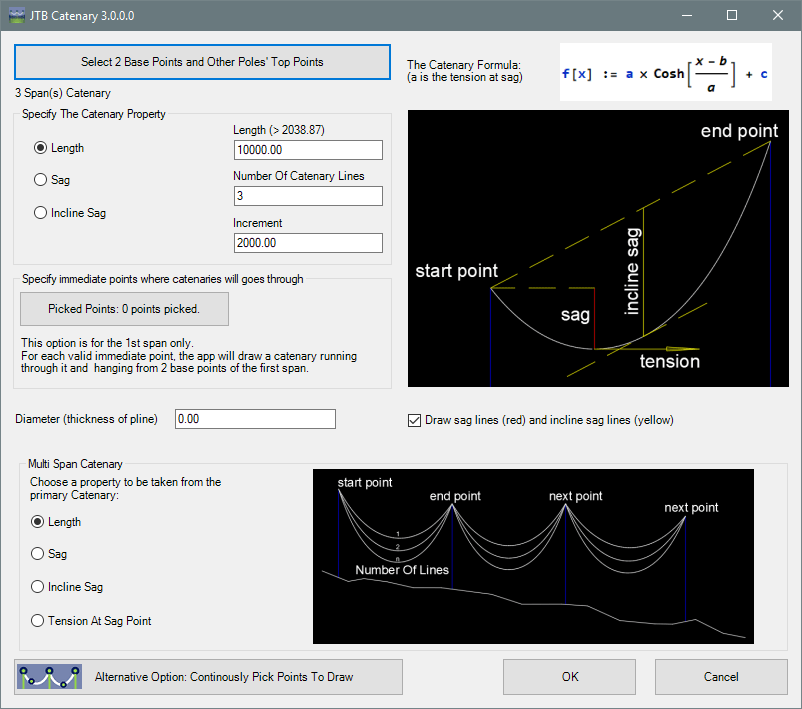
Catenary Parameters
Option draw catenary continuously
Option draw catenary continuously in 3D
Multispan
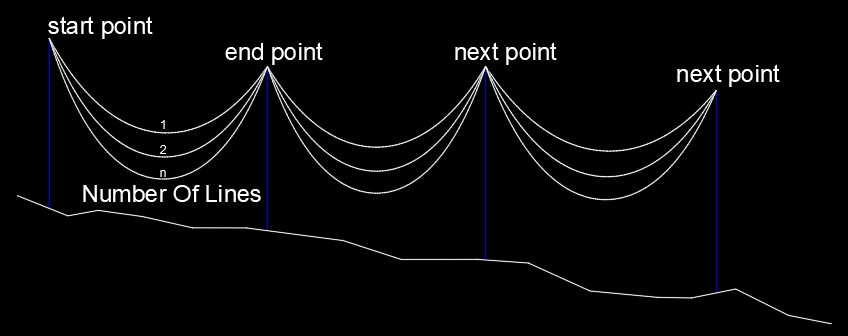
A parabola is different from a catenary. The catenary is the solution to a differential equation that describes a shape that directs the force of its own weight along its own curve, so that, if hanging, it is pulled into that shape, and, if standing upright, it can support itself. The parabola does not have the same property.
Catenary described according to Wikipedia:
In physics and geometry, the catenary is the curve that an idealized hanging chain or cable assumes under its own weight when supported only at its ends. The curve has a U-like shape, superficially similar in appearance to a parabola (though mathematically quite different). It also appears in the design of certain types of arches and as a cross section of the catenoid -- the shape assumed by a soap film bounded by two parallel circular rings.
The catenary is also called the "alysoid", "chainette", or, particularly in the material sciences, "funicular".
Mathematically, the catenary curve is the graph of the hyperbolic cosine function. The surface of revolution of the catenary curve, the catenoid, is a minimal surface, and is the only minimal surface of revolution other than the plane. The mathematical properties of the catenary curve were first studied by Robert Hooke in the 1670s, and its equation was derived by Leibniz, Huygens and Johann Bernoulli in 1691.
Catenaries and related curves appear in architecture and engineering, in the design of bridges and arches. A sufficiently heavy anchor chain will form a catenary curve.
Most suspension bridge cables like the Golden Gate Bridge follow a parabolic, not a catenary curve, due to the weight of the roadway being much greater than that of the cable.
JTB Catenary is available as an AutoCAD app on the Plug-ins or Add-ins tab or as a BricsCAD app.
Download
Download here with installer for both AutoCAD and/or BricsCAD.
JTB Catenary is available as an AutoCAD app on Autodesk App Store or by contacting us.

Trial license is available for 30 days after the first usage. Trial license is for evaluation purpose only, and it has limited usage of 10 runs per CAD session. When purchased it can be used without restrictions.
See activation instructions here: JTB World Apps Licensing.
Catenary Sample.dwg is found in the folder %ProgramFiles%\JTB World\JTBW-Catenary.bundle\Contents\Sample
System requirements
AutoCAD 2000 or later or verticals based on AutoCAD where AutoCAD 2026 is the most recent version supported.
All verticals or flavors based on AutoCAD should be working like AutoCAD Architecture (ACA), Architectural Desktop (ADT), AutoCAD Civil 3D, AutoCAD Electrical , AutoCAD Map 3D, AutoCAD Mechanical, AutoCAD MEP (AMEP, ABS), AutoCAD P&ID, AutoCAD Plant 3D, Autodesk Advance Steel.
BricsCAD Pro or Platinum 15 and newer is supported. BricsCAD Lite is not supported.
Other CAD software can be supported upon request.
Compatible with those operating systems AutoCAD or BricsCAD runs on like Windows Vista, Windows 7, Windows 8, Windows 8.1, Windows 10 and Windows 11.
Older Windows versions might also work but are not directly supported.

JTB World is an Autodesk Authorised Developer

Purchase
New license: 95 USD for one license or less depending on the quantity of licenses. Support and upgrades is included for versions released within 1 year after purchase. If Auto-Renewal is selected it is 29 USD per year and can be cancelled at anytime.
Upgrade license: 29 USD for 1 year for one license or less depending on the quantity of licenses. If Auto-Renewal is selected it is 29 USD per two years and can be cancelled at anytime.
Upgrade license: 48 USD for 2 years for one license or less depending on the quantity of licenses. If Auto-Renewal is selected it is 48 USD per two years and can be cancelled at anytime.
Once you have purchased a license, follow the instructions and email to JTB World for the license activation key. See activation instructions here: JTB World Apps Licensing.
If you have really many users that you want to give access to this software we can discuss a discounted price based on your particular situation. Educational discounts available.
The license is perpetual. If you have more than one computer and you are the only user of the application one license is enough.
The network license manager is available at no extra cost and normally most useful for companies with quite many licenses.
If your US company is tax exempt contact us directly.
2Checkout (Verifone) supports 45+ online and offline payment methods globally, but availability depends on shopper country, currency.
Main families of payment methods
-
Credit/debit cards (global core): Visa, Visa Electron, MasterCard, Maestro, Eurocard, American Express, Discover/Novus, JCB, UnionPay, plus domestic Visa/MasterCard variants in markets like Brazil and Turkey.
-
Local/regional cards: Dankort/VISA (Denmark), Bancontact (Belgium), Postepay (Italy), CB/Carte Bancaire (France), local Turkish and Brazilian cards, and other regional card schemes.
-
Digital wallets: PayPal, PayPal Express, Google Pay, Apple Pay, Alipay, WeChat Pay, MobilePay (DK), Vipps (NO), and others like Skrill, Neteller, Qiwi, WebMoney, Trustly depending on region.
-
Bank transfer & offline: Local and international bank/wire transfer (US, DE, UK, rest of world), SEPA-type transfers in EU, purchase orders, and additional local bank transfer rails in EMEA/APAC.
Documentation
Installation
Use the app installer and it puts a button on the Add-ins/Plug-Ins Ribbon tab or in BricsCAD.
License Activation
Activation is needed after purchase of a license or to request an extended trial.
See activation instructions here: JTB World Apps Licensing.
Usage
The command to start the program is JTBCatenary (JC for short).
The JTB Catenary Window will show up. Firstly, you have to select 2 base points. If you want a multispan catenary, you can continue to select other points of other spans on the CAD screen.
To build the first span, beside 2 first base points, you have to specify one more property to make the catenary determined. It can be the length, the sag, the incline sag or an immediate point which the catenary will go through.
If it is multispan catenary, other span will be drawn base on the first span's property. The base property to be chosen can be the length, the sag, the incline sage or the tension at sag.
The resulting catenary will be created in the current drawing (DWG or DXF) as a polyline with the width being the same as the diameter.
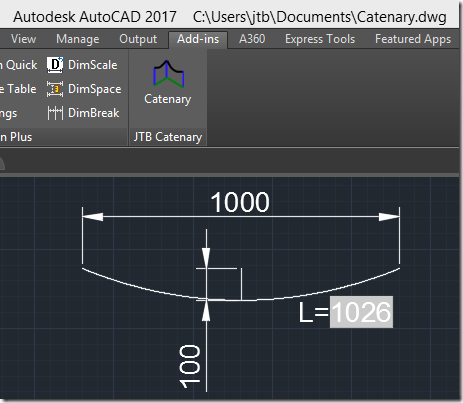
Below the catenary has been created with a distance of 1000 between start and end and a sag of 100 has been specified, creating a true catenary curve with the length of 1026.
Version History
- 2025-03-25 - version 4.1.0
- Added AutoCAD 2026 support.
- 2024-12-23 - version 4.0.0
- Added AutoCAD 2025 support.
- Added BricsCAD V25 support.
- 2023-04-14 - version 3.4.0
- Added AutoCAD 2024 support.
- 2022-10-21 - version 3.3.1
- Fixed bug in License file version 4.7.2
- 2022-04-25 - version 3.3.0
- Added AutoCAD 2023 support.
- 2021-07-09 - version 3.2.0
- Remove messages about uninstallation in very-silent installation mode.
- 2021-04-13 - version 3.1.2
- Added AutoCAD 2022 support.
- 2020-07-18 - version 3.1.1
- Upgraded to License 4.3
- 2020-05-08 - version 3.1.0
- Added AutoCAD 2021 support.
- 2019-06-29 - version 3.0.1
- Fixed a bug when draw in 3D.
- 2019-05-20 - version 3.0
- Added BricsCAD support.
- Added JTB Catenary input window.
- Added parameters: Incline Sag.
- Added option to draw catenary goes through a selected immediate point.
- Error handlers upgraded. Bugs fixed.
- Added option to draw multi catenaries per span, and multispan catenary.
- Added option to draw catenary in 3D.
- Added option to draw multispan catenary by picking points continuously.
- Single and network license added.
- 2019-03-28 - version 2.0 update
- Added support for AutoCAD® 2020 (no version number change)
- 2018-03-22 - version 2.0 update
- Added support for AutoCAD® 2019 (no version number change)
- 2017-03-21 - version 2.0 update
- Added support for AutoCAD® 2018 (no version number change)
- 2016-03-22 - version 2.0 update
- Added support for AutoCAD® 2017 (no version number change)
- 2015-09-01 - version 2.0
- Added the ability to specify sag.
- 2015-03-20 - version 1.0 update
- Added support to AutoCAD® 2016 (No change in version number)
Digital signing of vlx and installer added
- Added support to AutoCAD® 2016 (No change in version number)
- 2014-04-03 - version 1.0
- Updated installer for the Autodesk App version to support AutoCAD 2015 and verticals.
- 2013-10-17 - version 1.0
- Trial made available as AutoCAD app on Autodesk Exchange Apps
- 2012-11-05 - version 1.0
- First public release
License agreement
The license agreement is found here.
Customers
ArtFX Events
Basic Machinery Co.
BRG, Inc
Centrais Elétrica S.A.
CEPS, a.s.
General Machine corp.
JIMAZ prodej sw s.r.o.
Ok Tedi Mining Limited
Parameter Design Engineering Ltd
University of Queensland
Woodhouse Tinucci Architects
Vinsi Partners Pty Ltd
AEDIFICIO COMPANY
J.T. Thorpe & Son, Inc.
Nodo Solutions
Engetécnica
Quanta Telecom Canada
Contact us for any questions, wishes or comments.