
Please feel free to be inspired, cut&paste or if you have any feedback or questions go here. If you want some customization, VBA conversion to .NET or anything else that you can come up with that we might help you with you're welcome to contact us.
- ColorConversions.dvb
- line.dvb
- ListLayers.dvb
- ListXREF.dvb
- revert.dvb
- SavedTo2004.dvb
- WblockTo2000.dvb
- XREF_test.dvb
- Sheet Set Manager code snippets
UPDATE: As of January 31, 2014, Autodesk is no longer authorized to distribute VBA 6 or earlier versions of VBA for use with Autodesk AutoCAD and other Autodesk products. This change affects the availability to download and install VBA for Autodesk AutoCAD 2013 or earlier.
When you load a DVB file that is already loaded you can get this message: File already loaded: C:\yourproject.dvb
To avoid this us vl-vbaload instead of VBALOAD. This way you don't need to bother to know if the DVB file is loaded or not. In the same way vl-vbarun can be used instead of VBARUN. In some AutoCAD versions this is a way to avoid the load macro warning dialog box.
AutoCAD Focus Control for VBA Type Library (AcFocusCtrl16.dll or AcFocusCtrl.dll) found in C:\Program Files\Common Files\Autodesk Shared is useful if you have a modeless form in the VBA project. Without it the focus does not remain at a modeless form (ShowModal property set to false, available in AutoCAD 2002 and newer versions). Use the Tools menu and add a reference to the AcFocusCtrl16.dll file and then add the AcFocusCtrl by right-clicking for additional controls in the VBAIDE toolbox when you have the form in edit mode. In some cases it can be needed to register the dll file using regsvr32.
Sample to write and read Xrecord values in a Dictionary:
Public Sub WriteXRec()
  Dim oDict As AcadDictionary
  Dim oXRec As AcadXRecord
  Dim dxfCode(0 To 1) As Integer
  Dim dxfData(0 To 1)
  Set oDict = ThisDrawing.Dictionaries.Add("SampleTest")
  Set oXRec = oDict.AddXRecord("Record1")
  dxfCode(0) = 1: dxfData(0) = "First Value"
  dxfCode(1) = 2: dxfData(1) = "Second Value"
  oXRec.SetXRecordData dxfCode, dxfData
End Sub
Public Sub ReadXRec()
  Dim oDict As AcadDictionary
  Dim oXRec As AcadXRecord
  Dim dxfCode, dxfData
  Set oDict = ThisDrawing.Dictionaries.Item("SampleTest")
  Set oXRec = oDict.Item("Record1")
  oXRec.GetXRecordData dxfCode, dxfData
  Debug.Print dxfData(0)
  Debug.Print dxfData(1)
End Sub
colorconversions.dvb sample code for AutoCAD

Sub main()
   Dim RGB
   RGB = lookUpRGB(112)
   Debug.Print RGB(0)
   Debug.Print RGB(1)
   Debug.Print RGB(2)
End Sub
Private Function lookUpRGB(ByVal ACI As Integer) As Integer()
    Dim ACItoRGB(0 To 255, 0 To 2)  As Integer
    ACItoRGB(0, 0) = 0: ACItoRGB(0, 1) = 0: ACItoRGB(0, 2) = 0
    ACItoRGB(1, 0) = 255: ACItoRGB(1, 1) = 0: ACItoRGB(1, 2) = 0
    ACItoRGB(2, 0) = 255: ACItoRGB(2, 1) = 255: ACItoRGB(2, 2) = 0
    ACItoRGB(3, 0) = 0: ACItoRGB(3, 1) = 255: ACItoRGB(3, 2) = 0
    ACItoRGB(4, 0) = 0: ACItoRGB(4, 1) = 255: ACItoRGB(4, 2) = 255
    ACItoRGB(5, 0) = 0: ACItoRGB(5, 1) = 0: ACItoRGB(5, 2) = 255
    ACItoRGB(6, 0) = 255: ACItoRGB(6, 1) = 0: ACItoRGB(6, 2) = 255
    ACItoRGB(7, 0) = 255: ACItoRGB(7, 1) = 255: ACItoRGB(7, 2) = 255
    ACItoRGB(8, 0) = 128: ACItoRGB(8, 1) = 128: ACItoRGB(8, 2) = 128
    ACItoRGB(9, 0) = 192: ACItoRGB(9, 1) = 192: ACItoRGB(9, 2) = 192
    ACItoRGB(10, 0) = 255: ACItoRGB(10, 1) = 1: ACItoRGB(10, 2) = 1
    ACItoRGB(11, 0) = 255: ACItoRGB(11, 1) = 127: ACItoRGB(11, 2) = 127
    ACItoRGB(12, 0) = 165: ACItoRGB(12, 1) = 0: ACItoRGB(12, 2) = 0
    ACItoRGB(13, 0) = 165: ACItoRGB(13, 1) = 82: ACItoRGB(13, 2) = 82
    ACItoRGB(14, 0) = 127: ACItoRGB(14, 1) = 0: ACItoRGB(14, 2) = 0
    ACItoRGB(15, 0) = 127: ACItoRGB(15, 1) = 63: ACItoRGB(15, 2) = 63
    ACItoRGB(16, 0) = 76: ACItoRGB(16, 1) = 0: ACItoRGB(16, 2) = 0
    ACItoRGB(17, 0) = 76: ACItoRGB(17, 1) = 38: ACItoRGB(17, 2) = 38
    ACItoRGB(18, 0) = 38: ACItoRGB(18, 1) = 0: ACItoRGB(18, 2) = 0
    ACItoRGB(19, 0) = 38: ACItoRGB(19, 1) = 19: ACItoRGB(19, 2) = 19
    ACItoRGB(20, 0) = 255: ACItoRGB(20, 1) = 63: ACItoRGB(20, 2) = 0
    ACItoRGB(21, 0) = 255: ACItoRGB(21, 1) = 159: ACItoRGB(21, 2) = 127
    ACItoRGB(22, 0) = 165: ACItoRGB(22, 1) = 41: ACItoRGB(22, 2) = 0
    ACItoRGB(23, 0) = 165: ACItoRGB(23, 1) = 103: ACItoRGB(23, 2) = 82
    ACItoRGB(24, 0) = 127: ACItoRGB(24, 1) = 31: ACItoRGB(24, 2) = 0
    ACItoRGB(25, 0) = 127: ACItoRGB(25, 1) = 79: ACItoRGB(25, 2) = 63
    ACItoRGB(26, 0) = 76: ACItoRGB(26, 1) = 19: ACItoRGB(26, 2) = 0
    ACItoRGB(27, 0) = 76: ACItoRGB(27, 1) = 47: ACItoRGB(27, 2) = 38
    ACItoRGB(28, 0) = 38: ACItoRGB(28, 1) = 9: ACItoRGB(28, 2) = 0
    ACItoRGB(29, 0) = 38: ACItoRGB(29, 1) = 23: ACItoRGB(29, 2) = 19
    ACItoRGB(30, 0) = 255: ACItoRGB(30, 1) = 127: ACItoRGB(30, 2) = 0
    ACItoRGB(31, 0) = 255: ACItoRGB(31, 1) = 191: ACItoRGB(31, 2) = 127
    ACItoRGB(32, 0) = 165: ACItoRGB(32, 1) = 82: ACItoRGB(32, 2) = 0
    ACItoRGB(33, 0) = 165: ACItoRGB(33, 1) = 124: ACItoRGB(33, 2) = 82
    ACItoRGB(34, 0) = 127: ACItoRGB(34, 1) = 63: ACItoRGB(34, 2) = 0
    ACItoRGB(35, 0) = 127: ACItoRGB(35, 1) = 95: ACItoRGB(35, 2) = 63
    ACItoRGB(36, 0) = 76: ACItoRGB(36, 1) = 38: ACItoRGB(36, 2) = 0
    ACItoRGB(37, 0) = 76: ACItoRGB(37, 1) = 57: ACItoRGB(37, 2) = 38
    ACItoRGB(38, 0) = 38: ACItoRGB(38, 1) = 19: ACItoRGB(38, 2) = 0
    ACItoRGB(39, 0) = 38: ACItoRGB(39, 1) = 28: ACItoRGB(39, 2) = 19
    ACItoRGB(40, 0) = 255: ACItoRGB(40, 1) = 191: ACItoRGB(40, 2) = 0
    ACItoRGB(41, 0) = 255: ACItoRGB(41, 1) = 223: ACItoRGB(41, 2) = 127
    ACItoRGB(42, 0) = 165: ACItoRGB(42, 1) = 124: ACItoRGB(42, 2) = 0
    ACItoRGB(43, 0) = 165: ACItoRGB(43, 1) = 145: ACItoRGB(43, 2) = 82
    ACItoRGB(44, 0) = 127: ACItoRGB(44, 1) = 95: ACItoRGB(44, 2) = 0
    ACItoRGB(45, 0) = 127: ACItoRGB(45, 1) = 111: ACItoRGB(45, 2) = 63
    ACItoRGB(46, 0) = 76: ACItoRGB(46, 1) = 57: ACItoRGB(46, 2) = 0
    ACItoRGB(47, 0) = 76: ACItoRGB(47, 1) = 66: ACItoRGB(47, 2) = 38
    ACItoRGB(48, 0) = 38: ACItoRGB(48, 1) = 28: ACItoRGB(48, 2) = 0
    ACItoRGB(49, 0) = 38: ACItoRGB(49, 1) = 33: ACItoRGB(49, 2) = 19
    ACItoRGB(50, 0) = 255: ACItoRGB(50, 1) = 255: ACItoRGB(50, 2) = 1
    ACItoRGB(51, 0) = 255: ACItoRGB(51, 1) = 255: ACItoRGB(51, 2) = 127
    ACItoRGB(52, 0) = 165: ACItoRGB(52, 1) = 165: ACItoRGB(52, 2) = 0
    ACItoRGB(53, 0) = 165: ACItoRGB(53, 1) = 165: ACItoRGB(53, 2) = 82
    ACItoRGB(54, 0) = 127: ACItoRGB(54, 1) = 127: ACItoRGB(54, 2) = 0
    ACItoRGB(55, 0) = 127: ACItoRGB(55, 1) = 127: ACItoRGB(55, 2) = 63
    ACItoRGB(56, 0) = 76: ACItoRGB(56, 1) = 76: ACItoRGB(56, 2) = 0
    ACItoRGB(57, 0) = 76: ACItoRGB(57, 1) = 76: ACItoRGB(57, 2) = 38
    ACItoRGB(58, 0) = 38: ACItoRGB(58, 1) = 38: ACItoRGB(58, 2) = 0
    ACItoRGB(59, 0) = 38: ACItoRGB(59, 1) = 38: ACItoRGB(59, 2) = 19
    ACItoRGB(60, 0) = 191: ACItoRGB(60, 1) = 255: ACItoRGB(60, 2) = 0
    ACItoRGB(61, 0) = 223: ACItoRGB(61, 1) = 255: ACItoRGB(61, 2) = 127
    ACItoRGB(62, 0) = 124: ACItoRGB(62, 1) = 165: ACItoRGB(62, 2) = 0
    ACItoRGB(63, 0) = 145: ACItoRGB(63, 1) = 165: ACItoRGB(63, 2) = 82
    ACItoRGB(64, 0) = 95: ACItoRGB(64, 1) = 127: ACItoRGB(64, 2) = 0
    ACItoRGB(65, 0) = 111: ACItoRGB(65, 1) = 127: ACItoRGB(65, 2) = 63
    ACItoRGB(66, 0) = 57: ACItoRGB(66, 1) = 76: ACItoRGB(66, 2) = 0
    ACItoRGB(67, 0) = 66: ACItoRGB(67, 1) = 76: ACItoRGB(67, 2) = 38
    ACItoRGB(68, 0) = 28: ACItoRGB(68, 1) = 38: ACItoRGB(68, 2) = 0
    ACItoRGB(69, 0) = 33: ACItoRGB(69, 1) = 38: ACItoRGB(69, 2) = 19
    ACItoRGB(70, 0) = 127: ACItoRGB(70, 1) = 255: ACItoRGB(70, 2) = 0
    ACItoRGB(71, 0) = 191: ACItoRGB(71, 1) = 255: ACItoRGB(71, 2) = 127
    ACItoRGB(72, 0) = 82: ACItoRGB(72, 1) = 165: ACItoRGB(72, 2) = 0
    ACItoRGB(73, 0) = 124: ACItoRGB(73, 1) = 165: ACItoRGB(73, 2) = 82
    ACItoRGB(74, 0) = 63: ACItoRGB(74, 1) = 127: ACItoRGB(74, 2) = 0
    ACItoRGB(75, 0) = 95: ACItoRGB(75, 1) = 127: ACItoRGB(75, 2) = 63
    ACItoRGB(76, 0) = 38: ACItoRGB(76, 1) = 76: ACItoRGB(76, 2) = 0
    ACItoRGB(77, 0) = 57: ACItoRGB(77, 1) = 76: ACItoRGB(77, 2) = 38
    ACItoRGB(78, 0) = 19: ACItoRGB(78, 1) = 38: ACItoRGB(78, 2) = 0
    ACItoRGB(79, 0) = 28: ACItoRGB(79, 1) = 38: ACItoRGB(79, 2) = 19
    ACItoRGB(80, 0) = 63: ACItoRGB(80, 1) = 255: ACItoRGB(80, 2) = 0
    ACItoRGB(81, 0) = 159: ACItoRGB(81, 1) = 255: ACItoRGB(81, 2) = 127
    ACItoRGB(82, 0) = 41: ACItoRGB(82, 1) = 165: ACItoRGB(82, 2) = 0
    ACItoRGB(83, 0) = 103: ACItoRGB(83, 1) = 165: ACItoRGB(83, 2) = 82
    ACItoRGB(84, 0) = 31: ACItoRGB(84, 1) = 127: ACItoRGB(84, 2) = 0
    ACItoRGB(85, 0) = 79: ACItoRGB(85, 1) = 127: ACItoRGB(85, 2) = 63
    ACItoRGB(86, 0) = 19: ACItoRGB(86, 1) = 76: ACItoRGB(86, 2) = 0
    ACItoRGB(87, 0) = 47: ACItoRGB(87, 1) = 76: ACItoRGB(87, 2) = 38
    ACItoRGB(88, 0) = 9: ACItoRGB(88, 1) = 38: ACItoRGB(88, 2) = 0
    ACItoRGB(89, 0) = 23: ACItoRGB(89, 1) = 38: ACItoRGB(89, 2) = 19
    ACItoRGB(90, 0) = 1: ACItoRGB(90, 1) = 255: ACItoRGB(90, 2) = 1
    ACItoRGB(91, 0) = 127: ACItoRGB(91, 1) = 255: ACItoRGB(91, 2) = 127
    ACItoRGB(92, 0) = 0: ACItoRGB(92, 1) = 165: ACItoRGB(92, 2) = 0
    ACItoRGB(93, 0) = 82: ACItoRGB(93, 1) = 165: ACItoRGB(93, 2) = 82
    ACItoRGB(94, 0) = 0: ACItoRGB(94, 1) = 127: ACItoRGB(94, 2) = 0
    ACItoRGB(95, 0) = 63: ACItoRGB(95, 1) = 127: ACItoRGB(95, 2) = 63
    ACItoRGB(96, 0) = 0: ACItoRGB(96, 1) = 76: ACItoRGB(96, 2) = 0
    ACItoRGB(97, 0) = 38: ACItoRGB(97, 1) = 76: ACItoRGB(97, 2) = 38
    ACItoRGB(98, 0) = 0: ACItoRGB(98, 1) = 38: ACItoRGB(98, 2) = 0
    ACItoRGB(99, 0) = 19: ACItoRGB(99, 1) = 38: ACItoRGB(99, 2) = 19
    ACItoRGB(100, 0) = 0: ACItoRGB(100, 1) = 255: ACItoRGB(100, 2) = 63
    ACItoRGB(101, 0) = 127: ACItoRGB(101, 1) = 255: ACItoRGB(101, 2) = 159
    ACItoRGB(102, 0) = 0: ACItoRGB(102, 1) = 165: ACItoRGB(102, 2) = 41
    ACItoRGB(103, 0) = 82: ACItoRGB(103, 1) = 165: ACItoRGB(103, 2) = 103
    ACItoRGB(104, 0) = 0: ACItoRGB(104, 1) = 127: ACItoRGB(104, 2) = 31
    ACItoRGB(105, 0) = 63: ACItoRGB(105, 1) = 127: ACItoRGB(105, 2) = 79
    ACItoRGB(106, 0) = 0: ACItoRGB(106, 1) = 76: ACItoRGB(106, 2) = 19
    ACItoRGB(107, 0) = 38: ACItoRGB(107, 1) = 76: ACItoRGB(107, 2) = 47
    ACItoRGB(108, 0) = 0: ACItoRGB(108, 1) = 38: ACItoRGB(108, 2) = 9
    ACItoRGB(109, 0) = 19: ACItoRGB(109, 1) = 38: ACItoRGB(109, 2) = 23
    ACItoRGB(110, 0) = 0: ACItoRGB(110, 1) = 255: ACItoRGB(110, 2) = 127
    ACItoRGB(111, 0) = 127: ACItoRGB(111, 1) = 255: ACItoRGB(111, 2) = 191
    ACItoRGB(112, 0) = 0: ACItoRGB(112, 1) = 165: ACItoRGB(112, 2) = 82
    ACItoRGB(113, 0) = 82: ACItoRGB(113, 1) = 165: ACItoRGB(113, 2) = 124
    ACItoRGB(114, 0) = 0: ACItoRGB(114, 1) = 127: ACItoRGB(114, 2) = 63
    ACItoRGB(115, 0) = 63: ACItoRGB(115, 1) = 127: ACItoRGB(115, 2) = 95
    ACItoRGB(116, 0) = 0: ACItoRGB(116, 1) = 76: ACItoRGB(116, 2) = 38
    ACItoRGB(117, 0) = 38: ACItoRGB(117, 1) = 76: ACItoRGB(117, 2) = 57
    ACItoRGB(118, 0) = 0: ACItoRGB(118, 1) = 38: ACItoRGB(118, 2) = 19
    ACItoRGB(119, 0) = 19: ACItoRGB(119, 1) = 38: ACItoRGB(119, 2) = 28
    ACItoRGB(120, 0) = 0: ACItoRGB(120, 1) = 255: ACItoRGB(120, 2) = 191
    ACItoRGB(121, 0) = 127: ACItoRGB(121, 1) = 255: ACItoRGB(121, 2) = 223
    ACItoRGB(122, 0) = 0: ACItoRGB(122, 1) = 165: ACItoRGB(122, 2) = 124
    ACItoRGB(123, 0) = 82: ACItoRGB(123, 1) = 165: ACItoRGB(123, 2) = 145
    ACItoRGB(124, 0) = 0: ACItoRGB(124, 1) = 127: ACItoRGB(124, 2) = 95
    ACItoRGB(125, 0) = 63: ACItoRGB(125, 1) = 127: ACItoRGB(125, 2) = 111
    ACItoRGB(126, 0) = 0: ACItoRGB(126, 1) = 76: ACItoRGB(126, 2) = 57
    ACItoRGB(127, 0) = 38: ACItoRGB(127, 1) = 76: ACItoRGB(127, 2) = 66
    ACItoRGB(128, 0) = 0: ACItoRGB(128, 1) = 38: ACItoRGB(128, 2) = 28
    ACItoRGB(129, 0) = 19: ACItoRGB(129, 1) = 38: ACItoRGB(129, 2) = 33
    ACItoRGB(130, 0) = 1: ACItoRGB(130, 1) = 255: ACItoRGB(130, 2) = 255
    ACItoRGB(131, 0) = 127: ACItoRGB(131, 1) = 255: ACItoRGB(131, 2) = 255
    ACItoRGB(132, 0) = 0: ACItoRGB(132, 1) = 165: ACItoRGB(132, 2) = 165
    ACItoRGB(133, 0) = 82: ACItoRGB(133, 1) = 165: ACItoRGB(133, 2) = 165
    ACItoRGB(134, 0) = 0: ACItoRGB(134, 1) = 127: ACItoRGB(134, 2) = 127
    ACItoRGB(135, 0) = 63: ACItoRGB(135, 1) = 127: ACItoRGB(135, 2) = 127
    ACItoRGB(136, 0) = 0: ACItoRGB(136, 1) = 76: ACItoRGB(136, 2) = 76
    ACItoRGB(137, 0) = 38: ACItoRGB(137, 1) = 76: ACItoRGB(137, 2) = 76
    ACItoRGB(138, 0) = 0: ACItoRGB(138, 1) = 38: ACItoRGB(138, 2) = 38
    ACItoRGB(139, 0) = 19: ACItoRGB(139, 1) = 38: ACItoRGB(139, 2) = 38
    ACItoRGB(140, 0) = 0: ACItoRGB(140, 1) = 191: ACItoRGB(140, 2) = 255
    ACItoRGB(141, 0) = 127: ACItoRGB(141, 1) = 223: ACItoRGB(141, 2) = 255
    ACItoRGB(142, 0) = 0: ACItoRGB(142, 1) = 124: ACItoRGB(142, 2) = 165
    ACItoRGB(143, 0) = 82: ACItoRGB(143, 1) = 145: ACItoRGB(143, 2) = 165
    ACItoRGB(144, 0) = 0: ACItoRGB(144, 1) = 95: ACItoRGB(144, 2) = 127
    ACItoRGB(145, 0) = 63: ACItoRGB(145, 1) = 111: ACItoRGB(145, 2) = 127
    ACItoRGB(146, 0) = 0: ACItoRGB(146, 1) = 57: ACItoRGB(146, 2) = 76
    ACItoRGB(147, 0) = 38: ACItoRGB(147, 1) = 66: ACItoRGB(147, 2) = 76
    ACItoRGB(148, 0) = 0: ACItoRGB(148, 1) = 28: ACItoRGB(148, 2) = 38
    ACItoRGB(149, 0) = 19: ACItoRGB(149, 1) = 33: ACItoRGB(149, 2) = 38
    ACItoRGB(150, 0) = 0: ACItoRGB(150, 1) = 127: ACItoRGB(150, 2) = 255
    ACItoRGB(151, 0) = 127: ACItoRGB(151, 1) = 191: ACItoRGB(151, 2) = 255
    ACItoRGB(152, 0) = 0: ACItoRGB(152, 1) = 82: ACItoRGB(152, 2) = 165
    ACItoRGB(153, 0) = 82: ACItoRGB(153, 1) = 124: ACItoRGB(153, 2) = 165
    ACItoRGB(154, 0) = 0: ACItoRGB(154, 1) = 63: ACItoRGB(154, 2) = 127
    ACItoRGB(155, 0) = 63: ACItoRGB(155, 1) = 95: ACItoRGB(155, 2) = 127
    ACItoRGB(156, 0) = 0: ACItoRGB(156, 1) = 38: ACItoRGB(156, 2) = 76
    ACItoRGB(157, 0) = 38: ACItoRGB(157, 1) = 57: ACItoRGB(157, 2) = 76
    ACItoRGB(158, 0) = 0: ACItoRGB(158, 1) = 19: ACItoRGB(158, 2) = 38
    ACItoRGB(159, 0) = 19: ACItoRGB(159, 1) = 28: ACItoRGB(159, 2) = 38
    ACItoRGB(160, 0) = 0: ACItoRGB(160, 1) = 63: ACItoRGB(160, 2) = 255
    ACItoRGB(161, 0) = 127: ACItoRGB(161, 1) = 159: ACItoRGB(161, 2) = 255
    ACItoRGB(162, 0) = 0: ACItoRGB(162, 1) = 41: ACItoRGB(162, 2) = 165
    ACItoRGB(163, 0) = 82: ACItoRGB(163, 1) = 103: ACItoRGB(163, 2) = 165
    ACItoRGB(164, 0) = 0: ACItoRGB(164, 1) = 31: ACItoRGB(164, 2) = 127
    ACItoRGB(165, 0) = 63: ACItoRGB(165, 1) = 79: ACItoRGB(165, 2) = 127
    ACItoRGB(166, 0) = 0: ACItoRGB(166, 1) = 19: ACItoRGB(166, 2) = 76
    ACItoRGB(167, 0) = 38: ACItoRGB(167, 1) = 47: ACItoRGB(167, 2) = 76
    ACItoRGB(168, 0) = 0: ACItoRGB(168, 1) = 9: ACItoRGB(168, 2) = 38
    ACItoRGB(169, 0) = 19: ACItoRGB(169, 1) = 23: ACItoRGB(169, 2) = 38
    ACItoRGB(170, 0) = 1: ACItoRGB(170, 1) = 1: ACItoRGB(170, 2) = 255
    ACItoRGB(171, 0) = 127: ACItoRGB(171, 1) = 127: ACItoRGB(171, 2) = 255
    ACItoRGB(172, 0) = 0: ACItoRGB(172, 1) = 0: ACItoRGB(172, 2) = 165
    ACItoRGB(173, 0) = 82: ACItoRGB(173, 1) = 82: ACItoRGB(173, 2) = 165
    ACItoRGB(174, 0) = 0: ACItoRGB(174, 1) = 0: ACItoRGB(174, 2) = 127
    ACItoRGB(175, 0) = 63: ACItoRGB(175, 1) = 63: ACItoRGB(175, 2) = 127
    ACItoRGB(176, 0) = 0: ACItoRGB(176, 1) = 0: ACItoRGB(176, 2) = 76
    ACItoRGB(177, 0) = 38: ACItoRGB(177, 1) = 38: ACItoRGB(177, 2) = 76
    ACItoRGB(178, 0) = 0: ACItoRGB(178, 1) = 0: ACItoRGB(178, 2) = 38
    ACItoRGB(179, 0) = 19: ACItoRGB(179, 1) = 19: ACItoRGB(179, 2) = 38
    ACItoRGB(180, 0) = 63: ACItoRGB(180, 1) = 0: ACItoRGB(180, 2) = 255
    ACItoRGB(181, 0) = 159: ACItoRGB(181, 1) = 127: ACItoRGB(181, 2) = 255
    ACItoRGB(182, 0) = 41: ACItoRGB(182, 1) = 0: ACItoRGB(182, 2) = 165
    ACItoRGB(183, 0) = 103: ACItoRGB(183, 1) = 82: ACItoRGB(183, 2) = 165
    ACItoRGB(184, 0) = 31: ACItoRGB(184, 1) = 0: ACItoRGB(184, 2) = 127
    ACItoRGB(185, 0) = 79: ACItoRGB(185, 1) = 63: ACItoRGB(185, 2) = 127
    ACItoRGB(186, 0) = 19: ACItoRGB(186, 1) = 0: ACItoRGB(186, 2) = 76
    ACItoRGB(187, 0) = 47: ACItoRGB(187, 1) = 38: ACItoRGB(187, 2) = 76
    ACItoRGB(188, 0) = 9: ACItoRGB(188, 1) = 0: ACItoRGB(188, 2) = 38
    ACItoRGB(189, 0) = 23: ACItoRGB(189, 1) = 19: ACItoRGB(189, 2) = 38
    ACItoRGB(190, 0) = 127: ACItoRGB(190, 1) = 0: ACItoRGB(190, 2) = 255
    ACItoRGB(191, 0) = 191: ACItoRGB(191, 1) = 127: ACItoRGB(191, 2) = 255
    ACItoRGB(192, 0) = 82: ACItoRGB(192, 1) = 0: ACItoRGB(192, 2) = 165
    ACItoRGB(193, 0) = 124: ACItoRGB(193, 1) = 82: ACItoRGB(193, 2) = 165
    ACItoRGB(194, 0) = 63: ACItoRGB(194, 1) = 0: ACItoRGB(194, 2) = 127
    ACItoRGB(195, 0) = 95: ACItoRGB(195, 1) = 63: ACItoRGB(195, 2) = 127
    ACItoRGB(196, 0) = 38: ACItoRGB(196, 1) = 0: ACItoRGB(196, 2) = 76
    ACItoRGB(197, 0) = 57: ACItoRGB(197, 1) = 38: ACItoRGB(197, 2) = 76
    ACItoRGB(198, 0) = 19: ACItoRGB(198, 1) = 0: ACItoRGB(198, 2) = 38
    ACItoRGB(199, 0) = 28: ACItoRGB(199, 1) = 19: ACItoRGB(199, 2) = 38
    ACItoRGB(200, 0) = 191: ACItoRGB(200, 1) = 0: ACItoRGB(200, 2) = 255
    ACItoRGB(201, 0) = 223: ACItoRGB(201, 1) = 127: ACItoRGB(201, 2) = 255
    ACItoRGB(202, 0) = 124: ACItoRGB(202, 1) = 0: ACItoRGB(202, 2) = 165
    ACItoRGB(203, 0) = 145: ACItoRGB(203, 1) = 82: ACItoRGB(203, 2) = 165
    ACItoRGB(204, 0) = 95: ACItoRGB(204, 1) = 0: ACItoRGB(204, 2) = 127
    ACItoRGB(205, 0) = 111: ACItoRGB(205, 1) = 63: ACItoRGB(205, 2) = 127
    ACItoRGB(206, 0) = 57: ACItoRGB(206, 1) = 0: ACItoRGB(206, 2) = 76
    ACItoRGB(207, 0) = 66: ACItoRGB(207, 1) = 38: ACItoRGB(207, 2) = 76
    ACItoRGB(208, 0) = 28: ACItoRGB(208, 1) = 0: ACItoRGB(208, 2) = 38
    ACItoRGB(209, 0) = 33: ACItoRGB(209, 1) = 19: ACItoRGB(209, 2) = 38
    ACItoRGB(210, 0) = 255: ACItoRGB(210, 1) = 1: ACItoRGB(210, 2) = 255
    ACItoRGB(211, 0) = 255: ACItoRGB(211, 1) = 127: ACItoRGB(211, 2) = 255
    ACItoRGB(212, 0) = 165: ACItoRGB(212, 1) = 0: ACItoRGB(212, 2) = 165
    ACItoRGB(213, 0) = 165: ACItoRGB(213, 1) = 82: ACItoRGB(213, 2) = 165
    ACItoRGB(214, 0) = 127: ACItoRGB(214, 1) = 0: ACItoRGB(214, 2) = 127
    ACItoRGB(215, 0) = 127: ACItoRGB(215, 1) = 63: ACItoRGB(215, 2) = 127
    ACItoRGB(216, 0) = 76: ACItoRGB(216, 1) = 0: ACItoRGB(216, 2) = 76
    ACItoRGB(217, 0) = 76: ACItoRGB(217, 1) = 38: ACItoRGB(217, 2) = 76
    ACItoRGB(218, 0) = 38: ACItoRGB(218, 1) = 0: ACItoRGB(218, 2) = 38
    ACItoRGB(219, 0) = 38: ACItoRGB(219, 1) = 19: ACItoRGB(219, 2) = 38
    ACItoRGB(220, 0) = 255: ACItoRGB(220, 1) = 0: ACItoRGB(220, 2) = 191
    ACItoRGB(221, 0) = 255: ACItoRGB(221, 1) = 127: ACItoRGB(221, 2) = 223
    ACItoRGB(222, 0) = 165: ACItoRGB(222, 1) = 0: ACItoRGB(222, 2) = 124
    ACItoRGB(223, 0) = 165: ACItoRGB(223, 1) = 82: ACItoRGB(223, 2) = 145
    ACItoRGB(224, 0) = 127: ACItoRGB(224, 1) = 0: ACItoRGB(224, 2) = 95
    ACItoRGB(225, 0) = 127: ACItoRGB(225, 1) = 63: ACItoRGB(225, 2) = 111
    ACItoRGB(226, 0) = 76: ACItoRGB(226, 1) = 0: ACItoRGB(226, 2) = 57
    ACItoRGB(227, 0) = 76: ACItoRGB(227, 1) = 38: ACItoRGB(227, 2) = 66
    ACItoRGB(228, 0) = 38: ACItoRGB(228, 1) = 0: ACItoRGB(228, 2) = 28
    ACItoRGB(229, 0) = 38: ACItoRGB(229, 1) = 19: ACItoRGB(229, 2) = 33
    ACItoRGB(230, 0) = 255: ACItoRGB(230, 1) = 0: ACItoRGB(230, 2) = 127
    ACItoRGB(231, 0) = 255: ACItoRGB(231, 1) = 127: ACItoRGB(231, 2) = 191
    ACItoRGB(232, 0) = 165: ACItoRGB(232, 1) = 0: ACItoRGB(232, 2) = 82
    ACItoRGB(233, 0) = 165: ACItoRGB(233, 1) = 82: ACItoRGB(233, 2) = 124
    ACItoRGB(234, 0) = 127: ACItoRGB(234, 1) = 0: ACItoRGB(234, 2) = 63
    ACItoRGB(235, 0) = 127: ACItoRGB(235, 1) = 63: ACItoRGB(235, 2) = 95
    ACItoRGB(236, 0) = 76: ACItoRGB(236, 1) = 0: ACItoRGB(236, 2) = 38
    ACItoRGB(237, 0) = 76: ACItoRGB(237, 1) = 38: ACItoRGB(237, 2) = 57
    ACItoRGB(238, 0) = 38: ACItoRGB(238, 1) = 0: ACItoRGB(238, 2) = 19
    ACItoRGB(239, 0) = 38: ACItoRGB(239, 1) = 19: ACItoRGB(239, 2) = 28
    ACItoRGB(240, 0) = 255: ACItoRGB(240, 1) = 0: ACItoRGB(240, 2) = 63
    ACItoRGB(241, 0) = 255: ACItoRGB(241, 1) = 127: ACItoRGB(241, 2) = 159
    ACItoRGB(242, 0) = 165: ACItoRGB(242, 1) = 0: ACItoRGB(242, 2) = 41
    ACItoRGB(243, 0) = 165: ACItoRGB(243, 1) = 82: ACItoRGB(243, 2) = 103
    ACItoRGB(244, 0) = 127: ACItoRGB(244, 1) = 0: ACItoRGB(244, 2) = 31
    ACItoRGB(245, 0) = 127: ACItoRGB(245, 1) = 63: ACItoRGB(245, 2) = 79
    ACItoRGB(246, 0) = 76: ACItoRGB(246, 1) = 0: ACItoRGB(246, 2) = 19
    ACItoRGB(247, 0) = 76: ACItoRGB(247, 1) = 38: ACItoRGB(247, 2) = 47
    ACItoRGB(248, 0) = 38: ACItoRGB(248, 1) = 0: ACItoRGB(248, 2) = 9
    ACItoRGB(249, 0) = 38: ACItoRGB(249, 1) = 19: ACItoRGB(249, 2) = 23
    ACItoRGB(250, 0) = 84: ACItoRGB(250, 1) = 84: ACItoRGB(250, 2) = 84
    ACItoRGB(251, 0) = 118: ACItoRGB(251, 1) = 118: ACItoRGB(251, 2) = 118
    ACItoRGB(252, 0) = 152: ACItoRGB(252, 1) = 152: ACItoRGB(252, 2) = 152
    ACItoRGB(253, 0) = 186: ACItoRGB(253, 1) = 186: ACItoRGB(253, 2) = 186
    ACItoRGB(254, 0) = 220: ACItoRGB(254, 1) = 220: ACItoRGB(254, 2) = 220
    ACItoRGB(255, 0) = 252: ACItoRGB(255, 1) = 252: ACItoRGB(255, 2) = 252
    Dim arr(2) As Integer
    arr(0) = ACItoRGB(ACI, 0)
    arr(1) = ACItoRGB(ACI, 1)
    arr(2) = ACItoRGB(ACI, 2)
    lookUpRGB = arr
End Function
line.dvb sample code for AutoCAD
Save the code below to a file and load it at startup
Example: (vl-vbaload "r:\\cad\\r15g\\code\\line.dvb")
The result will be that when drawing a LINE command you don't get the unnessesary shortcut menu popping up.
Option Explicit
' Code by Jimmy B 2000-06-08
' No shortcut menu when in line command but in all others
' When no command is active right click is treated as an enter
Dim line As Boolean
Private Sub AcadDocument_Activate()
    line = False
End Sub
Private Sub AcadDocument_BeginCommand(ByVal CommandName As String)
    line = (CommandName = "LINE")
End Sub
Private Sub AcadDocument_BeginRightClick(ByVal PickPoint As Variant)
    If ThisDrawing.GetVariable("cmdactive") > 0 And line Then
        ThisDrawing.Application.Preferences.User.ShortCutMenuDisplay = False
    Else
        ThisDrawing.SetVariable "ShortcutMenu", 10
    End If
End Sub
ListLayers.dvb sample code for AutoCAD
Option Explicit
Dim objDbx As AxDbDocument
' 2000-03-08
' By Jimmy Bergmark
' Copyright (C) 1997-2003 JTB World, All Rights Reserved
' Website: www.jtbworld.com
' E-mail: info@jtbworld.com
' Runs in AutoCAD 2000 with axdb15.dll (must be referenced)
' Example of batch for listing all layers on all drawings in a directory.
Private Sub ListLayers()
Set objDbx = GetInterfaceObject("ObjectDBX.AxDbDocument")
Dim inDir As String
Dim elem As Object
Dim filenom As String
Dim WholeFile As String
Dim newHeight As Double
inDir = "r:\projekt\3828\A"
filenom = Dir$(inDir & "\*.dwg")
Do While filenom <> ""
    ThisDrawing.Utility.Prompt vbCrLf & "File: " & filenom
    ThisDrawing.Utility.Prompt vbCrLf & "-----------------"
    WholeFile = inDir & "\" & filenom
    objDbx.Open WholeFile
    For Each elem In objDbx.Layers
            ThisDrawing.Utility.Prompt vbCrLf & elem.Name
    Next
    Set elem = Nothing
    objDbx.SaveAs WholeFile
    filenom = Dir$
    ThisDrawing.Utility.Prompt vbCrLf
Loop
End Sub
ListXREF.dvb sample code for AutoCAD
Option Explicit
Dim objDbx As AxDbDocument
' 2000-03-08
' By Jimmy Bergmark
' Copyright (C) 1997-2003 JTB World, All Rights Reserved
' Website: www.jtbworld.com
' E-mail: info@jtbworld.com
' Runs in AutoCAD 2000 with axdb15.dll (must be referenced)
' Example of batch for listing all xrefs on all drawings in a directory.
Private Sub ListXREF()
Set objDbx = GetInterfaceObject("ObjectDBX.AxDbDocument")
Dim inDir As String
Dim elem As Object
Dim filenom As String
Dim WholeFile As String
Dim newHeight As Double
inDir = "r:\projekt\3828\A"
filenom = Dir$(inDir & "\*.dwg")
Do While filenom <> ""
    ThisDrawing.Utility.Prompt vbCrLf & "File: " & filenom
    ThisDrawing.Utility.Prompt vbCrLf & "-----------------"
    WholeFile = inDir & "\" & filenom
    objDbx.Open WholeFile
    For Each elem In objDbx.Blocks
        If elem.IsXRef = True Then
            ThisDrawing.Utility.Prompt vbCrLf & elem.Name
        End If
    Next
    Set elem = Nothing
    objDbx.SaveAs WholeFile
    filenom = Dir$
    ThisDrawing.Utility.Prompt vbCrLf
Loop
End Sub
revert.dvb sample code for AutoCAD
I use this one for AutoCAD 2004 instead of the Express tools command Revert since it has a limit of 127 characters for the length of the path and file name.
'Ravi Pothineni 1/13/2003
'Modify the following lisp code to define you command to run the revert() macro.
'You need to change "c:/temp/" to the directory where this file is copied.
'(defun C:REVERTVBA ()
'  (acet-error-init '(("CMDECHO" 0)))
'  (vl-vbarun "c:/temp/revert.dvb!ThisDrawing.revert")
'  (acet-error-restore)
'  (princ)
')
Public Sub revert()
    If Documents.Count > 0 Then
        If ThisDrawing.GetVariable("DWGTITLED") = 1 Then
            If ThisDrawing.GetVariable("dbmod") > 0 Then

                Dim strName As String
                strName = ThisDrawing.FullName
                If MsgBox("Abandon changes to " & strName, vbOKCancel + vbExclamation + _
                          vbDefaultButton2, "AutoCAD - REVERT VBA") <> vbCancel Then
                    If AcadApplication.Preferences.System.SingleDocumentMode = False Then
                        ActiveDocument.Close False
                        Documents.Open strName
                    Else
                        ThisDrawing.Open strName
                    End If
                End If
            End If
        Else
            MsgBox "Drawing has never been saved.", vbCritical + vbOKOnly, "AutoCAD - REVERT VBA"
        End If
    End If
SavedTo2004.dvb sample code for AutoCAD
This code is handy if you want to notify the user when a drawing is saved in 2004 format even though the format in Options>Open and Save>Save as is set to anything other than 2004. Command that are found are all commands making a save of the drawing (like SAVE, QSAVE, SAVEAS, COPYCLIP, WBLOCK). Example when using WBLOCK the following might be showed on the command line:
Command: w
WBLOCK
C:\temp\Aec ISO A0.dwg Saved in 2004 format
You can put this in any existing code you have autoloaded or make sure you you have SavedTo2004.dvb autoloaded.
If you don't have any acad.dvb file you can rename WblockTo2000.dvb to acad.dvb and place it at a path that is in the Support File Search Path.
You cannot load VBA until an AutoCAD VBA command is issued. If you want to load VBA automatically every time you start AutoCAD include the line acvba.arx in the acad.rx file.
' By Jimmy Bergmark
' Copyright (C) 1997-2003 JTB World, All Rights Reserved
' Website: www.jtbworld.com
' E-mail: info@jtbworld.com
Public Function DrawingVersion(strFullPath As String) As String
On Error Resume Next
  Dim i As Long
  Dim bytVersion(0 To 5) As Byte
  Dim strVersion As String
  Dim lngFile As Long
  If Len(Dir(strFullPath)) > 0 Then
    lngFile = FreeFile
    Open strFullPath For Binary Access Read As lngFile
    Get #lngFile, , bytVersion
    Close lngFile
    strVersion = StrConv(bytVersion(), vbUnicode)
  End If
  If Len(strVersion) > 0 Then
    DrawingVersion = strVersion
  Else
    DrawingVersion = "NEWNEW"
  End If
End Function
Private Sub AcadDocument_EndSave(ByVal FileName As String)
On Error Resume Next
Dim dv As String
    If ThisDrawing.Application.Preferences.OpenSave.SaveAsType <> ac2004_dwg Then
        dv = DrawingVersion(FileName)
        If (dv = "AC402b" Or dv = "AC1018") Then
            ThisDrawing.Utility.Prompt vbNewLine & FileName & " Saved in 2004 format" & vbNewLine
        End If
    End If
End Sub
WblockTo2000.dvb sample code for AutoCAD
Have you been irritated because you have set AutoCAD 2004 to save the drawings down to version 2000?
This code is handy if you want to notify the user when a block is saved using WBLOCK or -WBLOCK in 2004 format even though the format in Options>Open and Save>Save as is set to 2000 DWG.
You will get this question after creating a wblock.
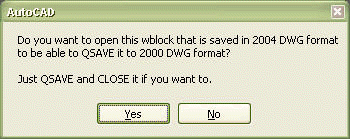
The wblock is opened if you answer yes and then you can QSAVE and CLOSE it.
You can put this in any existing code you have autoloaded or make sure you you have WblockTo2000.dvb autoloaded.
If you don't have any acad.dvb file you can rename WblockTo2000.dvb to acad.dvb and place it at a path that is in the Support File Search Path.
You cannot load VBA until an AutoCAD VBA command is issued. If you want to load VBA automatically every time you start AutoCAD include the line acvba.arx in the acad.rx file.
' By Jimmy Bergmark
' Copyright (C) 1997-2003 JTB World, All Rights Reserved
' Website: www.jtbworld.com
' E-mail: info@jtbworld.com
Dim strCMD As String
Dim strFileName As String
Private Sub AcadDocument_BeginCommand(ByVal CommandName As String)
    strCMD = CommandName
End Sub
Private Sub AcadDocument_EndCommand(ByVal CommandName As String)
    If CommandName = "WBLOCK" Or CommandName = "-WBLOCK" Then
        If ThisDrawing.Application.Preferences.OpenSave.SaveAsType <> ac2004_dwg Then
            If MsgBox("Do you want to open this wblock that is saved in 2004 DWG format" & vbNewLine & _
                        "to be able to QSAVE it to 2000 DWG format?" & vbNewLine & vbNewLine & _
                        "Just QSAVE and CLOSE it if you want to.", vbYesNo) = vbYes Then
                ThisDrawing.Application.Documents.Open (strFileName)
                ThisDrawing.Application.Documents.Item(ThisDrawing.Application.Documents.Count - 1).Activate
            End If
        End If
     End If
End Sub
Private Sub AcadDocument_EndSave(ByVal FileName As String)
    strFileName = FileName
End Sub
xref_test.dvb sample code for AutoCAD
XREF_test.dvb sample code determine if an Xref is Attached or Overlay
Sub xref_test()
    Dim ps_str As String
    Dim po_blk As AcadBlock
    Dim po_blkref As AcadBlockReference
    Dim pi_dxf70 As Integer
    Dim pv_1 As Variant
    Dim userr1 As Integer

    ThisDrawing.Utility.GetEntity po_blkref, pv_1

    userr1 = ThisDrawing.GetVariable("USERR1")
    Set po_blk = ThisDrawing.Blocks(po_blkref.Name)
    ps_str = "(SETVAR ""USERR1"" (cdr (assoc 70 (tblsearch ""BLOCK"" """ & po_blkref.Name & """)))) "
    ThisDrawing.SendCommand ps_str
    pi_dxf70 = ThisDrawing.GetVariable("USERR1")

    ps_str = "(SETVAR ""USERR1"" " & userr1 & ") "
    ThisDrawing.SendCommand ps_str

    If pi_dxf70 = 44 Then MsgBox "XREF " & po_blk.Name & " is Overlaid."
    If pi_dxf70 = 36 Then MsgBox "XREF " & po_blk.Name & " is Attached."
End Sub